Friday, October 29, 2010

NOOKcolor: a color slate with Wi-Fi

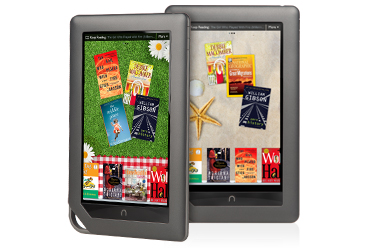
At $249, the Amazon NOOKcolor is an affordable Android slate tablet for those of you who need something that has a larger screen. This Wi-Fi slate has a 7" color screen and you can have access to over 2 million books. Plus, you can read magazines in full color.

The NOOKcolor will run on a custom version of Google Android. At this point, I don't think many people know what that really means. Will the NOOKcolor run standard Android apps?

Here's one of the best features of the NOOKcolor:
NOOKcolor takes Barnes & Noble's exclusive LendMe™ technology one step further with the new LendMe™ App. With NOOKcolor, lend a book to a friend, plus now you can also ask to borrow one of their books. All LendMe™ books can be shared once with friends at no cost, for up to 14 days.
You can learn more about the NOOKcolor here.  I may need to buy one for the kids.

Thursday, October 28, 2010

Media slate (e.g., Apple iPad) vs. slate PC (e.g., HP Slate 500)

What's the difference between a media slate vs. a slate PC? A media slate (like an Apple iPad) is built to be a consumer device, not a professional device. However, some people may argue that you can run enterprise-level applications by running a virtual machine on a device like an iPad.

In many ways, the HP Slate 500 looks like a larger version of some of the earlier ultra-mobile PC (UMPC) units. That "origami" UMPC phenomenon that never took off. I admit that I was an early adopter of the UMPC and I purchased a Samsung Q1 Ultra UMPC. I still have that 7" touch-screen tablet and I use it for a variety of things. The 7" screen was a bit too small and the lack of an active digitizer made the Q1 Ultra difficult to use for pen-based computing. However, it was nice and small (but it could have been thinner). I wonder what would happen if Microsoft tried to revive the UMPC now that Apple has plowed the road for people to adopt slate tablets. Would a Samsung UMPC sell like hotcakes if it was priced around $500 or 600?

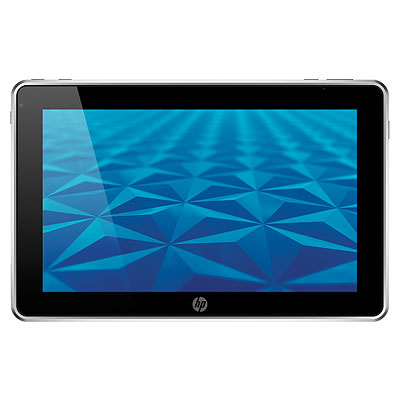
The HP Slate 500 is a very thin device that only weighs 1.5 pounds. It has an 8.9" screen, a 1.86GHz Atom Z560 processor, 2 GB of RAM, and a 64 GB SSD, so it should run Windows 7 adequately. Compared to my Samsung Q1 Ultra, the HP Slate 500 will be much faster. I'm eager to give it a test drive.

Here is link to a video (on SlashGear) featuring Carol Hess-Nickels from HP talking about the differences between a media slate vs. a slate PC and showing you the key features of the HP Slate 500.

Wednesday, October 27, 2010

mHealth Summit: Digital Efficiency vs. Disruptive Transformation

Debate to tackle challenges of mHealth technologies: Can mHealth deliver on the promises of economic benefit and healthcare delivery transformation?

The debate: “mHealth: Digital Efficiency and Extension or Disruptive Transformation?,” will close the 3-day 2010 mHealth Summit on Wednesday, November 10, at 1:15-2:45 pm at the Walter E. Washington Convention Center, conference organizers announced today. This special session will deal with several key issues that are sparking contentious dialogue within the mobile health ecosystem.

Mobile technologies offer unprecedented promise for improving access to health information and providers. This debate will focus on whether mHealth solutions merely extend the geographic reach and efficiency of existing healthcare, or whether they are likely to cause major disruptions, in both developed and developing countries, to the business models and methods of hospitals, providers’ practices, reimbursement organizations, as well as medical and diagnostic equipment and devices, and more.

Moderated by Richard Gallagher, Editorial Director of Scientific American’s LIVES: New Answers for Global Health, the debate will feature the following industry heavyweights representing varying perspectives:

* Jonathan Linkous, Chief Executive Officer, American Telemedicine Association
* Rob McCray, Chairman and CEO, Wireless-Life Sciences Alliance
* Patrick Soon-Shiong, CEO, Abraxis Health and Executive Director UCLA Wireless Health Institute
* Arletty Pinel, Director, eHealth and Telemedicine at iCarnegie
* Scott Ratzan, VP Global Health, Johnson & Johnson

For General Registration and Conference Details, visit: www.mhealthsummit.org

Don't miss this on Thurs: Medicine and the iPad: Lessons from an Early Adapter

Don't miss this exciting webinar titled, "Medicine and the iPad: Lessons from an Early Adapter."

Thursday, October 28, 2010 12:00 PM - 2:00 PM EDT

Early iPad adapter, and Oncology Net Guide advisory board member, Don Dizon, MD, FACP, will review the benefits of using the iPad and explore apps that health care professionals might find useful.

Dizon will also explain how he has implemented the iPad into his medical practice; initially planning to use the iPad for personal use, the physician now uses it 80% of the time for professional purposes.

Dr. Dizon is the Director of Medical Oncology, Integrative Care, and Co-Director of the Center for Sexuality, Intimacy and Fertility at the Program in Women's Oncology at Women and Infants Hospital of Rhode Island. His practice is tailored to breast and gynecologic malignancies, and he remains active in clinical research through the Gynecologic Oncology Group and Brown University Oncology Group. He is an Associate Professor of Obstetrics-Gynecology and Associate Professor of Medicine at Alpert Medical School of Brown University.

Register here.

Tuesday, October 26, 2010

What does "mHealth" mean to you?

This year, mHealth received a lot of attention. As smartphones became more powerful and as new devices like the Apple iPad emerged into the marketplace, the entire mobile health phenomenon really took off. Plus, we saw a number of clinical studies being published about the use of mobile computing technology to improve health care delivery.

What does mHealth mean to you? Is the future of mobile health going to focus around texting or SMS? Will it be around slate devices like the Apple iPad, the Dell Streak, or the Samsung Galaxy Tab? Will it be around smartphones?

I love mobile devices, so I find it especially exciting to see health care professionals and patients embracing mobile technology to improve health care. As technology continues to improve mobile computing capabilities, we'll soon find ourselves relying less on our desktops and we'll lean more heavily on our mobile devices. Soon, the term "computer" will become a term that get redefined. After all, is an iPhone a computer? Is a BlackBerry a computer? Is the iPad a computer?

Monday, October 25, 2010

Secure & Manage Enterprise iPads at the Point of Care

There's a complimentary webinar tomorrow titled, "Secure & Manage Enterprise iPads at the Point of Care."

Spot checks of hospital and health care IT staff validate that the iPad and other tablet devices are set to become the preferred data collection and access tool for doctors, nurses and clinicians to more accurately treat patients at the point of care. More than 300 iPad-specific medical apps have already hit the market. But with these large scale deployments will come security and IT support concerns few IT staff envisioned even months ago. Leave this Webinar knowing what you should do now to enable, deploy, support, audit and protect access to the iPad.

Tuesday, October 26, 2010
2pm Eastern Time
Complimentary Webinar

Learning Objectives

1. How to properly secure iPad devices at the point of care
2. How to prevent the iPad from causing regulatory violations or financial loss
3. How to create an IT support structure that ensures superior iPad service quality at the lowest cost

Presenters
Brian Reed, Vice President, Products, BoxTone

Continuing Education
CPHIMS, this activity qualifies for 1.2 contacts hours toward recertification of the CPHIMS credential.

Click here to learn more.

The HP Slate 500 reminds me of my old Newton MessagePad

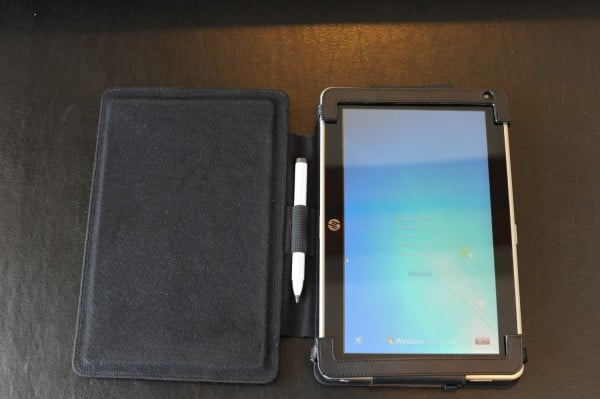
There's something about the HP Slate 500 that reminds me of my old Newton MessagePad (which Apple killed back in 1998). Like the Newton, the HP Slate 500 is simple. It uses a pen and has handwriting recognition through an active digitizer (which results in much better pen-based computing). The HP Slate 500 also comes with a nice portfolio case, and maybe this is why the Slate reminds me of the Newton. I had a variety of cases for my Newton. Almost every case was made by a third party vendor and some were built really well. I still have some of those cases made by companies like E&B Cases, the Newt Boot, and others.

Since the HP Slate 500 has a built-in active digitizer, will it revitalize pen-based computing? Or, will people mainly use it for touch computing?

Saturday, October 23, 2010

The HP Slate 500 is official! (and it's running Windows 7)

The HP Slate running Windows 7 is now official. For $799, you'll a full Windows 7 PC that only weighs 1.5 pounds. Like the Apple iPad, it will have a larger screen, but it will be wide-screen (8.9" diagonal WSVGA wide-viewing angle touchscreen).

The HP Slate 500 will also have an SD slot, a USB port, 2 GB of RAM, up to 64 GB of SSD storage, and 2 cameras. Plus, it will feature a digital pen or touch input on the screen. I can't wait to get my hands on this device so that I can try it out.

Click here to watch a demo video that begins with a physician using the HP Slate 500 in the health care setting.

Thursday, October 21, 2010

New MacBook Air - impressive? or simply overpriced?

The new MacBook Air really looks thin. Is it too thin and overpriced? Perhaps if you really need to keep up with all the latest "gadgets" that are out there, then you're the type of person who needs to get the newest MacBook Air. I still don't think it makes a lot of sense that you can't remove the battery if you run out of power. Maybe that's because I'm the type of person who's frequently swapping batteries on my laptop. I always travel with 2 batteries.

The new 11" MacBook Air looks really nice, but it's way overpriced at $999 for a super-slim netbook.

Samsung Galaxy Tab $599.99 on Verizon

Wow, I didn't expect the Samsung Galaxy Tab to cost $599.99. It's official. If you want to buy this slate tablet from Verizon, get ready to pay $600.

BASKING RIDGE, NJ, and DALLAS, TX — Verizon Wireless and Samsung Telecommunications America (Samsung Mobile) today announced the highly anticipated Samsung Galaxy Tab™ will be available Nov. 11 for $599.99. Running on Android™ 2.2, the Samsung Galaxy Tab features a brilliant 7-inch touch screen; robust HTML Web browsing experience with full support for Adobe® Flash® 10.1 for video and mobile gaming; and a 1GHz Cortex A8 Hummingbird Application processor.

Verizon Wireless customers can add a monthly access plan beginning at $20 a month for 1 GB on their Samsung Galaxy Tab. For additional features and specifications on the Samsung Galaxy Tab, visit www.verizonwireless.com/galaxytab.

Wednesday, October 20, 2010

Diversinet focusing on wireless health and mHealth

There are many companies placing a greater emphasis on wireless and mobile health or mHealth. Here's a recent press release about Diversinet and its MobiSecure® platform:

Diversinet Ranked Number 164 Fastest Growing Company in North America on Deloitte’s 2010 Technology Fast 500™

Attributes Listing to Focus on Secure Mobile Healthcare Applications

TORONTO, Oct. 20, 2010 – Diversinet Corp. (TSX Venture: DIV, OTCBB: DVNTF) today announced that it ranked Number 164 on Technology Fast 500™, Deloitte’s ranking of 500 of the fastest growing technology, media, telecommunications, life sciences and clean technology companies in North America.

Tuesday, October 19, 2010

AT&T to Sell iPads Directly to Businesses

It's not a surprise that AT&T plans to sell Apple iPads "Directly to Businesses." That's what the Wall Street Journal is saying. I wonder if hospitals will get a volume discount from AT&T or Apple if they purchase a large number of iPads for their staff. Apple should develop a robust theft-deterrent system for iPads so that they don't accidentally "wander" away from businesses or hospitals.

How many iPads have you seen in your local hospital? How many iPads will you see next fall?

Monday, October 18, 2010

Use VMware Virtualization Software to run your legacy applications

Are you running Windows Vista or Windows 7? Maybe you're run into the problem where you can't run your legacy applications. Or, maybe your old peripheral (e.g., printer, scanner, etc.) isn't working. Fortunately, VMware allows you to run a virtual Windows XP machine on your computer that's running Vista or 7. This way, you can still run those legacy applications and peripherals. That's what I'm doing. I have an old HP LaserJet printer that doesn't work on Windows 7. It's a good printer, so I don't want to throw it away. I'm now printing to that printer using a virtual Windows XP machine.

VMware gives you much more flexibility over the "Windows XP mode" feature that is built into Windows 7.

Friday, October 15, 2010

Apple iPad coming to Verizon Wireless (well, sorta)

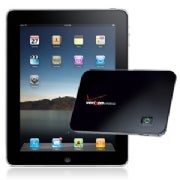
Before Verizon Wireless gets the Apple iPhone, it's getting the Apple iPad. Actually, it's not really a Verizon iPad. It's a combined deal where you can buy the iPad (Wi-Fi only) with a small Wi-Fi hub (mobile hotspot) called the MiFi. So, Apple isn't really making a new iPad that's compatible with the CDMA network on Verizon. This is a combo deal that includes a regular iPad that you can buy now from the Apple store plus a Verizon MiFi (which you can also buy right now) so that you can get online anywhere.

I guess this is good for all those Android users who don't want to switch to an iPhone but who might be looking for a nice slate. When I travel, I'm seeing more iPads and less netbooks. I wonder when netbooks will reach the point of extinction as they get replaced by thin and light slates like the iPad.

If you buy an iPad and MiFi bundle from Verizon, though, you will only pay $50/month (which is $10 less than a standard MiFi plan). Also, the MiFi doesn't require a two-year commitment. You can get away with a rolling monthly service, with no termination fees. Maybe this is my chance to get a MiFi that has no long-term commitment.

Thursday, October 14, 2010

Significant focus around mobile devices (like the iPad) for CME here at the AMA #cmetaskforce meeting

I'm attending the 21st Annual Conference Of The National Task Force On CME Provider/Industry Collaboration here in Baltimore. If you walk through the exhibit area, you'll see that a number of organizations are focusing around the use of mobile slate devices like the iPad for CME or continuing medical education.

These mobile devices have screens that are large enough for you to view meaningful content without panning or scrolling to read everything. There's no doubt they will play a greater role in the future of certified continuing medical education.

Wednesday, October 13, 2010

Testing Windows 7 Service Pack 1 beta and the results are...

The results are actually quite unimpressive. I think that's a good thing and it reflects the fact that Windows 7 is built as a very solid operating system. They took Vista and "fixed it." That's how I look at Windows 7. It's considered a minor upgrade from Windows Vista, but in my mind it's what Windows Vista should have been.

In any case, I'm testing Windows 7 Service Pack 1 beta and I'm finding no significant problems or issues with it. I'm doing this on a PC that's not a mission-critical computer, so I can afford to load the system to see how I might make it crash.

If you're still running Windows XP on your computers, get ready to lose Microsoft support in 2014. That may not seem too far away, but it feels like it's right around the corner when I think about how quickly 2010 is going by. 

"Finger Drift" when using the on-screen keyboard on the Apple iPad

After I wrote about using the on-screen keyboard on the Apple iPad, here's a great comment I received from a physician who describes the challenges of "finger drift" when he's typing on his iPad:


The biggest challenge to typing on an onscreen keyboard is what I'd call "finger drift." on a real keyboard you can feel the edge of the keys with your fingertips and you know when your fingers are hitting the edge of a key or that your fingers are getting a little out of alignment with the keyboard below. Your fingers sort of automatically readjust back to alignment with the keyboard. It's one of the reasons that most physical keyboards have that little raised dash on the bottom edge of the J and F keys.


This sort of feedback doesn't exist on a smooth piece of glass and having it vibrate on keypress (haptic feedback) adds nothing to this. Without it, you end up typing a "p" when you intended an "o" and so forth.

Tuesday, October 12, 2010

Typing on a "virtual" keyboard

There are times when I wonder if our physical keyboards will get replaced by "virtual" keyboards like those found on slate tablets like the iPad.

Have you tried placing the iPad on a flat (or angled) surface so that you can type using the on-screen keyboard?  After you get used to the fact that there are no physical buttons, you'll find that typing is actually quite easy (even if your fingers aren't tiny). If you haven't tried it, go by an Apple store and play with the iPad. Try typing on its screen and see what you think. Do you think you could get used to that?

Is this the future for all mobile computing devices? Will the days of physical QWERTY keyboards be a thing of the past as smartphones, slates, and other mobile devices move away from physical keyboards? With an on-screen keyboard, you don't have to worry about moving parts or small keys that may break or fall off. You also don't need to worry about annoying clicking sounds that may bother the person sitting next to you if you're an aggressive (and fast) typist.

mHealth Ecosystem Workshop

mHealth is the hottest topic in the world of health care.

Join mHealth Initiative leaders and others to explore the mHealth Ecosystem, December 9, 2010 at the Crowne Plaza Chicago O'Hare Hotel & Conference Center. Discuss:

* What are the various systems that make up mHealth and how do they fit together?
* What are the common support systems that various solutions depend on (for instance, security and interoperability)?
* How can an mHealth roadmap be constructed?
* And more...

The workshop will start with some thought leader presentations, but it will not be a seminar. Discussions, brainstorming breakouts, and subject matter expertise from participants will make the day interesting and thought provoking.

Learn more here: http://www.mobih.org/meetings/

Monday, October 11, 2010

A few days with the Motion Computing C5v Tablet PC

The Motion Computing C5v Tablet PC isn't your average tablet PC. This Mobile Clinical Assistant (MCA) is built as a rugged, industrial tablet specifically for the health care market. It's built with Corning's with Gorilla™ glass for up to four times the strength in breakage resistance over standard displays. Equipped with Intel® Core™ vPro™ technology, the C5v is very fast and responsive while it runs Windows 7. The sealed design is wipeable for quick cleaning and disinfecting.

So, what do I really like about the C5v? This device has the same types of features you'll find on other rugged mobile computers. It's an MCA, so it has the capability for an integrated barcode reader, Radio Frequency (RFID) technology, etc.

I really like the overall design of the C5v. It's sleek, it's very slim, and it uses a simple design. The C5v is easy to use and I like the fact that you can even hot-swap the batteries. Even busy physicians will find that  the C5v can be an indispensable tool if you're constantly reviewing electronic health record information and entering computerized orders. The C5v can also be connected to a wide array of docking options and other accessories that allows you to effectively use this computer at your desk.

Stay tuned as I continue to review my C5v and share some of my insights about this mobile device. 

New iPad App Eases Access to Electronic Medical Records

This is a guest post by Angelita Williams.

CNET recently reported on the release of a new iPad app that will make accessing EMRs a quick and efficient process. The software company ClearPractice has been working directly with Apple to develop the app, called Nimble. Nimble is reportedly the first EMR app to run natively on iOS.

Nimble includes all the components of ClearPractice's Electronic Medical Records solution into an iPad application. Because the application connects using WiFi or 3G networks directly to ClearPractice's cloud, no information is stored on the device, allowing Nimble to be fully compliant with HIPAA regulations. ClearPractice's software-as-service (SaaS) EMR program, on which Nimble is based, is the most advanced EMR software of its kind, in that it is completely web-based.

Sunday, October 10, 2010

Samsung Galaxy Tab for $399 on T-Mobile? (Android slate tablet)

According to several reports, it appears like Samsung's Galaxy Tab (slate tablet running Android) will be available on T-Mobile for $399. This is a 3G slate that can also function as a phone (but I doubt people will carry this everywhere and use it like a regular phone). I'm guessing that the Galaxy Tab is also coming to over networks other than T-Mobile. Let's wait to see!

Friday, October 8, 2010

Medicine and the iPad: Lessons from an Early Adapter

Don't miss this exciting webinar titled, "Medicine and the iPad: Lessons from an Early Adapter."

Thursday, October 28, 2010 12:00 PM - 2:00 PM EDT

Early iPad adapter, and Oncology Net Guide advisory board member, Don Dizon, MD, FACP, will review the benefits of using the iPad and explore apps that health care professionals might find useful.

Dizon will also explain how he has implemented the iPad into his medical practice; initially planning to use the iPad for personal use, the physician now uses it 80% of the time for professional purposes.

Dr. Dizon is the Director of Medical Oncology, Integrative Care, and Co-Director of the Center for Sexuality, Intimacy and Fertility at the Program in Women's Oncology at Women and Infants Hospital of Rhode Island. His practice is tailored to breast and gynecologic malignancies, and he remains active in clinical research through the Gynecologic Oncology Group and Brown University Oncology Group. He is an Associate Professor of Obstetrics-Gynecology and Associate Professor of Medicine at Alpert Medical School of Brown University.

Register here.

Thursday, October 7, 2010

I'm now testing the Motion Computing C5v Tablet PC

I'm now testing the Motion Computing C5v Tablet PC. This is a great little slate tablet that runs Windows 7 and it's designed specifically for the hospital or health care industry. I'm eager to spend some time with this device and I'll be sharing some of my impressions over the next few weeks as I review the C5v.

Here's a brief description of this device:

Deliver mobility and reliability at the point-of-care with the Motion® C5v. The industry’s first Mobile Clinical Assistant (MCA), the C5v was designed specifically for healthcare environments in partnership with Intel® Health and based on input from thousands of clinicians worldwide. Lightweight, rugged and fully-sealed to ensure compliance with infection control protocols, the C5v is built for demanding healthcare environments.

From the hospital to home care, the rugged design can handle even the toughest conditions. The C5v now comes standard with Gorilla™ glass for up to four times the strength in breakage resistance over standard displays. Add in View Anywhere® technology and users get the best tablet PC viewing experience available. And now with Intel® Core™ vPro™ technology, the C5v offers new levels of power, security and manageability. With up to 50% improvement in performance, a nearly 30% increase in battery life, hot-swap battery feature and enhanced remote management capabilities, both clinicians and IT personnel can feel confident that the C5v is available and patient data secure – freeing up valuable time and resources to focus on patient care.

BlackBerry PlayBook has a 1 GHz dual-core processor

The BlackBerry PlayBook could be the fastest mobile slate tablet (that's not a tablet PC) because it has a 1 GHz dual-core processor. I can't wait to try it out!

Here's another interesting feature that's found on this device:
  • 3G access via existing BlackBerry smartphone service plan.
Get online by tethering your PlayBook to your BlackBerry smartphone. Seems to make sense, right? After all, why pay for 2 data plans?

I wonder if the BlackBerry Tablet OS, powered by QNX technology, will become the next OS for all BlackBerry devices. At some point, we'll probably see a major convergence of desktop and laptop PCs, smartphones, and these slate tablet devices. When that time comes, we won't have multiple devices. We won't have a laptop, a smartphone, and a slate. Instead, we'll simply use a single mobile device that will have the capability to keep up with all our other computing needs.

Wednesday, October 6, 2010

Thieme Medical Publishers Releases Atlas of Anatomy for Use in modalityBODY iPad™ App

Complete Atlas Features More Than 1500 Images For Medical Reference and Training

Durham, N.C., – October 1, 2010 – Modality, Inc. and Thieme Medical Publishers, Inc., today announced that Thieme’s complete Atlas of Anatomy is now available for In App Purchase via the modalityBODY App.

The modalityBODY App, currently available in the App Store, allows users to view, organize, annotate, search and store thousands of medical images and create custom image collections for study and reference.

“Thieme’s Atlas of Anatomy provides health care students and professionals with a wide breadth of more than 1500 high quality images with thorough contextual notes,” says Anne Vinnicombe, Thieme vice-president and director of educational publishing. “As Thieme expands our digital initiatives, the combination of the Atlas with the features of the modalityBODY application and the brilliant display of iPad adds a compelling new dimension to our content.”

HP refreshed the EliteBook 2740p tablet PC

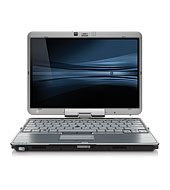
If I had to buy a new tablet PC today, it would probably be the HP EliteBook 2740p Tablet PC. I've used convertible tablet PCs made by Fujitsu, Lenovo, and HP. I like the ThinkPad X200 tablet PC, but the EliteBook 2740p includes features that are more appropriate for a user like me.

HP recently refreshed their line of EliteBook 2740p tablet PC. Now, you can spend the same amount of money (1,599.00 and 1,699.00) and you'll get faster machines when you choose either the HP EliteBook 2740p Tablet PC (ENERGY STAR) (XT935UT) or the HP EliteBook 2740p Tablet PC (ENERGY STAR) (XT936UT) pre-configured models on the HP website.

You can also configure your model so that you have the latest processing speed by choosing the Intel® Core™ i7-640M Processor (2.80 GHz, 4 MB L3 cache).

Let me highlight some of the innovative features that you'll only find on the HP EliteBook 2740p tablet PC:
  • Pop-out LED light that illuminates the keyboard
  • Ultra-slim battery option that attaches to the base of the computer and provides an additional 4-5 hrs of computing time
  • Ultra-slim expansion base/docking station that includes an optical drive (much thinner compared to other docking stations)
Like many other convertible tablet PCs, the 2740p includes a multi-touch screen option in addition to the active Wacom digitizer.  Since the HP 2740p isn't a rugged tablet PC, if you have the need for a rugged tablet, go with a Panasonic Toughbook instead.

Tuesday, October 5, 2010

Support Breast Cancer Awareness Month with a Pink Mouse

This is from the Microsoft Hardware Blog:

Every 23 seconds, someone in the world is diagnosed with breast cancer. These are mothers, sisters, aunts, grandmothers and friends.* The Microsoft Hardware Team is doing what we can during National Breast Cancer Awareness Month by partnering with Susan G. Komen for the Cure to create a special edition pink mouse. We’re donating 10% of the selling price to Susan G. Komen for the Cure, the world’s largest and most progressive grassroots network of survivors and activists fighting to end breast cancer forever.

Purchasing one of these special edition mice will not only contribute to a great cause, but set you up with a particularly stylish mouse that works wherever you do. It’s available for $39.95, so get one today and help contribute to a great cause!

Panasonic Toughbook T8 - further thoughts

Now that I've had the opportunity to use the Panasonic Toughbook T8 for a few weeks, I've gotten used to the smaller keyboard and I'm able to type on it without any problems. The unit has a small footprint, even though it's quick thick. I still find the hand strap is my favorite feature on this laptop (if you missed my earlier video, make sure to catch it here).

You're not going to find the Panasonic Toughbook T8 at your local Best Buy. You can get it online from a number of retailers, but get ready to pay over $2k. You're getting a solid, rugged laptop that can withstand more drops compared to standard notebooks. If you're planning on using it in a busy environment like a hospital or doctor's office, that additional rugged feature is certainly a worthwhile investment.

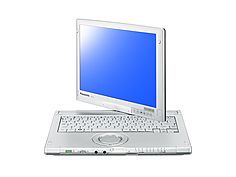
If you're looking for a rugged convertible tablet, go for the Toughbook C1.  The 3.2 lb. Panasonic Toughbook C1 still boasts that it is the "World’s Lightest 12.1” Convertible Tablet PC" (and it's also the world's lightest rugged tablet PC)

Monday, October 4, 2010

Parallels Mobile - run Windows 7 (virtual machine) on your iPad

Here's a video showing an iPad running Windows 7 (through a Parallels Virtual Machine mobile app):

Waterproof, spill-proof keyboards

There are a variety of different waterproof, spill-proof keyboards. Some look like regular keyboards, so you wouldn't even know that they're waterproof. You can type on them without any problems because they look and feel like standard QWERTY keyboards.

Other waterproof keyboards are flexible and they are somewhat difficult to use. Those that are flexible feel more like buttons on a calculator instead of a keyboard.

You can also find keyboards that have a backlight so that you can use them in low-light situations. These are perfect for radiology suites and call rooms.

Saturday, October 2, 2010

Panasonic Toughbook CF-C1 tablet PC gets updated

Here's the press release:

Panasonic Toughbook CF-C1 Offers Tablet Computing For Gloved Workers And Removes The Cost Of Accidental Damage

Class Leading Convertible, Business Rugged Notebook Now Offers Multi-Touch Resistive Screen, Web Camera And 2 Year Accidental Damage Warranty Making It The Business-Ready Tablet

UK. 30TH SEPTEMBER 2010: Panasonic today enhanced its Toughbook CF-C1 range with a Multi-touch Resistive screen, web camera option and a two-year accidental damage warranty making the lightweight, business rugged convertible notebook the tablet for business use.

Able to be used in clamshell or tablet form, the CF-C1 is ideal for mobile workers. The new Multi-touch Resistive screen option is designed to deal with semi-outside conditions less affected by dust particles and water drops and allows the users to operate the device whilst using gloves. The Multi-touch screen also delivers all the benefits of a tablet device allowing pinching and stretching gestures on the screen to control zooming. It is also pressure and gesture sensitive, allowing actions such as the rotation of objects on the screen. This latest screen option complements the existing CF-C1 Multi-touch Digitizer screen model and is available immediately priced at £1,709 + vat. (Standard version)

Friday, October 1, 2010

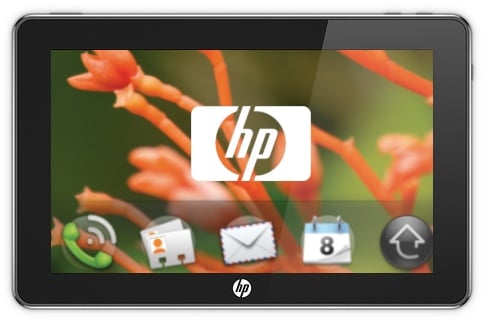
HP PalmPad running webOS coming in early 2011

According to several different sources, it's confirmed: HP is releasing a slate tablet called the PalmPad in the early part of 2011. This slate will run webOS. Perhaps this is the consumer version of the HP Slate. The business/professional version of the HP Slate will run Windows 7 (I think).

That seems to make sense to me. A slate tablet running webOS should be easier to use, less expensive, and have better battery life. It would be perfect for consumers who are looking for a multimedia or entertainment device (or gaming device, or e-book reader, or mobile web browser).

For business professionals who are looking for a mobile tablet, it seems to make more sense to offer a device that runs Windows 7. This way, you won't get caught up looking for virtualization options if you need to run your enterprise software on your mobile slate. I can't wait to get my hands on one!

Should you wait for the next iPad?

I think that it's reasonable to expect the following features in the next Apple iPad:
  • Webcam (probably two: front-facing plus back-facing so that you can do FaceTime)
  • Widescreen resolution? (Android and BlackBerry tablets are coming out as 7" widescreen models. Will Apple make a 7" iPad?)
  • Better battery life
  • Better performance
  • Retina display 
  • Lower price? (doubt it)
If we follow the evolution of the iPod touch, we see that Apple made similar changes from the 1st generation to the 2nd generation to the 3rd generation. The addition of a camera (or two) would be a huge upgrade for those who like to Skype or do FaceTime.
 
So, should you wait for the next version of the Apple iPad? What if you knew that it would be available in the first quarter of 2011?