Thursday, March 31, 2011

Medscape App for iPad: March 2011 updates

Tables & Protocols Updates >
Now 100+ widely-used tables & protocols

21 new tables added, including:
• NIH Stroke Scale, Karnofsky Performance Status Scale, Modified Rankin Scale, Glasgow Coma Scale, and more.

10 new infectious disease treatment tables added, including:
• Empiric and organism-specific therapy for influenza, bacterial meningitis, pericarditis, and more.

Drug Reference Updates >
Now with 8,000+ drugs, OTCs, herbals and supplements

Tuesday, March 29, 2011

BlackBerry PlayBook to support Android Apps...kind of

Author: Riley Alexander, MD, MBA

I'm a little late in reporting this to our readers, but some interesting news popped up on the web last week concerning BlackBerry's entry into the slate tablet market, the PlayBook. Specifically that it would support Android apps. At first glance, the blog headlines listed seemed to insinuate that the Playbook would have the same access to the Android market as true Android phones/tablets...well, let's just say I'm glad I read the entire article.

It appears that these apps will only be available through BlackBerry's own App World via dedicated "app players." Essentially BlackBerry is making it very easy for Android developers to port their apps to the PlayBook from a coding standpoint. This still means that they have to choose to actually port this and do all the necessary steps to follow any differing rules set by BlackBerry for publishing. So don't expect every Android app being available.

Even though the news wasn't quite as good as it sounds, I think it's still a smart move on BlackBerry's part. Their app offerings are dismal compared to Android and iOS and if they're going to have any luck tapping into the iPad's huge market share and convincing consumers the PlayBook isn't an enterprise device, they need all the help they can get. And considering the hardware is looking pretty good, it may even help Android's status in the slate tablet world as well.

Monday, March 28, 2011

Wireless Health Segments

This slide was presented by Robert Jarrin from Qualcomm at the Mobile Monday Mobile Health Forum in Philadelphia. He spoke of these wireless health segments as he presented the keynote address.

Friday, March 25, 2011

Keyboard "noise suppression" on new ThinkPads

When I type on my current ThinkPad X200 tablet PC, it's loud. It's embarrassingly loud when I'm sitting in a conference and trying to take notes.

The 2011 Lenovo ThinkPads are coming with keyboards that have "noise suppression."
Keyboard noise suppression minimizes key clicks from being heard...
That's what I need on my ThinkPad. The other feature I really need is a keyboard light for my ThinkPad. It sure would be nice if Lenovo would include a keyboard light on their X220 tablet PC.

mHealth Alliance Announces New Director of Maternal-newborn mHealth Initiative

Leading Initiative of the mHealth Alliance Focuses on Improving Maternal and Newborn Health through Application of Innovative Mobile Technologies

Washington DC (March 24, 2011)—The mHealth Alliance today announced the appointment of Jennifer Potts, MPH, as Director of the Maternal-newborn mHealth Initiative. In this role, Potts will help the mHealth Alliance leverage the growing reach of wireless technologies in the developing world and reduce maternal and newborn mortality through the power of modern information and communications technologies, or ICT, especially mobile.

The Maternal-newborn mHealth Initiative (MMI) is working with HealthUnbound.org to create a dynamic online repository of maternal-newborn mHealth projects around the world, potentially reducing the fragmentation and duplication of efforts worldwide, promoting national scalability of existing pilot projects, and stimulating critical discussions regarding best practices in the maternal mHealth community.

Thursday, March 24, 2011

Love your iPad, but hate the lack of connections? Try this

Author: Riley Alexander, MD, MBA


This is the 5-in-1 connection kit by USB Fever that I saw on Gizmodo today. It allows for USB connections (including USB keyboards), SD/SDHC cards, micro SD, TV-out, and mini-USB.

For $45, it looks like a nice, nearly universal connector for the iPad. It does state that only one device at a time can be plugged in, so no dreams of turning the iPad into a mini-desktop with this thing. It's also very difficult to tell from the pictures how large the attachment is, but it looks like it should still be very portable.

HTC Flyer tablet

If you're looking for a slate tablet that runs Android, consider the HTC Flyer tablet. Here's what you can expect from this device:

7 inch (1024 x 768) touchscreen display, 1.5GHz processor, 16GB internal storage, microSD card slot, 5 megapixel rear facing camera with auto-focus, 1.3 megapixel front facing camera, Wi-Fi, Bluetooth 3.0 and a 4000 mAh battery.

Press release:

Best Buy® and HTC Announce Exclusive Launch of the Wi-Fi HTC Flyer Tablet at CTIA Wireless 2011

Wi-Fi HTC Flyer slated to launch this spring

ORLANDO, Fla., March 22, 2011 – Best Buy and HTC today announced the exclusive launch of the highly-anticipated Wi-Fi only version of the HTC Flyer™ tablet. All Best Buy and Best Buy Mobile standalone stores, as well as BestBuy.com, will have the tablet when it launches this spring.

Wednesday, March 23, 2011

Blausen Medical Launches New Lite Version of Human Atlas HD for iPad

This came out yesterday and I wanted to share this with my readers. This is especially exciting for medical students!

Blausen Medical Launches New Lite Version of Human Atlas HD for iPad

Free App Samples Five Award-Winning Blausen 3D Animations; Enables In-App Purchase Option for 17 Blausen Atlases in 12 Languages

HOUSTON (March 22, 2011) - The new Blausen Human Atlas HD Lite iPad App is now available in the Apple iTunes App Store. Developed internally by Houston-based Blausen Medical Communications, the free download offers five 3D animation videos, representative of the 300 topics in the Human Atlas total library. In addition, The new app provides for in-app purchase of 17 additional Blausen atlas products, all available in 12 languages. In addition the app supports a caching functionality that enables users to save individual animations directly to their device and play them when they wish, with no delay or waiting.

Free videos for Asthma, Delivery, Diabetes, Rheumatoid Arthritis of the Hand and Stroke. 17 additional atlases, from the general Human Atlas Volumes 1 and 2, plus the individual atlases (Cancer, Circulatory, Digestive, Ear, Endocrine, Eye, Immune, Muscular, Nervous, Pediatric, Reproductive, Respiratory, Skeletal, Skin and Urinary). 12 languages (Arabic, British, Dutch, English, French, German, Italian, Norwegian, Portuguese, Spanish/Latin American, Spanish/Castilian and Romanian).

Invited to speak about Mobile Health and Telemedicine

Next month, I'll be speaking at the Health Journalism 2011
04/14/11 - 04/17/11
Philadelphia, PA

The title of the session is: "Going mobile: The new telemedicine."
Friday, April 15 at 4:40 pm

The presenters include:
• Mohit Kaushal, M.D., M.B.A., executive vice president of business development and chief strategy officer, West Wireless Institute
• Joseph Kim, M.D., M.P.H., vice president of medical affairs and technology, Medical Communications Media Inc.
• Hemang Patel, market development manager, Microsoft Corp., Healthcare and Life Sciences
• Moderator: Eric Whitney, health reporter, Colorado Public Radio

I look forward to seeing you there as we discuss mobile health and telemedicine.

You can find more information about  Health Journalism 2011 here.

Monday, March 21, 2011

2nd Annual Mobile Healthcare Forum

If you live near Philadelphia, don't miss this event:

2nd Annual Mobile Healthcare Forum
Mon, Mar 28 2011, 5:00p.m. - 8:30p.m.
The College of Physicians of Philadelphia, Philadelphia, PA

MobileMonday’s 2nd Annual MOBILE HEALTH FORUM
How Mobile Devices and Services are Changing the Healthcare Landscape –
"A Guide for Entrepreneurs and Healthcare Providers"

MobileMonday is delighted to present Mr. Robert Jarrin, Senior Director of Government Affairs for Qualcomm Inc, as the Keynote Speaker. Based in Washington, DC, Mr. Jarrin represents Qualcomm on US regulatory matters relating to wireless health and life sciences.

Mr. Jarrin’s areas of responsibility include health policy, FDA regulatory oversight, healthcare legislative affairs, CMS telehealth reimbursement and the regulation of health information technology as it relates to wireless. He also serves as Co-Chair of the US Policy Working Group for the Continua Health Alliance. Prior to joining Qualcomm, Mr. Jarrin worked as a Manager of Strategic Partnerships for Ericsson Wireless Communications, served as a Law Clerk in the White House Office of Counsel to President Clinton and also served as a Law Clerk and subsequent Consultant in the US Department of Justice to Attorney General Janet Reno.

LogMeIn Ignition updated for iOS (iPad, iPhone)

LogMeIn Ignition has received an update to version 2.0.264 on the Apple iPad and iPhone. Don't forget that you can win a free copy of LogMeIn Ignition here.

Here's a recent press release about the update:

New Version of LogMeIn Ignition Lets Users View, Transfer and Save Files Between Their iPads, PCs and Macs

LogMeIn Introduces First App to Combine Remote Control and File Management for iPad 2, iPad, iPhone and iPod touch

WOBURN, Mass., March 18, 2011 (GLOBE NEWSWIRE) -- Apple iOS device owners can use their iPad 2, iPad, iPhone and iPod touch to view, transfer and save files from their PCs and Macs with the newest update to LogMeIn Ignition, the top-grossing third-party iPad app of 2010.

The newest version from LogMeIn, Inc. (Nasdaq:LOGM) adds file functions to Ignition's remote control capabilities. It is the first iOS app to combine remote control with file management. The app is available now in the iTunes App Store and as a free update to current users.

Saturday, March 19, 2011

Adobe Flash 10.2 now on the Android Market

Android users can update their Adobe Flash app to version 10.2. I really wish my Apple iPad would support Flash. Eventually, my main slate tablet might end up being an Android slate like the Motorola Xoom or the Samsung Galaxy Tab. I don't see websites moving away from Flash and switching to HTML5, just so they can support the iPad.

Win a free app! LogMeIn Ignition

Here's your chance to win a free app! LogMeIn Ignition. We're giving away three (3) copies of LogMeIn Ignition here on MobileHealthComputing.com and we need your help to promote this contest!

I've been using LogMeIn Ignition for the past few months and I've found this to be an "essential" app for my iPad. It's been a great way for me to access my PC or Mac remotely from my Apple iPad. LogMeIn Ignition has some nice features that facilitates the remote computing experience on a touch-screen device like the iPad. They also have an application for Android smartphones & tablets. You can read my review of the iPad version here.

Here's how you can enter the contest:

  1. Leave a single comment at the bottom of this blog post explaining how you plan to use LogMeIn Ignition to remotely access your computer from your mobile device (iPhone, iPad, Android, etc.) Your creativity can help you win! Make sure to include your full name with your comment.
  2. You'll need a Facebook account for this second step: "Like" the following four pages on Facebook:
It's that simple. Leave a comment and like 4 Facebook pages for a chance to win one of three LogMeIn Ignition apps.

How the winners will be chosen: Two of the winners will be selected at random. The third winner will be selected based on the creativity of your comment.

This contest will run from Feb 21, 2011 to May 21, 2011.

On May 23, 2011, we will announce three winners here on MobileHealthComputing.com!

Each winner will receive a free LogMeIn Ignition app for either their iOS or Android device. = Winners will be notified via their Facebook page.

With LogMeIn Ignition, you’re just a touch or click away from all your computers. Install LogMeIn Ignition on your iPhone, iPad or Android deviceand get to your information anytime, anywhere.

Thursday, March 17, 2011

Motorola Xoom: Not off to a strong start

Author: Riley Alexander, MD, MBA

The Motorola Xoom represented a fairly important device. It was viewed as the first real competitor to the iPad and many hoped for it to inject some variation into the slate tablet market the iPad had essentially created. Well, initial reports are that the device is not selling as well as planned and production may even be cut on it due to decreased demand. With Motorola hoping for 800,000 units sold by summer, it appears they are having to adjust their sales forecast.

I, for one, am not surprised by this. The Xoom appears to be a compelling device, but initial reports are that the initial version of Android 3.0 (Honeycomb) it is running is quite buggy and feels unfinished.
The more important reason is likely a simple one...price. I went through the pricing of this tablet in a previous post here and mainly ridiculed Verizon's high data pricing, but I think I should have cautioned uptake in regards to the actual unit price more. No single comparable Xoom model costs less than an iPad and most cost a fair bit more. With Apple's considerable brand equity/strength, this is a huge problem for Motorola.

Wednesday, March 16, 2011

First GSMA-mHA Mobile Health Summit to take place in South Africa

First GSMA-mHA Mobile Health Summit to take place 6-9 June 2011 in South Africa

16 March 2011, London--The inaugural GSMA-mHA Mobile Health Summit will be held 6-9 June 2011 in Cape Town, South Africa.The premier event will bring together the key stakeholders in the mobile health world - from leaders in government, private sector and industry, to developers and implementers working on the ground, in order to further the understanding and adoption of mobile technology in the health sector. The GSMA also announced that it has launched Mobile Health Live, an online information centre designed specifically for mobile health professionals.

The Summit will include a cutting-edge conference programme which will address a wide range of topics, including:

* Mobile Health for Capacity Building
* Parallels and Diversities in Mobile Health between Emerging and Developed Countries
* Delivering the Mobile Health Ecosystem
* Privacy and Security of Mobile Health
* Compliance and Medical Adherence around Non-Communicable Diseases
* Mobile Health Solutions along the Continuum of Care for Maternal Health

The Summit will also feature an exhibition showcase, and will also offer business development opportunities for key executives from across the mobile and healthcare industries. The event will attract a wide range of stakeholders including mobile operators, insurance groups, pharmaceutical companies, healthcare providers, research centres, equipment manufacturers, infrastructure vendors, application developers and integrators from around the globe.

iPad or Computer On Wheels (C.O.W.)?

Would you rather have a small iPad or a computer on wheels (COW)? You can actually have both by docking an iPad into a cart that has a keyboard. The challenge right now comes with using the mouse since the current iPad (or iPad 2) doesn't support a mouse. You can easily attach a Bluetooth keyboard and type away, but the mouse function requires some "hacking" (jailbreaking). I don't see many hospital IT folks eagerly jailbreaking iPads.

Eventually, as slate tablets evolve, they probably will support pointing devices like mice. Then, the COW experience could truly be replicated by using a small slate tablet like the iPad in the clinical setting.

Today, you can use a slate PC running Windows 7 on a cart so that you can effectively have a slate tablet + COW combination. We're seeing many more slate tablet PCs running Windows 7, so maybe that will eventually become the standard in the hospital setting.

Tuesday, March 15, 2011

Differences between telemedicine and mHealth

Attend the 3rd mHealth Conference in Chicago, IL March 30-31, 2011 to learn why it is essential to develop mHealth communication systems for teams to discuss patient care. Find out how to integrate apps, to address payer mHealth projects, and to implement new communication patterns to reach both clinicians and patients.

This conference gets to the roots of connected health, wireless health, and participatory health, and explores the deep-rooted differences between telemedicine and mHealth.

3rd mHealth Networking Conference
March 30-31, 2011
Crowne Plaza Chicago O'Hare Hotel & Conference Center

More details here.

Monday, March 14, 2011

Reviewing the ZAGGmate case and keyboard for the Apple iPad

Over the past few weeks, I've had the opportunity to review the ZAGGmate case and keyboard for the Apple iPad. I want to thank the folks at ZAGG for sending me a review unit so that I can test it with my iPad.

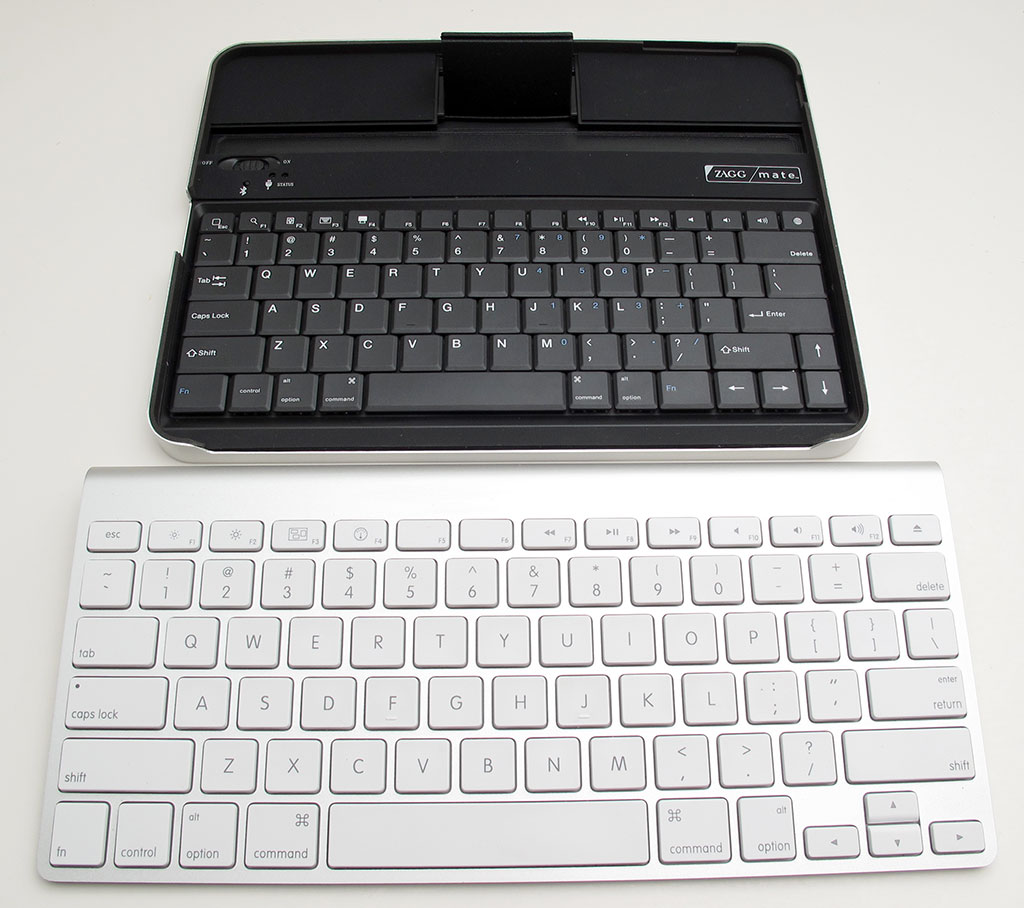
First, you'll see how the keyboard buttons compare to the keys on my ThinkPad laptop. The keys on the  ZAGGmate are very responsive and they're easy to press, but keep in mind that they're smaller than the buttons that you'll find on a regular laptop. Compared to the majority of the iPad keyboard cases that are currently out there on the market, this one is definitely one of the best ones that blends functionality with portability.

Here's another photo showing the ZAGGmate next to an Apple keyboard (photo from the-gadgeteer.com):


The ZAGGmate holds the iPad at a particular viewing angle. I wish it offered more options for viewing angles, but then the iPad would probably tip over.

The viewing angle works fine as long as you have the ZAGGmate on a desk or table. I find that if I place the ZAGGmate on my lap, the viewing angle isn't optimal for me, but it still works.

ZAGGmate iPad Case w/ keyboard Features
  • Embedded wireless Bluetooth physical keyboard
  • Special function keys for music control, volume control, slideshow, home, search, etc.
  • Aircraft-grade aluminum with a bead-blasted, anodized finish that matches the iPad
  • Military grade high-density padding for superior drop protection

I really like how the ZAGGmate doubles as a durable case for the iPad. It will mainly protect the iPad screen and the edges. Make sure to get a cover for the back if you want to avoid scratches on the back of your iPad case.

Now that the iPad 2 is out, you'll probably want to get the ZAGGmate for the iPad 2. I'm still not sure if I'm going to upgrade to an iPad 2 or wait for the iPad 3. My current iPad works just fine for most of my needs, so I'll probably just hang onto my current one and wait.

Get the ZAGGmate here. (You can currently pre-order the ZAGGmate for iPad 2)

Friday, March 11, 2011

The iPad 2 dissected

Watch the iFixit team dissect the new Apple iPad 2! As you can imagine, there is a very large (but flat) battery in the iPad 2.

View the "iPad 2 Wi-Fi Teardown" (I think I'd rather call it a dissection). 

Thursday, March 10, 2011

HP WebOS coming on all future HP computers

Get ready for "instant on" performance from upcoming HP computers. They'll be loaded with HP WebOS (formerly known as Palm webOS) and you'll gain the benefit of booting up instantly when you need to (like when you're at the airport or coffee shop).

Don't worry, these computers will still come equipped with Microsoft Windows 7, so when you've got some serious work to do, you can boot up into Windows.

Eventually, maybe MacBooks will also come with iOS and maybe other PCs will also come with Android.

32 vs. 64 bit Windows

Recently, I've decided to conduct a few small experiments. I'm taking some older, slower computers and re-installing Windows 7. I'm configuring each system with 3 GB of RAM and 32-bit Windows 7. I'm comparing their performance to same systems configured with 4 GB of RAM and 64-bit Windows 7.

Will 1 GB of RAM make any difference in performance? Given that a 32-bit OS can only work with 3 GB of RAM, what happens if you take that same system and install a 64-bit OS and boost the RAM?

If these systems were faster, then the 64-bit OS with more RAM would easily outperform the 32-bit OS. However, my first test machine is a laptop that has an Intel Core 2 Duo CPU L9400 running @ 1.86 GHz. Let's see how it does, so stay tuned.

Wednesday, March 9, 2011

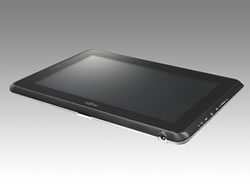
Fujitsu STYLISTIC® Q550 Slate PC offers Quick-Swap Batteries

The Fujitsu STYLISTIC® Q550 Slate PC is an emerging slate PCs running Windows 7 that offers "quick-swap" batteries. Unlike the Apple iPad (which does not have a user-removable battery), the Q550 makes it easy to swap between the 2-cell or 4-cell battery. Here's a little video that will give you a sense of what the Q550 will have to offer:


The STYLISTIC Q550 Slate PC equips you with the tools you need to efficiently complete mission-critical tasks. Its combination of pen and multi-touch will raise your computing interaction to new levels of convenience and productivity.

Experience with the Lenovo ThinkCentre M90z

Author: Thuc Huynh, MD

I've been using the Lenovo ThinkCentre m90 for my business needs.  It's an all-in-one touchscreen desktop with a huge 23 inch screen.  That's a breath of fresh air from my 13 inch macbook air screen.

I use my Macbook Air to add medical apps to ScrubdIn and my Lenovo ThinkCentre to eye conversation in healthcare and social media on twitter.  The ThinkCentre's touchscreen makes it easy to switch between Windows, refresh for new tweets, and control simple settings such as volume or launch new applications.

I love how large the screen is.  It's perfect for keeping tabs on what people are saying in the #HCSM chatroom.  TweetChat has a rolling refresh feature so I can glance over and see any new tweets as they occur.

The ThinkCentre also has an integrated 2 megapixel webcam at the top of the console.  That combined with it's top-notch speakers makes for a powerful video-conferencing system.  The other day, I used it to connect with Nat Findlay via Skype to learn about Hello Health.  

I'll be sharing my experiences with the Lenovo ThinkCentre as I integrate it into my daily life.  For a video I created about Lenovo's key features, click here.

Tuesday, March 8, 2011

Further thoughts about the iPad 2 and the rest of the competition

Author: Riley Alexander, MD, MBA

Well, this is the week of the iPad so I had to get a post in of my own to talk about it a little bit and try not to cover what's already been covered on our blog here and here. I know that we have discussed in depth the upcoming competitors to the iPad, but now that the iPad 2 is official, it seems fitting that we give it a real comparison. Personally, I think the iPad 2 looks great, but will probably not change the mind of those who are against certain things it lacks (click the third "here" above)--it really didn't pick up any of those. And for those of you with iPad 1's, unless you plan on doing a lot of video editing or video outputting via the new HDMI accessory, you may just want to wait until the iPad 3 or 2.5--it might be here sooner than you think.

But, to that comparison I was talking about. Lifehacker put up a great table today comparing all the major players. Take a look here and judge them for yourself.

Monday, March 7, 2011

National Institutes of Health launches mHealth Summer Institute

What are you doing this summer? Maybe you could spend it at the first NIH mHealth Summer Institute. This announcement came out last week on Feb 28:

The National Institutes of Health today announced the creation of the first NIH mHealth, or mobile health, Summer Institute. Scheduled for the summer of 2011, this week-long workshop will bring together leaders in mobile health technologies, behavioral science researchers, federal health officials and members of the medical community to provide early career investigators with an opportunity to learn about mHealth research. The Office of Behavioral and Social Sciences Research (OBSSR), part of NIH, partnered with Qualcomm, a developer of wireless technologies, to cosponsor the course.

Mobile technologies have the potential to transform medical research and enable health care providers to more rapidly and accurately assess biological processes, behavior, attitudes, and the environment. These technologies also allow providers to help patients improve their health in real time—enabling them to personalize health care options and monitor progress.

Friday, March 4, 2011

GE Healthcare Expands Mobile Access to Electronic Medical Records #HIMSS11

Company’s Focus on mHealth Demonstrated at HIMSS11 Conference; Offers Free iPad® to New Centricity Advance Customers

ORLANDO – Feb 23, 2011 – General Electric, an industry leader in the adoption of mobile technology, demonstrated the extension of its healthcare IT portfolio to mobile devices and tablet computing at this week’s Health Information Management and Systems Society (HIMSS) Conference in Orlando. The company featured remote access to its portfolio of electronic medical records (EMRs) for physician practices, including Centricity* Advance and Centricity Practice Solution, on the Apple® iPad and iPhone®.

Microsoft Tablet OS in 2012

Some may say that Windows 7 is a tablet OS. I think Windows 7 is a nice OS for tablet PC users who are using a Wacom or Penabled stylus pen. It's difficult to compare Windows 7 against iOS, webOS, or Android if you're mainly using finger touch for primary navigation. That's probably why Microsoft is going to release a tablet OS in 2012. I think that many people are concluding that Windows 7 is not an optimal OS for touch-screen slate tablet PCs. My prediction is that the Microsoft tablet OS will look very similar to HP (formerly Palm) webOS. Some are already saying that RIM's BlackBerry PlayBook is using an OS (BlackBerry Tablet OS) that closely mimics HP webOS.  I won't get into that right now.

Eventually, will these tablet operating systems become so powerful that they essentially replace standard desktop and laptop operating systems? Perhaps this may happen as cloud-based computing evolves. After all, if we can compute off the cloud, then who needs a robust OS? You just need a robust (and fast) connection to the Internet. Let the cloud provide all the software services that you need.

Thursday, March 3, 2011

Here's what the iPad 2 is still missing

There's no doubt that the iPad 2 is a significant upgrade from the original iPad. However, there are several features I would have really liked to see (and that will probably be found on the iPad 3):
  • LED flash for the rear camera. You don't really need this on the front-facing camera, but this is almost a standard feature on most devices now.
  • 4G wireless. 3G is so 2010...
  • USB port
  • SD card slot (or at least a microSD card slot)
I'm going to hang onto my current iPad and wait for the iPad 3 (which will probably have some of these features).

By the way, you can now get the original iPad for a great deal!

Will the iPad 2 charge via standard USB?

If you have an existing iPad, you may have noticed that the iPad indicates that it doesn't charge when it's plugged into a standard USB port. In reality, it's receiving a low, trickle charge that slowly charges the iPad when the screen's off (but you would have no way of knowing that it's charging).

The specs on the iPad 2 indicate:
Charging via power adapter or USB to computer system.

It doesn't specify high-output USB ports, so does this mean that the new iPad 2 will actually charge on a standard USB port - even when you're using the iPad 2?

The iPad 2: Will You Upgrade?

Author: Brittany Chan

On Wednesday, March 2, Steve Jobs announced the new iPad 2. Rumors had been flying for the past few months over the new features. Here are some of the highlights:

- Front and rear-facing cameras. As expected, you can now chat with your friends using FaceTime, shoot 720p HD video, and take and edit pictures.
- Dual-core A5 processor. A faster iPad means smoother multi-tasking, movie playback, and gaming.
- Slimmer design. The new iPad is 33% thinner and weighs only 1.3 pounds, down from the original iPad’s 1.5.
- iOS 4.3. The new operating system features iTunes home sharing, improvements to AirPlay, and the ability to use your iPad as a “personal hotspot.”
- Smart covers. These covers, designed in a lighter but similar fashion to the original Apple iPad case, will protect your screen and fold over to become a stand for your device. Closing the cover will put your iPad in sleep mode, and opening it will awaken your iPad. Smart covers will also come in several colors.
- Same 10-hour battery life.

Tuesday, March 1, 2011

Fujitsu STYLISTIC Q550 (Secure Slate PC for Business Class)

The Fujitsu STYLISTIC Q550 is a business-class slate PC designed for the high-security requirements of mobile enterprise computing.

The STYLISTIC Q550 runs on Microsoft Windows® 7 and is compatible with Windows®' multi-touch capabilities. Users can control applications and input text by touching the screen simply with just a touch of their fingers or by the attached stylus.

The STYLISTIC Q550 is equipped with a next-generation Intel® ATOM™ CPU that is highly-compatible with Microsoft Windows® 7 operating system, energy efficient, and features superior performance. By making full use of Fujitsu's proprietary power supply control functionality, the new series provides effortless operations using a large-capacity battery that can power the slate PC's 10.1 inch screen while still lasting approximately 10 hours.

Xoom your way to 4G LTE

Over the weekend, I spent some time at my local Verizon store and I played around with the Motorola Xoom slate tablet running Android. The Xoom is the first slate tablet being powered by Android 3.0 (Honeycomb) and you can upgrade it to 4G LTE (at no cost). I'm still using a Droid X on the 3G network and I also carry an Apple iPad. When I need to get online with my iPad, I simply switch on the 3G Mobile Hotspot feature on my Droid X and I'm able to get online very easily.

The Xoom will be one of the first "larger" slate tablets to offer 4G LTE connection speeds, so you can expect blazing Internet speeds on this device.

Have you tried the Xoom? If I didn't already have an iPad, I would seriously consider purchasing a Xoom. Then again, maybe I'll need to sell my iPad (or give it away) so that I can justify having a Xoom.