Feds Approve $44,000 Reimbursement for Using drchrono’s Free iPad App
Federal Sanction Could Be Needed Boost to Enable iPad as New Platform in Battle to Inspire Electronic Medical Records
MOUNTAIN VIEW, Calif.--(BUSINESS WIRE)--drchrono, the company modernizing healthcare through a free Electronic Health Record (EHR) platform on the iPad, announced today that its free iPad app has received official government certification that will result in doctors receiving $44,000 in incentives when they use drchrono as an electronic medical records platform. The certification makes drchrono the first native EHR on the iPad to be certified for Meaningful Use.

Thursday, July 28, 2011


Wednesday, July 27, 2011
Lexicomp now available for HP TouchPad tablet

Learn more here.
Monday, July 25, 2011
The Mid-Sized IT Support Challenge of Mobility (BYOPC, Work-from-Home, Mobile Computing) -- and How To Solve It!
Here's an upcoming webinar focused on IT support challenges in our world of mobile computing:
The Mid-Sized IT Support Challenge of Mobility (BYOPC, Work-from-Home, Mobile Computing) -- and How To Solve It!
Tuesday, July 26, 2011 11:00 AM - 12:00 PM PDT
Delivering IT services and support for a medium-sized businesses is a constant challenge for CIOs, CTOs, and IT Managers because there’s an inherent struggle of conflicting priorities. Ultimately, the goal is to grow the business by making strategic investments in people and technology, but there are cost constraints that challenge Technology Leaders to be ‘creative with budgets’ and ‘do more with less.’ As a result, most MBs are looking at a variety of end-user compute programs that will turn CapEx to OpEx.
The Mid-Sized IT Support Challenge of Mobility (BYOPC, Work-from-Home, Mobile Computing) -- and How To Solve It!
Tuesday, July 26, 2011 11:00 AM - 12:00 PM PDT
Delivering IT services and support for a medium-sized businesses is a constant challenge for CIOs, CTOs, and IT Managers because there’s an inherent struggle of conflicting priorities. Ultimately, the goal is to grow the business by making strategic investments in people and technology, but there are cost constraints that challenge Technology Leaders to be ‘creative with budgets’ and ‘do more with less.’ As a result, most MBs are looking at a variety of end-user compute programs that will turn CapEx to OpEx.
OSX Lion: First Impressions
 Author: Riley Alexander, MD, MBA
May 20 saw the release of the next (and possibly final) release of Apple's Mac OSX--titled Lion or 10.7 if you're going by the number designation. It was announced way back in June at WWDC and was billed as the merging of OSX and iOS. Essentially all the new features were announced back then and they heavily leaned on importing features/functions native to iOS to the desktop/laptop experience. I've only gotten little over a day to play with the new OS so this is by no means meant to be a full review and I will not cover every feature, but it should give you a very good idea of what to expect if you upgrade and, perhaps, reason to do or not to do so.

INSTALLATION
I'm starting with this (rather boring) part because so much attention has been paid to the unique way in which Apple is distributing the product initially: only via the Mac App Store. That being said, this update is only possible from Snow Leopard so no luck if you haven't updated to that in the last couple of years. Lion is very nicely priced at $29.99 (good for all your computers, too) and is a ~4.5 gb download, though you need around 7 gb to install. It took me a solid couple of hours to download at home, but this was shortly after work when many other Macophiles had also rushed home to download the OS and I'm sure the servers were a little taxed. Installation was, by far, the easiest of an OS I've ever encountered. Once downloaded, it took about 15 minutes and I barely had to press a button. Easy. Between this, no optical drive on the MacBook Air and on the new MacMini, Apple seems to be waging a full-scale war with physical media. Judging by their most recent earning reports, they seem to be winning.
Tuesday, July 19, 2011
Kindle Textbook Rental

- Great savings: Save up to 80% off the list price of the print textbook
- Pay only for the time you need: Choose a rental length between 30 and 360 days and pay only for the exact time you need a book. Extend your rental for as little as one day or convert to purchase
- Rent once, read everywhere: Rent and read tens of thousands of textbooks on PC, Mac, Kindle, or your mobile device
- Keep your annotations: Access your notes and highlights anytime, even after the rental expires, at kindle.amazon.com
Monday, July 18, 2011
Remote computer support for medical offices

Perhaps you've had some experience using some remote desktop applications such as GoToMyPC or Remote Desktop that's available within Microsoft Windows XP, Vista, and 7. There are other Remote PC options such as LogMeIn or Windows Live Mesh.
Best Practices for the Implementation of Telepresence in a Telehealth Solution
 Here's a complimentary upcoming webinar:
Best Practices for the Implementation of Telepresence in a Telehealth Solution
Date: Wednesday, July 20, 2011 I Time: 1 p.m. Eastern / 10 a.m. Pacific I Duration: 1 Hour
Join Michael Young, director of Telemedicine at the University of North Carolina Lineberger Comprehensive Cancer Center, as he shares best practices in implementing telepresence as part of the telehealth solution. Learn about key technical considerations when implementing a telehealth solution to ensure that you get the most from your video and telepresence solutions.
Attend the Web seminar to:
- Gain an understanding of how to implement a telepresence-based telehealth solution
- Identify key consideration for connecting geographically dispersed doctors to maximize the telepresence experience
- How to make the most of a telepresence investment
Wednesday, July 13, 2011
ZAGGfolio iPad 2 Folio


Are you looking for a keyboard/case combo for your iPad 2? The ZAGGfolio iPad 2 Folio could be what you need. I've used a number of different ZAGG products in the past and this thin multi-function iPad folio case looks very impressive. I currently use the ZAGGmate with keyboard for my original iPad.
The removeable iPad keyboard works in combination with the built-in stand to give you the most flexibility of use.
You can learn more about the ZAGGfolio iPad 2 Folio here.
Tuesday, July 12, 2011
Panasonic Introduces New MCA, the Toughbook H2
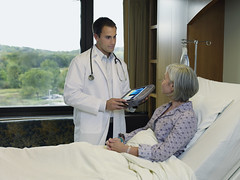
The Toughbook H2 MCA is designed for the mobile healthcare worker, with features like a fanless design and sealed buttons for easy disinfection, thus reducing the risk of germs being spread from patient to patient. Panasonic’s Cleaning Reminder Tool, can also be programmed to remind users to wipe down the unit at defined intervals.
The Toughbook H2 is a secure and intuitive platform for barcode medication administration (BCMA) vitals capture as well as electronic medical records (EMR) capture and review.
The security, disinfection features and design of the Toughbook H2 will help to maximize workflow and ease clinical loads for doctors and nurses, allowing them to access patient records at the point of care and document a patient's condition in real time.
Monday, July 11, 2011
Will you switch to the iPad HD?
Rumors are flying all over again. Apple is getting ready to release a high definition iPad called the iPad HD this fall. What will this iPad have? A high-resolution display. Is that it? Will the dimensions be different?
Here's one good thing that will happen if Apple releases an iPad HD this fall: the price for the iPad 2 might come down (or you'll find some on eBay).
Here's one good thing that will happen if Apple releases an iPad HD this fall: the price for the iPad 2 might come down (or you'll find some on eBay).
Thursday, July 7, 2011
CareCore National’s Prior Authorization Function Debuts on New Cisco CiusTM Tablet
First Specialty Benefit Management Application Saves Physicians Time, Money
BLUFFTON, S.C. – July 7, 2011 – Today CareCore National announced the release of the first mobile authorization application that streamlines the process physicians use to get prior approvals for medical tests and treatments – while providing them access to vast information about diagnostics and therapies to confirm the most appropriate care for a specific patient.
The application, CareCore TouchMED, is featured on the Cisco’s CiusTM, the innovative business tablet that delivers one of the most portable, powerful, reliable, and secure communications, computing, and collaboration experiences for a device of its kind. It will reduce administrative overhead by allowing physicians to review details of their patients’ past visits, update data based on new visits and check insurance and co-pay requirements. But the software will also enable a physician to identify the most appropriate therapies or diagnostic tests for their patients, based on detailed, evidence-based data guidelines.
BLUFFTON, S.C. – July 7, 2011 – Today CareCore National announced the release of the first mobile authorization application that streamlines the process physicians use to get prior approvals for medical tests and treatments – while providing them access to vast information about diagnostics and therapies to confirm the most appropriate care for a specific patient.
The application, CareCore TouchMED, is featured on the Cisco’s CiusTM, the innovative business tablet that delivers one of the most portable, powerful, reliable, and secure communications, computing, and collaboration experiences for a device of its kind. It will reduce administrative overhead by allowing physicians to review details of their patients’ past visits, update data based on new visits and check insurance and co-pay requirements. But the software will also enable a physician to identify the most appropriate therapies or diagnostic tests for their patients, based on detailed, evidence-based data guidelines.
Wednesday, July 6, 2011
Cisco Cius enterprise tablet
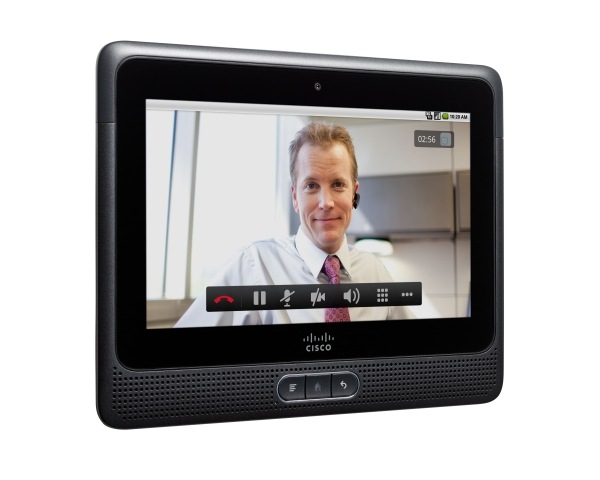 The innovative Cisco Cius is an ultra-portable, mobile collaboration enterprise tablet that offers access to essential business applications and technologies.
Application capabilities include:
- HD video (720p) including interoperability with Cisco TelePresence systems with the EX Series provide lifelike video communications with the simplicity of a phone call
- Virtual Experience Infrastructure (VXI) thin-client integration enables highly secure access to cloud-based business applications
- Cisco AppHQ delivers access to secure transformative business-process applications
- Collaboration applications include Cisco Quad, Jabber IM, and Presence as well as integrated, one-click access to WebEx meetings
Tuesday, July 5, 2011
A budget Android slate tablet from VIZIO

The VIZIO Tablet runs Google Android and connects via WiFi & Bluetooth. It also has a built-in GPS.
Friday, July 1, 2011
HP TouchPad reviewed on CNET
 The HP TouchPad running webOS has been reviewed by the CNET editors. They have it a "very good" rating with 3.5 stars. Here's a brief summary:
The good: The HP TouchPad uses Palm's unique WebOS interface and delivers Adobe Flash-enabled Web browsing, Beats audio enhancement, and impressive compatibility with third-party calendar, messaging, and e-mail services.
The bad: The TouchPad has a thick, smudgy design, offers no rear camera or HD video capture, includes a limited app selection, and its unique cards system of multitasking isn't as fully utilized as it could be.
The bottom line: The TouchPad would have made a great competitor for the original iPad, but its design, features, and speed put it behind today's crop of tablet heavyweights.
Read more here
Subscribe to:
Posts (Atom)