Thursday, February 24, 2011

Motorola Xoom available 2/24--Final pricing released

Author: Riley Alexander, MD, MBA

The first "real" competitor to the iPad is released tomorrow (2/24) and offers up what is looking to be a very compelling product. One of the big question marks has been its pricing--something that really hampered competitors to the iPod early in its dominance. It is now official.

The low-end WiFi-only model is priced at $600 (right at the similar 32gb version of the WiFi-only iPad) and the 32gb 3g+WiFi model will start at $799 ($80 more than the 32 gb 3G iPad).

At first glance, these numbers seem to be pretty reasonable as the Xoom offers a lot of things the current iPad does not. It looks like the major price concerns are going to be for those really set on getting the 3G model and using it a lot. Verizon's data rates for the Xoom look very expensive--even compared to similar plans offered by AT&T for the iPad. $20 for 1gb would make me want to seek free WiFi in a bad way. At least the upgrade to 4G LTE will be free when Verizon supports it.

Hands-on with the HP Slate 500 at #HIMSS11

I'm at HIMSS and I'm seeing the HP Slate 500 everywhere throughout the exhibit hall. I've been waiting to get my hands on this device so that I can test it myself. The HP Slate 500 is a complete PC running Windows 7 so you won't need to run a virtual machine if you need to access your electronic health record or hospital-based CPOE system on your tablet.

Starting at 1.5 lb, this slate device has an 8.9" diagonal WSVGA wide-viewing angle touchscreen that is responsive to capacitive touch. Plus, you can use the HP Slate Digital Pen for data input. I prefer the capacitive touch input.

You won't find the Slate 500 in a brick and mortar store like Best Buy or Staples. This product was developed as an enterprise-level device and not a consumer device. The HP TouchPad running webOS will be more widely available and will meet the needs of many consumers and health care professionals who are currently using slate devices like the Apple iPad.

After playing around with the HP Slate 500, I've concluded that this is a really nice device for those who want a very light, portable slate that will run Windows 7. I'm currently using LogMeIn Ignition to access Windows 7 on my Apple iPad, but maybe I'll be in a better position if I'm simply using a Windows 7 slate.

Wednesday, February 23, 2011

MobileAccess Announces Partnership with Philips Healthcare #HIMSS11

MobileAccess Announces New Integrated In-Building Wireless for Philips WMTS Solution

Leading Technology Vendors Team to Deliver Seamless and Reliable Wireless System to Healthcare Facilities

VIENNA, VA--(Marketwire - February 22, 2011) - MobileAccess, a global provider of enterprise wireless solutions, today announced a teaming agreement with Philips Healthcare and introduced the EC560 Solution for Philips. The EC560 Solution will enable interoperability between the MobileAccess2000 distributed antenna system (DAS) and the Philips Smart-hopping WMTS 1.4 GHz network. The open MobileAccess wireless platform is a robust and complete wireless infrastructure solution for integrated wireless medical telemetry systems (WMTS), making it a good partner for Philips' patient monitoring solution.

Tuesday, February 22, 2011

iPads are everywhere here at #HIMSS11

Last year at HIMSS, the iPad was just a concept. This year, I'm seeing the iPad at almost every exhibit booth. Everywhere I go, I'm seeing someone using an iPad. Plus, a huge percentage of conference attendees are carrying iPads instead of laptops or netbooks. I'm also finding that many exhibitors are giving away free iPads to entice participants to visit by their booths and learn more about their products and services. Want to win a free iPad? Spend some time in the exhibit hall and maybe you'll get a chance to win an iPad.

Those who think that the iPad is a fad should think again. The Apple iPod wasn't a fad when it was introduced many years ago. In fact, that device revolutionized the digital music industry. As more slate devices emerge on the market, it will be interesting and exciting to see how health care professionals use these mobile computing devices at the point of care.

HIMSS11 coverage is sponsored by HP and Practice Fusion. HP’s extensive portfolio of products, solutions, services and relationships can help your healthcare organization achieve quality business practices and provide quality patient care. Practice Fusion's free EHR is the fastest growing Electronic Health Records (EHR) system in the US. 

Practice Fusion's iPad solution launching at #HIMSS11

I am attending HIMSS and it's exciting to see that Practice Fusion is announcing an iPad solution for their free EHR. Here are some details (the following is from an email sent by Practice Fusion):
You're invited to come by the Practice Fusion booth #4585 at HIMSS 2011 in Orlando to be one of the first to demo their Electronic Health Record (EHR) solution for the iPad. Practice Fusion, the free, web-based EHR is the fastest growing EHR system in the US has teamed with LogMeIn to create an affordable, secure and easy way for medical professionals to stay connected on the go.

Swing by or schedule a time to visit the Practice Fusion booth (#4585) at HIMSS to meet our Chief Medical Officer, Robert Rowley, MD and hear the latest on:

* Practice Fusion's iPad solution and our larger mobile roadmap
* Why healthcare is one of the top three industries adopting the iPad for business
* Our company's triple digit growth since HIMSS 2010
* How our unique free business model works for healthcare

HIMSS11 coverage is sponsored by HP and Practice Fusion. HP’s extensive portfolio of products, solutions, services and relationships can help your healthcare organization achieve quality business practices and provide quality patient care. Practice Fusion's free EHR is the fastest growing Electronic Health Records (EHR) system in the US.

Monday, February 21, 2011

HP Helps Improve Quality and Efficiency of Care with Telehealth Programs #HIMSS11

PALO ALTO, Calif., Feb. 21, 2011 – HP today announced new product solutions and applications that help advance telehealth adoption and accessibility for healthcare organizations and patients nationwide, promoting improved quality and efficiency of healthcare.

HP will demonstrate the following collaborative solutions introduced at the annual Healthcare Information and Management Systems Society (HIMSS) conference and exhibition (booth 731):

— Lifebot® is designed to provide a secure, mobile emergency medical services (EMS) telemedicine solution.

— Canvys delivers advanced display systems for patient monitoring, bio-medical displays, ultrasound, cardiac imaging and picture archiving and communication systems (PACS).

— Medweb’s cloud-hosted imaging and data repository improves the speed and security of image and records storage for physicians, radiologists and specialists.

— Parental Health facilitates daily health monitoring by allowing seniors to connect face-to-face with doctors, book medical appointments or dispatch a physician in emergency situations.

“HP is committed to providing industry-leading, comprehensive telehealth solutions for cost-effective and accurate remote patient monitoring and care,” said Chris Mertens, vice president, Healthcare, Personal Systems Group, HP. “Through our close collaboration with innovative technology leaders, HP telehealth solutions bring physicians and care givers to the point of care, regardless of their location, with fast, reliable and enhanced secure technology.”

Sunday, February 20, 2011

72-year-old uses an iPad to check in at a hospital (saving check-in times) #HIMSS11

You're never too old to learn something new. I'm attending the annual HIMSS conference and I wanted to share this interesting press release about NIIT Healthcare Technologies:

NEW HEALTHCARE IT PILOT PROGRAM CUTTING PATIENT CHECK-IN TIMES BY 80 PERCENT

-- iPad-enabled program links patients, physicians and hospitals on a common technology platform –

ORLANDO, Fla. @HIMSS 2011 (February 20, 2011) – Patients too old for technology? Tell that to the 72-year-old who recently used an iPad to check in for his procedure at South Lake Hospital.

“He was delighted with the process, partly because it was a new experience for him but primarily because his check-in time was under two minutes,” said Pranam Ben, COO and head of NIIT Healthcare Technologies. “We’ve found that regardless of the patient’s age or experience with technology, their overall satisfaction with the program has been exceptional.”

Friday, February 18, 2011

Diversinet Enhances its MobiSecure® Mobile Healthcare Platform

Diversinet Enhances its MobiSecure® Mobile Healthcare Platform With More Than 50 New Features

Improvements Extend Support to 70 Additional Smart Phones and Tablets; Strengthen Security Compliance; Enable Faster Deployment

TORONTO, Feb. 18, 2011 – Underscoring its leadership in “Connected and Protected” mobile healthcare communications, Diversinet Corp. (TSX Venture: DIV, OTCBB: DVNTF) released a significant upgrade to its MobiSecure® platform, including support of additional mobile devices and introduction of more than 50 new features.

“We have enriched our MobiSecure product suite to support additional mobile devices, including tablets, while making it simpler for healthcare payers and providers and the users they serve to manage mobile health applications,” said Albert Wahbe, Diversinet’s Chairman and CEO.

Thursday, February 17, 2011

Dell Mobile Clinical Computing Significantly Improves Clinician Productivity

* Medical professionals reclaim up to three hours per week each, in study of Mobile Clinical Computing (MCC) at European hospitals
* MCC helps improve IT management and data security for hospitals
* Solution features latest virtualization and bio-metric authentication technologies with services that simplify implementation

ROUND ROCK, Texas--(BUSINESS WIRE)--Findings of Dell Mobile Clinical Computing (MCC) pilot projects at 10 European hospitals show how the right information technology can help medical professionals reclaim up to three hours a week for patient care by improving access to patient information and reducing application access time by an average of 83 percent. For the hospitals, this time savings can add up to £10,000 (approximately $15,000) in annual productivity gains for each medical professional1.
“There are real savings to be realized—in seconds, minutes and hours. And for medical professionals, that is time best spent with patients—not hunting for critical information.”
The adoption of Electronic Medical Records (EMR) is an important step in improving patient care and streamlining administrative processes and the study, commissioned by Dell and performed by Ignetica Ltd., highlights the need to simplify secure access to that information for medical professionals who use it for diagnosis and decision-making. Specifically, the study measures the time clinicians lose searching for the systems and information they need and estimates the impact of these disruptions to patient care and caregiver productivity.

Stryker Orthopaedics Launches Its First iPad™ Apps for Surgeons

Proprietary iPad Apps Aim to Enhance Surgeon-Patient Education and Provide Easy Access to Product and Technique Information

MAHWAH, N.J., Feb. 17, 2011 /PRNewswire/ -- Stryker Corporation's Orthopaedics division announced today during the annual American Academy of Orthopaedic Surgeons (AAOS) convention that it launched its first iPad™ applications for surgeons, available through Apple's App Store(SM) to help them enhance the patient education process and provide easy access to information about products and surgical techniques.

"Transforming our customer interactions with advanced digital technology like the iPad™ will help us achieve our business objectives and sustainability goals," said Bob Campomenosi, Senior Director, Healthcare Innovations. "The iPad is a game changing technology that can improve the way we interact with our customers."

ReadyDock:UV - Chemical-Free disinfection for the Motion C5

Disinfect your Motion C5 tablet PC by using ultraviolet technology. Chemical-Free disinfection for the Motion C5 Tablet in 105 seconds Flat! The world's first and only product offering automated general purpose disinfection for TabletPCs. Disinfect without the mess.

ReadyDock™ products are used around the globe to support workflow and the overall management of tablet PC applications in hospitals, field service, and other applications that require charging, storage, and security of tablet PCs.

I'm testing the ZAGGmate w/keyboard

I'm testing the ZAGGmate w/keyboard with my Apple iPad. I want to thank the folks at ZAGG for sending me one so that I can test and review this device. So, stay tuned over the next few weeks as I share my perspectives on this innovative case + keyboard. Here's a brief description of the ZAGGmate / keyboard:

ZAGGmate iPad Case Features

* Aircraft-grade aluminum with a bead-blasted, anodized finish that matches the iPad
* Military grade high-density padding for superior drop protection
* Innovative hinge provides ten angles for viewing and typing in both portrait and landscape mode (non-keyboard version only)
* Stylish, thin and lightweight. Half as thin as most folios for the iPad
* Large, flat base allows for use on a soft or uneven surface such as a lap or on a bed
* Only adds about ⅛" to the iPad

Wednesday, February 16, 2011

PC World compares slate tablets

PC World has a story titled, "Big Tablet Fight: Samsung Galaxy Tab 10.1 vs. HP TouchPad vs. Motorola Xoom vs. Apple iPad"

I'd like to share their chart that outlines some of the key specs that differentiate these slate tablets (click on the image to zoom in):
This probably isn't a fair comparison since we don't know what the iPad 2 will deliver, but I think it's fair to assume that the iPad 2 will have at least one camera (probably two) and a faster processor.

Tuesday, February 15, 2011

HTC Flyer (slate tablet running Android)

HTC has joined the slate tablet revolution with the HTC Flyer. This Android slate will feature: HTC Sense UI, HTC Watch video service, HTC Scribe Technology and OnLive cloud gaming. With a 7" screen, it will resemble the Samsung Galaxy Tab but it will feature a stylus pen. Right! This may be the first capacitive-only slate tablet that includes a stylus pen. HTC has been promoting its HTC Scribe technology for pen-based computing on a capacitive screen.

Monday, February 14, 2011

Slate 500, Xoom, TouchPad, PlayBook, or iPad?

We're seeing more slate tablet options this year. I have a number of people asking me, "which one should I get?"
  • The HP Slate 500 running Windows 7?
  • The Motorola Xoom running Android?
  • The HP TouchPad running webOS?
  • The BlackBerry PlayBook?
  • Or, the Apple iPad?
Until we see the new iPad 2, we can't compare all the specs across these different devices. I've been using an iPad for a while and even though I really like the device, I think it could definitely use a faster processor. 1 GHz is fairly fast, but a dual-core processor is what's needed (and it's probably what we're going to see in the new iPad 2).

I'm definitely a fan of the 9 or 10" screen. Those devices with 7" screens (like the Samsung Galaxy Tab) are nice and pocketable, but they're not going to give you the level of productivity as slates that have a larger screen. This is especially true when you're using the on-screen keyboard for two-hand finger typing. On the other hand, if you're a huge fan of thumb typing, you'll have a better experience using a 7" tablet in portrait mode.

Friday, February 11, 2011

Key Intersections Between Mobile Health and Mobile Finance

New Analysis Identifies Key Intersections Between Mobile Health and Mobile Finance

Promising Linkages between Mobile Health and Mobile Financial Services Can Boost Access to Healthcare in Poor Countries

WASHINGTON, DC(February 11, 2011)–The mHealth Alliance (mHA) and the World Economic Forum released a pivotal paper today identifying key linkages between mobile financial services and mobile health that could ultimately establish a more robust system to help pull people out of poverty.

The paper, Amplifying the Impact: Examining the Intersection of Mobile Health and Mobile Finance, identified ways in which the mobile communications platform could be leveraged to strengthen financial inclusion and improve health outcomes in developing countries. The topic was discussed during the World Economic Forum Annual Meeting recently held in Davos-Klosters, Switzerland and will also be highlighted at the upcoming Mobile World Congress in Barcelona in mid-February.

“One of the most promising opportunities for positive socioeconomic change lies in the mutually supportive scaling of mobile health and mobile financial services,” said William Hoffman, Head of Telecommunications Industry at the World Economic Forum.

LogMeIn Ignition on my Apple iPad: an Essential App

I've been testing LogMeIn Ignition on my Apple iPad for the past few weeks. For me, this is an essential app because I frequently need to access my Windows 7 PC when I'm on the road.

With LogMeIn Ignition, I can have full access to my remote PC. People are getting very familiar with the concept of a virtual desktop or remote access. Applications like GoToMyPC and LogMeIn have made it very easy for anyone to access a remote PC.

With LogMeIn Ignition on the iPad, you'll see a tiny on-screen mouse (which reminds me of the on-screen mouse that we used to see on passive touch-screen Windows 7 PCs). This little mouse has right and left buttons, but you can also select those buttons by using the menu bar below the main screen.

Pinch-to-zoom also works really well so that you can zoom right into key areas like the scroll bar or different parts of the menu.

Here's a tip: widen the scroll bars on your desktop PC so that you can easily tap those scroll bars when you're using remote access. On Windows 7, you can do this by going to the Control Panel -> Personalization -> Windows Color -> Advanced appearance settings...

The app costs $29.99. For me, it's an essential app. If you need a solution that provides remote access to your Mac or your PC, then take a look at LogMeIn Ignition.

Description

Directly control your Mac or PC, all your programs and all your files – like that important presentation for your boss or that application that only exists on your work computer – with a simple touch.

Thursday, February 10, 2011

Fujitsu LIFEBOOK® T580 Tablet PC

Once upon a time, I used to have a small convertible tablet PC made by Fujitsu. I gave that computer away about 2 years ago. The  Fujitsu LIFEBOOK® T580 Tablet PC  looks like it's a great little device for people who need a device that blends the benefits of a netbook (small, portable, + keyboard) with a capacitive touch-screen tablet that runs Windows 7.  So, it's not as light as an iPad, but it gives you a functional keyboard when you need it.


You can also get an optional hand strap for this small convertible tablet PC.  This hand strap makes handling and carrying your LIFEBOOK Tablet PC easier. The hand strap comes with an attachment bracket that allows you to attach it to the threaded inserts on the back of your tablet to provide a secure attachment. The adjustable Velcro makes this hand strap easy to adjust for any size hand. 

Here are some highlights of its specs:
  • Genuine Windows® 7 Professional
  • Intel® Core™ i5 Processor
  • Ultra versatile Tablet PC with 10.1" WXGA LED backlight display
  • Multi-touch screen with pen input
  • Optional webcam and solid state drive
  • 4-finger capacitive multi-touch screen with pen input

Wednesday, February 9, 2011

HP unveils the TouchPad tablet running webOS

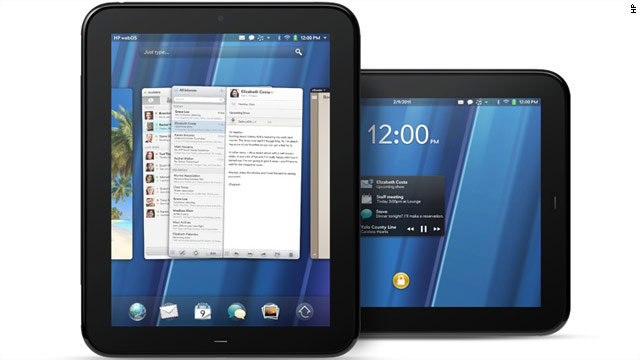
HP has entered the slate tablet space (yet again, since they already have the HP Slate 500 running Windows 7) with the TouchPad tablet running webOS. From a distance, the TouchPad might look like an Apple iPad. However, this slate device runs webOS (and the name "Palm" has been effectively removed from all webOS products). It's dual-core processor will provide a faster experience than the current iPad and webOS is built for true multi-tasking. Plus, the HP TouchPad will display Adobe Flash.

You'll have to wait until the summer to buy one of these. By then, Apple will have the iPad 2 out there. 2011 is truly the year of the "slate revolution" and I look forward to testing all these different devices. If you're not sure that you'll become an adopter, just wait. In time, I think the majority will adopt these slate devices.

PEPID to Launch Its Application for the Apple iPad at #HIMSS11

Phoenix, AZ — February 9, 2011 — PEPID, the leading developer of clinical decision-support information and technology for doctors and nurses, will officially launch its Apple iPad® application at HIMSS11, making it the first point-of-care application designed to take full advantage of the device.

Those attending HIMSS February 20-24 in Orlando are encouraged to stop by PEPID’s booth #663 to see a demonstration and the official launch of the PEPID for iPad application. The official launch of the PEPID for iPad application will be held at the PEPID reception Tuesday, February 22 from 4:30-6:30 on the HIMSS exhibit floor.

“I truly believe the iPad and other tablet PCs will play a significant role in the future of healthcare, and I’m pleased to add iPad to our list of supported platforms,” says John Wagner, president. “We’re proud to be a first mover on the device, providing healthcare professionals with critical information at the bedside from their iPad.”

How many iPads will we see at #HIMSS11?

Last year, when HIMSS was in Atlanta, we didn't see any iPads. Apple had just made the announcement about the iPad and exhibitors were giving away free iPads (that were going to be shipped in April).

This year, I'm sure we'll see thousands of iPads at HIMSS11. Given that we're going to have over 29,000 health information technology professionals in Orlando, it should be quite a spectacle to see so many gadgets in a conventional hall exhibit floor.

Next year might be a different story since the slate tablet market will be more diversified with more slate tablets running Google Android, HP webOS, RIM BlackBerry, and even Microsoft Windows 7.

For 2011, the Apple iPad will be the dominating slate tablet at HIMSS11. I'm sure we'll see a few people carrying an Android slate like the Samsung Galaxy Tab or the Dell Streak, but I predict that the majority of attendees will have an iPad.

Speaking of HIMSS11, make sure to catch me for my two presentations (Mon and Wed afternoons). More details of my presentations can be found here.

Tuesday, February 8, 2011

Reviewing the Marware C.E.O. Hybrid for iPad

You may have seen my earlier review of the Professional iPad Briefcase. I have also been using the Marware C.E.O. Hybrid case for the Apple iPad.

This is a nice alternative to the original Apple case for the iPad. This case is still relatively slim and light and it allows you to tilt the iPad in a three different angles. Plus, it has a nice elastic hand strap that will help you to hold the iPad securely when you're working in the clinical setting.

This case is primarily for those who want a slim, light, simple case. There are no pockets, no compartments, and no other bells or whistles. This is a simple case that incorporates an innovative design and I would recommend this case over the standard Apple case.

Here are its features:

• Ultra low-profile, sleek design
• Innovative elastic interior hand strap for better grip
• Padded exterior and injection molded interior for rigid support and protection
• Soft suede-like interior protects from scratching
• Multiple adjustable angles for viewing, displaying or typing
• Reinforced grip corners for maximum hold, corner protection and secure closure
• Elastic strap to hold the case in the open position
• Includes: Faux leather folio case

Monday, February 7, 2011

Anyone want to purchase an OQO model 02?

I have a used OQO model 02 in excellent condition. I'm thinking about selling it, but I don't want to list it on eBay. It's a great little computer and I have Windows 7 loaded on the device.  Gently used, mainly for corporate testing. No cracks or dents on the case.

Quick specs:
  • OQO model 02
  • 1 GB of RAM
  • 60 GB hard drive
  • Docking station with DVD-RW
  • Batteries (standard and extended)
  • AC and DC chargers
  • Case
If you're interested, please contact me.

Friday, February 4, 2011

FREE for a Limited Time: Microsoft OneNote App for iPhone, iPad, iPod Touch

Author: Brittany Chan

As a medical student, I am always searching for better ways to take class notes on my iPad. I loved using Microsoft OneNote on my laptop, but hadn't been able to find anything comparable on the iPad.

Finally, Microsoft has created a OneNote app, and it's free for a limited time! You can sync your existing OneNote files using a Windows Live SkyDrive account. You can also create new notes from within the app. Of course, it doesn't have the full functionality of the Office program, but seems like a great alternative to lugging your PC around. And they've been cranking out the updates frequently, so the app just keeps getting better.

The display is optimized for iPhone/iTouch, so iPad users using a wireless keyboard may get a little annoyed at the ever-present on-screen keys while typing. Hopefully the developers will release an iPad-optimized version in the future.

Thursday, February 3, 2011

What's the best iPad stylus pen?

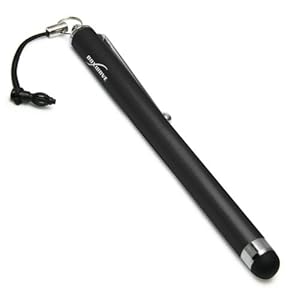
I love my iPad, but I miss inking on a traditional tablet PC. That's why I'm now on the hunt to find a nice stylus pen for the Apple iPad. There are a variety of them out there, but which one is the "best" one?  It can't be too easy to make a functional capacitive stylus.  Maybe that's why some of these pens have gotten poor ratings by users.

Right now, there are several options out there including:
  • Griffin Technology Stylus for iPad
  • BoxWave Capacitive iPad Stylus
  • Targus Stylus for Apple iPad 
  • Hard Candy Cases iPad Stylus
  • Acase Apple iPad Capacitive Stylus
  • Ten One Design Pogo Sketch stylus for iPad
What's been your experience with these stylus pens? This weekend, I plan to visit my local Apple store so that I can test some of them out.

Wednesday, February 2, 2011

Reviewing the Professional iPad Briefcase

I've had the opportunity to use the Professional iPad Briefcase for the past few weeks. This is a very unique case that you won't find anywhere else. I have to credit one of the founders: an MIT engineer who went to medical school (that sounds like me, but I'm not the founder of this iPad Briefcase). I think you'll be impressed by the overall design and innovation woven into this case.

First - it's a professional briefcase plus an iPad case. It actually resembles a mini briefcase since it's so slim and small compared to standard briefcases. If you're working in the hospital and you always want to have your iPad by your side, then this is a great way to keep your iPad with you. You can hang the case on your shoulder or you can carry it in your hand like a slim briefcase. The case holds your iPad securely and also allows you to prop it up at an angle.

The case comes with a removable shoulder strap attachment that lets you use the case while it's on your shoulder. You simply unlock the case, open the flap, and you have immediate access to your iPad (in landscape mode).  When you're done, simply close the flap and you're on your way.

When I was using the case, I found that it was very easy to use the iPad while the case was around my shoulder. Plus, I could quickly remove the case from my shoulder and hold the iPad in my hands. 

The flaps are both protective and functional as storage space. You'll find several pockets and compartments where you can store business cards, credit cards, or small papers. On the outside of the case, you'll find a larger compartment for your papers.

The case is slim and light and it also includes a loop for your pen or stylus. It's very easy to slip the iPad in and out of the case and this case looks like it will do a good job protecting your iPad in the event of an unexpected drop.

To learn more about the Professional iPad Briefcase, click here.

Tuesday, February 1, 2011

Mobile Payments: The biggest tech trend of 2011?

Author: Riley Alexander, MD, MBA

2010 saw the rise of Android and the introduction of the iPad, which has made the slate tablet the hottest device in computing (or recreated the sector if you remember the awful tablet PCs of the early 2000's). Despite this, I would still argue the biggest tech trend of 2010 was Groupon and its many clones. With recent valuation estimates placing the company at $15 billion and its largest clone, LivingSocial, selling over 1 million Amazon gift cards in one day, the daily deal/group coupon has changed the way consumers engage with business. 2011 may offer something of the same--mobile payments.

As of now, there are actually several ways to use your phone to make payments, but they all go about doing this in different ways. I'll try and cover some of the bigger ones, but I'm sure to leave out a few.

Card readers:
The simplest solution to paying with your phone is simply hooking up a card reader to your phone. There are several options for this...I was even surprised how many there are out there when I did a Google Shopping search for "iPhone credit card readers." The biggest player in this market is Square. Square is the brainchild of Jack Dorsey, who created a little website called Twitter. Square requires the use of a free card reader that plugs in to the headphone jack of your smartphone or iPad. The app and reader are free for the user. It is targeted at both the business user and personal user. The big drawback for personal use is, of course, that you have to have this square card reader sticking out of your phone or on you to use it.