Have an old laptop? Before you throw it away, consider upgrading the hard drive to breathe some new life into that aging machine!
Here's a very quick way to significantly boost performance on your old laptop: upgrade to an SSD (solid state drive). Chances are, your laptop has a traditional spinning hard drive. Maybe you can even hear it when it's "thinking." Upgrading to an SSD can result in a significant performance boost, especially if you get an SSD made by a reputable company. Avoid getting an SSD on eBay from a no-name company.
If your laptop is really old, then you're probably going to need a 2.5" hard drive with an IDE or PATA connector. If you purchased your laptop within the last 3-4 years or so, then it probably uses a SATA connector.
I recently upgraded a few different laptop hard drives to an SSD and found amazing performance improvements ranging from quick start-up boot times and very efficient multi-tasking. You can now get decent SSDs for laptops for less than $150. You can get away with a 128 GB drive if you're running Windows XP, Vista, or 7.

Showing posts with label solid state disk. Show all posts
Showing posts with label solid state disk. Show all posts
Thursday, August 16, 2012


Tuesday, May 24, 2011
Blazing performance after upgrading to an SSD

- Windows Startup Performance
- File Copy Performance
- Opening Applications
- Multitasking Performance
I also saw a moderate improvement in battery life, but this wasn't nearly as significant as the other performance improvements.
If you're looking for ways to improve your laptop's performance, consider switching to an SSD before you upgrade your RAM. You'll notice a difference, especially if you're running Windows 7. If you're going to purchase an SSD, make sure to get one made by a reputable manufacturer like Intel, Samsung, Kingston, Crucial, Transcend, etc.
Tuesday, May 17, 2011
Replacing my laptop hard drive with an SSD
 It's amazing how the prices on solid-state hard drives (SSD) have dropped. I remember when it used to cost a fortune to get a 64 GB SSD. Now, you can get one for $125.
 After experiencing SSD performance on a number of mobile computers including the HP Slate 500, I've decided to switch one of my laptop hard drives with an SSD. I don't need much storage space, so 64 GB is plenty. Plus, I have an SD slot and plenty of USB ports to expand storage if needed. I'm eager to see how this laptop will perform after I upgrade the drive to an SSD.
Thursday, March 18, 2010
Working on the train today
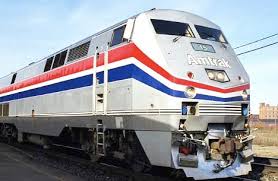 I'm traveling for work today, so I'm working on a train. That's mobile computing, isn't it? Some trains have really nice tables and plenty of power outlets. I remember when airplanes used to have working power outlets on the seats. Now, those green lights are never on.
So, have you ever computed on a train? It can be a bit bumpy at times, so I often wonder what my laptop hard drive is going through. If you do a lot of computing on the train, you should probably get an SSD (solid state disk) in your mobile computer. SSDs are dropping in price (they're still expensive), but it's a worthwhile investment if you're constantly working on trains.
Tuesday, September 15, 2009
How cool is your mobile computer?
The old Pentium 4 processors found in older laptops were known to cause a significant amount of heat. As a result, notebooks that used this processor had really loud fans that were spinning all the time. Newer laptops use cooler processors, so not a large source of heat becomes the hard drive. As prices on SSDs continue to fall, this will probably replace spinning hard drives on mobile computers.
To monitor the temperatures on your mobile computer, I use SpeedFan. This is a free utility and there are many others out there that are free. HD Tune is another one.
Saturday, September 12, 2009
Keeping my laptop cool
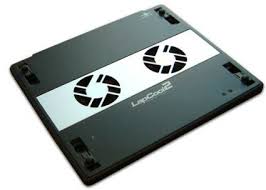
Over the years, I've found that many people don't use a laptop cooler. They don't realize how high temperatures can impact the lifespan of computers. Hard drives have spinning parts that will degrade over time when exposed to high heats. Other components are also susceptible to failure when they overheat. There was a time when I didn't use a laptop cooler regularly. Now, I do everything I can to keep the temperatures as low as possible.
As more mobile computers use solid state hard drives or SSDs, we will see some reductions in heat because we won't have spinning parts anymore. Plus, low-voltage processors are keeping things a bit cooler as well.
Tuesday, June 23, 2009
Tiny SSDs for netbooks

Netbooks are tiny. You won't find a 2.5" hard drive (which is the standard size for regular laptops) in netbooks. You'll either find a 1.8" hard drive or some type of SSD (solid state disk). Flash memory technology has made it possible to cram gigabytes of memory on tiny, flat flash memory cards. Samsung has introduced mini-card SSDs that are even smaller than your typical SSD. According to PC World, "Samsung's mini-card SSDs are up to 80 percent smaller than SSDs found in most laptops today, the company said. The small drives weigh between 7.5 grams (0.17 pounds) and 8.5 grams, lower than the 75 grams to 85 grams that 1.8-inch and 2.5-inch SSDs weigh."
FYI, the 1.8" hard drives (spinning HD, not SSD) can also be found in older iPods (video iPod, photo iPod, etc.) and the new iPod classic. The old iPod mini had a 1" hard drive, also known as microdrives. Those 1" hard drives were the size of a compact flash (CF) card.
Subscribe to:
Posts (Atom)