Showing posts with label Surface Pro. Show all posts

Thursday, May 22, 2014

Surface Pro 3 vs. ThinkPad Tablet 10

By now, you've heard of the new Microsoft Surface Pro 3 that's replacing the current Surface Pro 2. The Surface Pro 3 is larger, thinner, and lighter than the Pro 2. It even has a redesigned hinge that makes the tablet much more functional and 9 hrs of battery life sounds very compelling given that this device is powered by an Intel Haswell processor. However, the switch away from Wacom and to an N-Trig pen has me wondering if the new tablet will suffer from digitizer and inking issues. I'm sure that N-Trig has come a long way since their earlier generation pens and technology, but I do not like the fact that the pen requires batteries (especially since AAAA batteries don't last very long and can be a bit more difficult to find).

Although the Surface Pro 3 is improved in so many ways, the main drawbacks for me are: the N-Trig pen and the larger size. If they had stayed with Wacom, then I think it would have been a true winner. But, I don't know that they would have been able to keep the device so think and light if they had stayed with Wacom digitizer technology. The larger size is great if you need a laptop, but if you plan to carry this device around all day and use it while you're standing, then a 10" screen is sufficient and a 12" screen is too much.

One of the other newly announced Windows 8 tablet PCs is the Lenovo ThinkPad Tablet 10. This is the successor to the thin, light ThinkPad Tablet 2. This time, Lenovo has created what they're calling an "Ultrabook Keyboard" that will deliver a true laptop-like experience when you're typing. One of the major drawbacks of this keyboard: the tablet sits at a single, fixed angle. At least the angle is steeper (and more functional) than the keyboard angle that we saw with its successor: the ThinkPad Tablet 2 and its Bluetooth keyboard. Lenovo has decided to stay with a 3rd generation, low-power Intel Atom processor that delivers plenty of processing capabilities while keeping the device thin and light. Lenovo has stayed with a Wacom pen for this new ThinkPad.

There's no doubt that the ThinkPad Tablet 10 has major improvements over the ThinkPad Tablet 2. However, the major drawbacks for me include: the keyboard is not backlit and the tablet only sits on the keyboard at a fixed angle.

Both the Surface Pro 3 and the ThinkPad Tablet 10 offer major upgrades from previous versions. Let's see what types of "real world" reviews start showing up over the next few months. By then, I'm sure that Dell, HP, Asus, and others will have some new models as well.


Monday, September 23, 2013

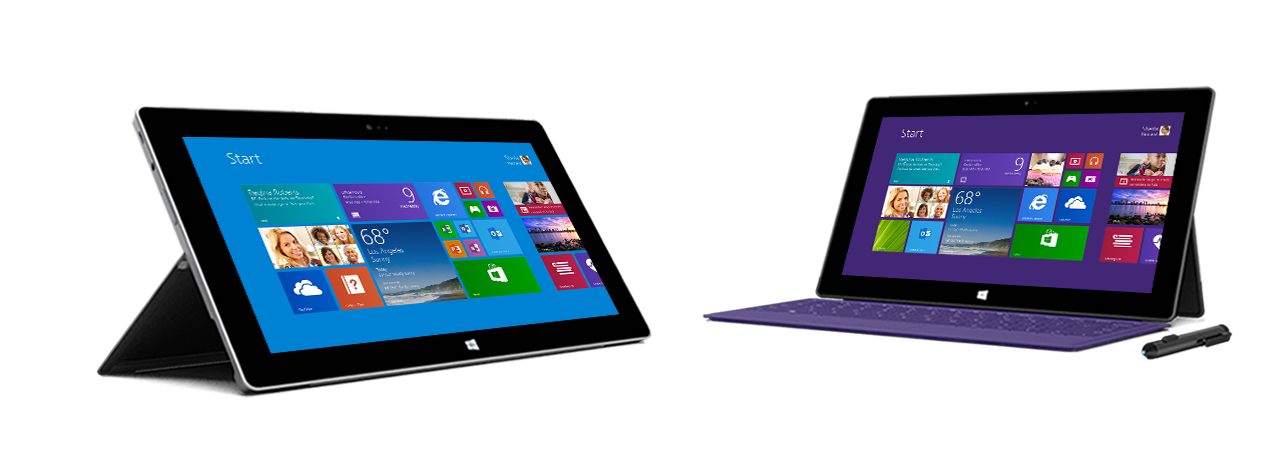
Microsoft introduces the Surface Pro 2

Today, Microsoft announced their updated Surface RT and Surface Pro tablet PCs.

The Surface 2 runs Windows RT, so it's a great little mobile tablet for running basic tasks and mobile apps. The Surface Pro 2 runs Windows 8.1 Pro and comes with the latest Intel Haswell processor so that it's very fast and has 75% longer battery life than the original Surface Pro. One of the key problems with the original Surface Pro was the fact that its battery life was fairly limited.

The updated models also include 2 settings on the flip-out kickstand so that you can adjust the viewing angle on the tablet.

Microsoft also announced updated keyboards that click to these slate tablets. The new Touch Cover 2 and Type Cover 2 keyboards come with a backlight and they're thinner than their first-generation predecessors. Microsoft is even providing a keyboard called a Power Cover that has a built-in battery to help power the tablet.

They are aggressively positioning the Surface Pro 2 as a laptop replacement. Of course, if you do a lot of typing with your laptop literally on your lap, then the Surface Pro 2 may not be the ideal form factor for sitting propped up on your legs.

Most of the slate tablet PCs running Windows 8 are powered by Atom processors so that they can have 10+ hrs of battery life. I don't think the Surface Pro 2 will have 10 hrs, but even 7 or 9 hrs may be enough for your average business user. Will that be enough for your health care worker? In the health care environment, nurses generally need devices that have a minimum of 12+ hour battery life or removable batteries since they work 12-hr shifts. Doctors can settle for shorter battery life since they have more opportunities to plug and charge (or plug into a docking station) throughout their clinical workflow.

Sunday, February 10, 2013

Microsoft Surface Pro

You can order Microsoft Surface Pro directly from Microsoft. I'm still trying to understand why Microsoft decided to venture into the hardware side of the Windows business this year with Surface Pro.

Surface Pro starts at $899 (for the 64 GB version). The 128 GB version is $999. Surface Pro is a Windows 8 tablet PC and you can attach either a Touch Cover or a Type Cover. You can also use the Surface Pen for accurate writing and drawing. The pen costs $29.

If you're thinking about ordering one, don't miss the following:
  • 64 GB (approximately 29 GB available for user content) 
  • 128 GB (approximately 89 GB available for user content) 
In other words, the 64 GB version hardly has very little usable space. If you plan to use this device like a standard PC, you'll definitely want the 128 GB version.

Also, you can expect roughly 5 hours of battery life.