Showing posts with label Android. Show all posts

Wednesday, March 5, 2014

Evernote users on Android tablets can now incorporate handwritten notes #EvernoteHandwriting

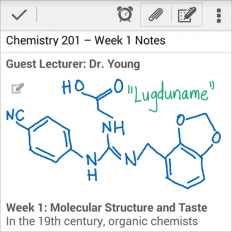
Handwriting for Android has arrived in Evernote (for Android).

When Evernote acquired Penultimate (for iOS), iPad users who were still relying on pen-based input had a way of incorporating those hand-written notes into Evernote. That's exactly what I did.

Now, Android users can add handwriting into new notes or existing notes. I'm sure that medical students and residents will certainly appreciate this feature. When you're standing by a patient's bedside, it's much easier to scribble a note than to use the on-screen touch keyboard to enter information.

I'm still waiting for Evernote to add this handwriting feature for tablets running Windows 8. On a Windows-based device, you can either type a regular note (no handwriting) or you can create an Ink Note (handwriting only and no typing). You can't add handwriting into a regular typed note. Windows users may gravitate towards using Microsoft OneNote (which is what I used to use heavily back in the days of Windows XP Tablet), but I now use multiple devices (including iOS and Android) and that's why I use Evernote. I need to access all my notes across all my devices.

Saturday, September 7, 2013

Toshiba Encore - an 8" tablet running Windows 8.1 powered by Intel Bay Trail

If you've been following the Windows 8 tablet PC market, you'll know that most of the current Windows 8 slate tablet PCs have a 10" screen size. Then Acer announced the Iconia W3, an 8" Windows 8 tablet to compete against smaller mobile tablets like the iPad mini and the Google Nexus 7 (by Asus) running Android. It's nice to be able to hold a smaller, thinner tablet in one hand.

Toshiba has announced the Encore - an 8" tablet running Windows 8.1 powered by Intel's Bay Trail processor (the latest generation Atom processor featuring quad-core performance and even longer battery life).

Intel Bay Trail is the successor of the Intel Atom processors named Clover Trail which are powering some of the current Windows 8 tablet PCs. Clover Trail has very long battery life, but overall system performance is slow compared to the ultra-fast (but more battery-draining) Intel i3, i5, i7 Core processors. The next generation of the Intel Core processor is called Haswell and it's supposed to delivery very fast performance along with very long battery life. Intel Bay Trail is supposed to deliver the same: fast performance with even longer battery life.

So, it sounds like the performance/battery life lines separating the performance between Bay Trail (Atom) vs. Haswell (Core) may be getting blurred. But, the key distinction here is that tablet PCs powered by Bay Trail will also have the ability to run the Android OS if the manufacturer chooses that capability. So, perhaps the future of many Windows 8.1 tablets will also include a dual-booting option with Google Android.

Speaking of Windows 8.1, you can preview an early version of Windows 8.1 (not the final version) by downloading and installing Windows 8.1 Preview (windows.microsoft.com/en-us/windows-8/preview‎). Or, you can wait for the final version of Windows 8.1 which is getting released on October 17.

Wednesday, July 24, 2013

New version of Google Nexus 7 Android tablet

There's a new version of the Google Nexus 7 Android tablet. The new Nexus 7 is still a 7" Android tablet, but it's going to run the latest Android OS which is Android 4.3. The device is faster, has more RAM, adds a camera to the back, and has a higher pixel density display with a resolution of 1,920 x 1,200. This is the highest resolution that you'll find on a 7" tablet.

The Nexus 7 offers all these "upgrades" in a package that is thinner and lighter.

Will the higher resolution display help physicians and other health care providers view radiology images on a small screen? I'd like to see someone conduct a research study to answer that question.

Thursday, June 20, 2013

Feeling schizophrenic? Samsung ATIV Q comes with both Windows 8 and Android

Schizophrenia is not the same as a dual identify disorder (or multiple personality disorder). However, I like the word, so that's why I threw it in there. The Samsung ATIV Q will make you feel like you have two devices built-into one. It runs both Windows 8 or Android. So, if you love certain Android apps, you can run them on this large device.

The ATIV Q uses an interesting hinge to convert the device from a slate tablet to a laptop. Will this type of hinge design catch on and gain popularity in the convertible tablet PC space? The Acer Aspire R7 uses a similar hinge design. With this design, you sacrifice the space you'd normally have to rest your wrists and for a trackpad pointer.

The ATIV Q is a 13.3" device that comes with a keyboard with a built-in mouse pointer. The device also houses the Samsung S Pen, an active digitizer stylus pen. It also has a screen resolution that is much higher that what you will normally find in 13.3" ultrabooks. The 3,200 x 1,800 screen on the ATIV Q has a higher resolution than the 2,560-by-1,600 Retina Display found on the 13.3" MacBook Pro. Do you really need that much resolution? Maybe you do if you're a radiologist. Then again, this device is not an FDA-approved "medical device" that can be used for diagnostic purposes, but maybe radiologists will be eager to see how CT scans, X-rays, MRIs, and ultrasound images appear on the ATIV Q.

Since it's powered by the new Intel 4th Gen Core processor (Haswell), the device is very fast and has robust battery life. Samsung rates it for 9 hours. The big question now is, what's it going to cost? 

Sunday, April 28, 2013

HP Slate 7 Android Tablet

You can now get a 7" Android tablet for $169.99 from HP. The HP Slate 7 is an Android tablet that also includes a microSD card slot, cameras on the front and back, and features Beats Audio for excellent sound from a small little device. Runs Android 4.1.

7" is a really nice size for an Android tablet. Fits easily in one hand. Slips into a white coat pocket.

Monday, April 1, 2013

Use your iPad as a second monitor: Air Display by @avatron


No April Fools here. You really can use your iPad as a second PC monitor.

Using two monitors really enhances productivity. You can read something on one screen while you type on the other. Or, you can copy something on one screen and paste them to an application running on the second screen. At work, I use two monitors but when I'm traveling, I'm often confined to a single monitor which is my laptop screen. There are apps that can transform my iPad (or iPad mini) to act as a second monitor.

Air Display by Avatron is an example of one of these apps that lets you use a spare mobile device as a second monitor for your Mac or PC. You have the option to use a spare Mac, PC, iPad, or Android tablet to serve as a second monitor. In other words, you can configure your second monitor like this:

Mac -> Mac
Mac -> Windows
Mac -> iPad
Mac -> Android


Windows -> Mac
Windows -> Windows
Windows -> iPad
Windows -> Android

You need to purchase separate apps for each second monitor configuration. I chose to use my iOS devices as a second monitor, so I grabbed my iPad 3 and my iPad mini. 


There is a little lag when you move windows around on the second monitor, but overall the app works quite well. I spent most of my time using my iPad 3 as my second monitor. My iPad mini worked as well, but it definitely felt slower than the iPad 3. My primary PC was a Windows 7 laptop.

All you need is the Air Display app (running on your second monitor device), drivers for your primary device, and your devices need to be connected on the same Wi-Fi network.

Sunday, February 24, 2013

Samsung Galaxy Note 8 with S-Pen

At Mobile World Congress 2013, Samsung announced the new Galaxy Note 8. Unlike many other Android slate tablets, Samsung has added an active digitizer pen called the S-Pen that uses Wacom technology. You can hover the pen off the display and the tablet will respond. If you've used older Windows Tablet PCs, you'll be familiar with the Wacom pen.

The Galaxy Note 8 joins the Galaxy Note II which is a 5.5" phablet (phone/tablet) and the Galaxy Note 10.1 which is a 10.1" Android slate tablet. The entire family of these Galaxy Note devices use the active digitizer S-Pen. The other Samsung Galaxy products like the Galaxy Tab, the Galaxy S, and other Galaxy mobile devices do NOT use the S-Pen.

I believe the international version of the Galaxy Note 8 will also function as a phone. But, who would want to hold an 8" tablet up to the ear?

I'm curious to see how Samsung will price the Galaxy Note 8. The smaller 5.5" Galaxy Note II is around $299 on most US wireless carriers. Will the Galaxy Note 8 be available as a Wi-Fi only version here in the United States? Or, will it only be available through wireless carriers?


HP Slate 7

At Mobile World Congress 2013, HP announced the HP Slate 7. This is a 7" Android tablet that will be sold for $169 starting in April. It also features Beats Audio for improved sound quality for such a small, thin device. Plus, it will have HP ePrint and give you the ability to print to certain HP printers.

Specs include:
  • 1.6GHz dual-core ARM processor
  • 3 MP camera on back plus a front-facing VGA camera for video conferencing
  • Weight: 13 ounces
  • HP ePrint
  • 7" display
Learn more at hp.com/slate

Thursday, August 23, 2012

Another Android tablet built for business users: Fujitsu STYLISTIC M532 Tablet

The Fujitsu STYLISTIC M532 Tablet is an Android tablet built for business users. It's powered by a Quadcore ARM-based NVIDIA® Tegra3 mobile processor T30S. But, it only has a microUSB port and a microSD card slot. Compared to the original Lenovo ThinkPad Tablet which had a full USB port and a full SD card slot, the Fujitsu STYLISTIC M532 Tablet doesn't have the ports or slots that a typical business executive may need. Then again, the STYLISTIC M532 is lighter and slimmer than the ThinkPad.

The big question for me is: how will Android and iOS cater to the needs of business/enterprise customers once Windows 8 devices start rolling out this fall?

Tuesday, August 14, 2012

From ThinkPad Tablet 1 to ThinkPad Tablet 2

I happen to own a Lenovo ThinkPad running Google's Android OS. I was compelled to use this tablet because it included several enterprise-level features that are not normally found on other mobile tablets. I was drawn by features like: a digitizer pen; a full-sized USB port; a full-sized SD card slot; and more. Overall, the tablet's been a fine business device and the OS was recently updated to one of the latest versions of Android (4.0 or Ice Cream Sandwich).

Lenovo is making a major transition by leaving Android and moving to Windows 8 for its next ThinkPad Tablet which has been named the ThinkPad Tablet 2 (quite an original name, isn't it?).

Like the first ThinkPad Tablet, the 2 will have an optional digitizer pen (which is much more accurate than a capacitive pen) and a full-sized USB port.

Measuring less than 10mm, the 10.1" ThinkPad Tablet 2 goes everywhere you go. And, with up to 10 hours battery life, it keeps going for as long as you need it to. Use 3G and 4G support to stay connected to colleagues, family and friends.

You can learn more about the Thinkpad Tablet 2 here. (I predict that this device will sell for roughly $500)

Monday, July 23, 2012

A key missing feature on the Google Nexus 7

Many of you may be thinking about purchasing the Google Nexus 7 Android tablet. I had a chance to play with one over the weekend and I forgot that the Nexus 7 does NOT have a camera on the back of the device. It has a 1.2 MP front-facing camera for video conferencing, but that's it. No camera on the back to capture high-definition (HD) videos of your patients or high quality photos of rashes or other medical conditions. At least you can use it for video conferencing in the setting of telemedicine.

The other interesting fact about the Nexus 7 is that it uses scratch-resistant Corning glass, but it's not Gorilla Glass. It's also not Gorilla Glass 2. So, what is it?

Finally, I do want to emphasize that the Nexus 7 is a beautiful tablet for $199 and it's a considerable improvement over other devices like the Amazon Kindle Fire. But, don't forget that Amazon is getting ready to launch an updated Kindle Fire 2. The current Kindle Fire doesn't have a camera, but I'm sure the Fire 2 will have at least one camera. The key question is: will it have two?

Will an Android 4.1 (Jelly Bean) update come to the ThinkPad Tablet?

Just when I got excited about upgrading my ThinkPad Tablet to Android 4.0 (Ice Cream Sandwich), I find myself now waiting to hear if Lenovo will be releasing an Android 4.1 (Jelly Bean) update. Given that the ThinkPad Tablet is really for an enterprise audience, let's hope that Lenovo will try to keep up with these latest Android updates for their business users.

Android 4.1 (Jelly Bean) offers some performance enhancements over the existing Android 4.0 OS. It also includes some other nice features, but I'm mainly interested in the performance improvements.

Here's a little tip for those of you performing an Android system update on your tablet (regardless of the company that makes your tablet): perform a hard reset (factory reset) after you perform the upgrade. Make sure you've backed up and saved all your important files. Many users have reported significant performance improvements after performing a hard reset after an upgrade. Initially, I didn't perform a hard reset after I upgraded my ThinkPad Tablet and I was having some performance issues. Then, the tablet froze and I was forced to perform a hard reset. Now, it works beautifully (except that there is a slight delay with the screen turning on when I press the power button).


Saturday, July 7, 2012

Google Nexus 7 Android tablet

The Google Nexus 7 tablet is one of the hottest tablets that's causing a significant amount of buzz right now. At $199, it's remarkably affordable and it will place some serious competition on the Amazon Kindle Fire.

The Nexus 7 (8 GB) will be $199 and the 16 GB version is $249.

The Nexus 7 is similar to the Kindle Fire and it even includes both front-facing and rear-facing webcams! Of course, we're expecting an updated Kindle Fire 2 anytime now, so we're about to see the "battle of the 7" Android tablets."

Given that the Nexus 7 is made by ASUS, I wonder what other 7" tablets ASUS will release this year.


Sunday, July 1, 2012

The original iPad won't support iOS 6

Those of us who were early adopters purchased the original iPad. Many of us went ahead and upgraded to the iPad 2 or the New iPad. The rest of us who are still using the original iPad will be stuck on iOS 5 and will soon find that certain apps will no longer run on our devices. It's nearly impossible to stay current with the latest hardware technology because of the rapid pace of hardware advancement. I've been a happy user of the original iPad, but the time is approaching where I'll need to upgrade to a newer model. I'm also using an Android tablet simultaneously and Lenovo was kind enough to release the latest Android OS (Android 4 also known as Ice Cream Sandwich) on the ThinkPad Tablet, so I'm fortunate to have a tablet running the latest Android OS (and I didn't need to upgrade the hardware).

Monday, June 25, 2012

Lenovo Thinkpad update to Ice Cream Sandwich

Lenovo has been rolling out Android 4.0 (Ice Cream Sandwich or ICS) updates for Thinkpad tablet users in the UK and Western Europe, but how about us living in the USA? When will we see our update? Some bloggers have reported June 8 while others have reported June 18. Both of those dates have passed and June is almost over.

I'm mainly interested in seeing how those improvements in functionality and speed will improve this tablet. The end of June is approaching and I hope that we will see that ICS update before the end of the second quarter (Q2).

Tuesday, May 8, 2012

Ice Cream Sandwich coming to the Lenovo ThinkPad Android Tablet

Google Android 4.0 is called Ice Cream Sandwich and it's coming to the Lenovo ThinkPad Android Tablet this month. I've been waiting for this upgrade for my ThinkPad because it's currently running Android 3.1 Honeycomb and I'm sure there's a better, more refined operating system that will make this tablet work more efficiently. I chose to get the Lenovo ThinkPad Android Tablet because it's one of the few Android tablets that also comes with the option of an active pen for inking and writing. These pens are much more accurate compared to spongy capacitive stylus pens.

Android 4.0 Ice Cream Sandwich is currently available on a number of other Android tablets like the Asus Transformer Prime.

Monday, March 26, 2012

Thinnest 4G LTE Tablet

The Samsung Galaxy Tab™ 7.7 is the Thinnest 4G LTE Tablet that you'll find on the Verizon network. This tablet is only 0.31” thin and weighs just 12 ounces. Now if only this tablet came with a smart stylus pen, I might be tempted to get in line...

The Droid Xyboard tablets by MOTOROLA are 0.35" thin, so that's pretty impressive as well. The Xyboard is available as an 10.1" screen or an 8.2" screen. The 10.1" Droid Xyboard can use a smart stylus pen, but the smaller 8.2" does not.

The new iPad seems quite thick in comparison if you consider that it's now 0.37" thick. (the iPad 2 is 0.34" thick)

You'll see that I'm still a big fan of using a "smart" stylus pen with my tablets. Terminology around stylus pens can get quite confusing these days. Samsung has added to the confusion with their S Pen for the Samsung GALAXY Note (a 5.3" phablet - is it a phone or a tablet device) that comes with an S Pen stylus that uses a different technology compared to the N-Trig or Wacom-based stylus pens.

My main tablets these days are: the HP Slate running Windows 7 (uses an N-Trig stylus pen) and the Lenovo ThinkPad Tablet running Android (uses an N-Trig stylus pen). Both of these use the same type of stylus pen, so I can switch back and forth. Neither are super-thin. Neither has built-in 3G or 4G, so I carry a 4G MiFi with me when I go out with a tablet.

Thursday, February 16, 2012

ThinkPad Tablet: Turn off Wi-Fi when display is off to save battery life

I've been using the Lenovo ThinkPad tablet for a few months now. This device is an Android slate tablet that is similar to the iPad but includes several distinct features such as the following:

1. Optional active digitizer stylus pen for more accurate writing and drawing (similar to the type of pen that you'll find on Windows-based Tablet PCs)
2. Handwriting recognition software that will convert your scribbles into formatted text (remember the old Apple Newton MessagePad?)
3. Full-size USB port (so you can read those files from your USB flash drive)
4. Full-size SD card slot (full size SD, not just limited to microSD)
5. A mini HDMI port

This device is a nice tablet, but it's certainly bulkier and heavier than many other tablets on the market. Despite the larger size, the battery life just doesn't impress me on the ThinkPad Tablet. One of the main reasons why the battery life is limited is because the Wi-Fi remains on even when the display is turned off. There is an option that allows you to turn off the Wi-Fi when the display is off. Here are the instructions (from Page 38 of the User Manual):

Configuring the wireless network disconnect policy

To get longer battery life, manage your wireless connections more reasonably by configuring the wireless network disconnect policy.

Monday, February 6, 2012

Eee Pad Transformer Prime TF201

If you're looking for a really slim and powerful Android slate tablet, the Eee Pad Transformer Prime TF201 looks to be a nice option. I believe this is the first Android tablet running a quad-core processor.

The Eee Pad Transformer Prime TF201 also comes with an optional TF201 Mobile Dock that is a keyboard + extra battery that gives you a total of 18 hours of battery life.

Tuesday, January 10, 2012

Motorola Droid Xyboard 8.2

The Motorola Droid Xyboard 8.2 is another nice option for those of you who are looking for a thin, slightly smaller tablet running the Android OS. The Droid Xyboard comes in 2 sizes: 10.1 and 8.2 inch screen sizes. This tablet is only available through Verizon Wireless on their 4G network.

The larger Xyboard also lets you use a digital stylus pen for inking/drawing/writing.

The smaller Xyboard does not have the active stylus pen option.

Many physicians and medical students have gotten accustomed to the 10" screen found on the Apple iPad, but these devices don't usually fit in a traditional white coat. So, you could use a shoulder sling or you can buy a white coat that has a bigger pocket. Or, you could get a smaller tablet.

I still wonder if Apple will release a smaller iPad that has a 7 or 8" screen. In many ways, that would be optimal for busy health care professionals who need to carry these devices everywhere they go.

In the meanwhile, the Motorola Droid Xyboard 8.2 is another option for Android users who want something a bit smaller.