A really nice enterprise feature found on Windows 8 is called Windows To Go. It's a nice option for IT administrators dealing with BYOD headaches.
Here's a brief description:
Windows To Go is your own fully manageable, corporate image installed on a bootable certified USB drive. It is a new feature of Windows 8 Enterprise to help businesses address a wide range of mobility and travel light requirements.
Windows To Go is different from other mobility solutions because people can be productive from almost any location they choose to work. Simply insert a drive into a compatible computer and boot into a personalized Windows 8 image, network connectivity not required.
All of the great technologies you use with Windows 8 Enterprise work with Windows To Go: Group Policy, BitLocker, BranchCache, AppLocker, App-V, UE-V, and DirectAccess. Windows To Go is literally Windows 8 Enterprise in your pocket.
You'll need to use a Windows To Go certified drive:
Windows To Go certified drives pass a battery of certification tests, including self-hosting and boot compatibility across a variety of PCs. The certification process ensures that drives are built for the high random read / write speeds required for running Windows smoothly. Additionally, certified drives are backed with manufacturer warranties, with a focus on continuing to operate under normal working conditions. Microsoft only supports drives certified for Windows To Go.

Showing posts with label USB. Show all posts
Showing posts with label USB. Show all posts
Tuesday, February 26, 2013


Thursday, August 25, 2011
Lenovo ThinkPad slate tablet (Android OS) is now on sale
 The Lenovo ThinkPad tablet is now on sale. Don't get this one confused with the ThinkPad X220 tablets that are convertible laptops.
The ThinkPad tablet runs Android and it's a slate. However, you're limited to the Wi-Fi versions for now. The tablets that include 3G radios will be coming in October. Even though theThinkPad tablets run Google's Android OS, this tablet isn't just like all the other Android tablets out there. This one is really built for business users who require enterprise-level services. Sounds like it could be a good fit for the health care industry. This photo is from GottaBeMobile.
The ThinkPad tablet includes a digitzer pen and has a built-in pen storage compartment in the tablet. It also includes multiple connectivity ports: Native USB 2.0 and micro-USB ports, full-size SD card slot and mini-HDMI output. You won't find these features on most Android tablets (or the Apple iPad for that matter).
Lenovo has made a nice tablet here, but I wonder why it won't be available with a 4G antenna this fall. After all, the Samsung Galaxy Tab 10.1 and the Motorola Xoom are available with 4G.
Thursday, March 3, 2011
Will the iPad 2 charge via standard USB?
 If you have an existing iPad, you may have noticed that the iPad indicates that it doesn't charge when it's plugged into a standard USB port. In reality, it's receiving a low, trickle charge that slowly charges the iPad when the screen's off (but you would have no way of knowing that it's charging).
The specs on the iPad 2 indicate:
Charging via power adapter or USB to computer system.
It doesn't specify high-output USB ports, so does this mean that the new iPad 2 will actually charge on a standard USB port - even when you're using the iPad 2?
Friday, September 3, 2010
This is the USB flash drive I've been waiting for...

With this flash drive, you can plug it in and leave it in without worrying about it breaking off or getting stuck on anything. It's great for those who are using mobile computers like laptops, notebooks, netbooks, ultra-mobile PCs, or tablet PCs. You can order it on the LaCie website here.
Thursday, July 15, 2010
A great (and cheap) way to organize your gadget cables (USB, power, etc.): binder clips
Are you tired of picking up your gadget charging cable off the ground? Do you need a quick and effective solution? Try large binder clips.
 If you're like me, then you may have several different gadgets on your desk. Some are plugged in, others are not. Some may have a docking station or cradle. Others rely on loose USB or charging cables. Don't you hate it when the cable falls to the floor?
In this photo, you'll see that I've taken very large binder clips and I've attached them to the edge of a cabinet that is roughly 1" thick. Then, I've taken each USB cable or charging cable and I've simply passed them through the handle on each binder clip.
The cables stay off the ground. I can easily put the cables on the "hanger" after I'm done charging my device and I can add more clips if I get more cables. It's too bad that I can't apply for a patent for this little invention.
What other practical tips or tricks would you like to share?
 If you're like me, then you may have several different gadgets on your desk. Some are plugged in, others are not. Some may have a docking station or cradle. Others rely on loose USB or charging cables. Don't you hate it when the cable falls to the floor?
 In this photo, you'll see that I've taken very large binder clips and I've attached them to the edge of a cabinet that is roughly 1" thick. Then, I've taken each USB cable or charging cable and I've simply passed them through the handle on each binder clip.
The cables stay off the ground. I can easily put the cables on the "hanger" after I'm done charging my device and I can add more clips if I get more cables. It's too bad that I can't apply for a patent for this little invention.
What other practical tips or tricks would you like to share?
Tuesday, December 22, 2009
Gift idea for gadget lovers: battery extenders
 Shopping for a gadget lover? What does every electronic gadget have in common? They require batteries.
 A battery extender makes a great gift. What do I mean by "battery extender?" Well, I'm primarily thinking about external battery packs that allow you to extend the life of your gadget if you're on a plane, bus, train, etc. If you don't have access to a power source and you can't plug in to recharge your device, then life can be quite frustrating if you have a gadget but you can't use it.
I have a robust external battery that I carry so that I can charge and power my laptop (actually, it's a convertible Tablet PC), my iPod, my smartphone, my Bluetooth headset, and any other gadget that requires power either via a USB cable or a proprietary power supply. These external batteries come in all sizes and shapes and they've been great.
Thursday, December 10, 2009
Tips when you're computing in the car

Never drive while you're computing in a car. If I'm computing in a car, I'm not driving. Because I do some work-related traveling in the car, I find myself pulling out my laptop, tablet, or ultra-mobile PC to stay productive while I'm on the road. Here are some tips I've learned over the years:
- Never expose your computer or computer bag when you're parked. You're inviting theft.
- Carry a DC charger (or preferably an AC/DC charger) that has an attachment for a cigarette lighter adapter. This way, you can stay charged up while you're in the car.
- Use an active laptop cooling pad that has a built-in fan.
- Carry an extra battery.
- Tether using your smartphone to get online. Or, use the built-in WWAN. Broadband cards are a nice option as well.
- Carry a USB-powered keyboard light if you think you'll be riding at night.
- Plan to use maximum screen brightness when you're riding during the day. This will eat up your battery life, so make sure you have plenty of battery or DC power.
- Get on Traffic.com and check your local traffic.
- Get on Weather.com and check your local weather.
- Offer to navigate if necessary. If your computer has a GPS, then you can easily navigate using your PC.
Thursday, October 15, 2009
Tips for longer laptop battery life
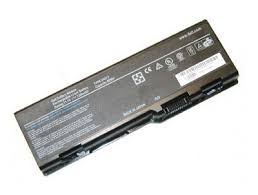
Many people don't realize that notebook battery life ratings are generally estimated as the "maximum" battery life on the lowest power settings. This means:
- Lowest brightness setting.
- Lowest processor settings (most CPUs will throttle up or down depending on the burden placed on the CPU).
- No use of optical drives.
- No use of any internal communications cards. This includes Wi-Fi, Bluetooth, and internal WWAN cards.
- No use of USB ports or any other power-consuming ports.
If you want to improve battery life, make sure you're doing what you can to reduce power consumptions in the areas described above. The easiest way to improve battery life is to decrease brightness and reduce your CPU settings. Turn off your wireless cards if you're not using them.
Monday, October 12, 2009
Slim storage
 This is an interesting concept for storage: a slim USB data card. Forget about flash drives. We're now talking about a flash card.
The Slim Data Card is as thin as a credit card. If you could store 64 GB of data in your wallet, then the credit card slogan "what's in your wallet?" will have an entirely new meaning.
Image source: Gadgetell
Monday, July 6, 2009
Always On USB

I often travel with my Lenovo Thinkpad X200 Tablet and a few USB cables to power my peripherals (like my smarphone and iPod). So the "Always On USB" feature on my Thinkpad comes in very handy. I get to charge my devices at night by keeping them plugged in to my laptop. I can also charge them when I'm on the plan and when my laptop is in "sleep" mode.
If your laptop capable of "always on USB," it's a great feature when you're traveling.
Saturday, June 27, 2009
Windows 7 on a USB flash drive

Will Microsoft sell Windows 7 on a USB flash drive? Since they are targeting netbooks (which don't have optical drives), it would make sense to offer the installer file on a flash drive. My Lenovo Thinkpad X200 Tablet doesn't have a built-in optical drive. I have an external drive, but I hardly use it. My docking station has an optical drive, but I hardly use that too. So, it would make a lot of sense to have Windows 7 on a USB flash drive.
Subscribe to:
Posts (Atom)