Do you call it a convertible tablet or a convertible ultrabook? ASUS is calling the Transformer Book a detachable notebook.
The ASUS Transformer Book is a Windows 8 convertible tablet/notebook that's powered with an Intel Core i7 processor. This means that it's much faster than any of the Atom-based processors, but it also consumes more battery power as well. So, that's the trade-off that you must consider. The Transformer Book also has a larger 13.3" screen which means that the overall device is going to be larger and heavier compared to many other Windows 8 tablets. Battery power on this device is 38Whr (Pad), 23Whr (Keyboard Dock).
The ASUS Transformer Book is also one of the few detachable tablet/laptop combinations that includes a backlit keyboard. I'm sure more future models from all the other major manufacturers will include backlit keyboards as fairly standard features. Right now, the 2011-2014 time period seems to be when we're making the major transition to follow after the Apple MacBook Air and include backlit keyboards on even ultralight and ultraslim PCs.
One of the major reasons why my HP Folio 13 ultrabook is still my main laptop is because it has a backlit keyboard. Once you've experienced it, you can't live without it. If I could remove the screen on my Folio 13 and carry that around like a tablet, that sure would be nice.
Here's a short video that describes the ASUS Transformer Book:

Showing posts with label Ultrabook. Show all posts
Showing posts with label Ultrabook. Show all posts
Sunday, February 17, 2013


Thursday, January 10, 2013
Exciting new tablets and ultrabooks at CES
This week, my friends are in Las Vegas attending the Consumer Electronics Show (CES). This year, I'm following the show from a distance.
Major computer manufacturers are announcing new tablets and ultrabooks. Here are a few of the ones that caught my attention:
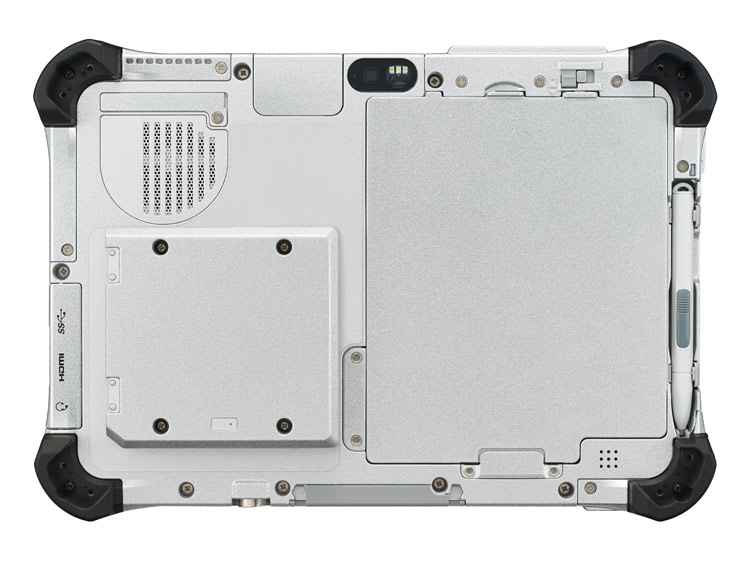 Panasonic Toughpad (similar to their Toughbook line of rugged products)
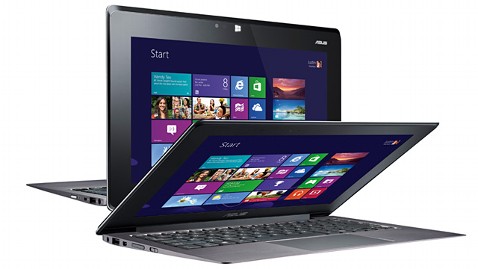 Asus
Asus
HP

Lenovo

Dell

Samsung was also demonstrating a flexible, unbreakable screen that may get used on smartphones and tablets. Wouldn't it be nice to have a truly unbreakable screen? Corning was featuring its Gorilla Glass 3 - a thinner, tougher glass.
Major computer manufacturers are announcing new tablets and ultrabooks. Here are a few of the ones that caught my attention:
Panasonic Toughpad (similar to their Toughbook line of rugged products)- The Toughpad FZ-A1 is the only Android tablet with hardware encryption.
- The Toughpad FZ-G1 is the thinnest and lightest fully-rugged 10.1" Windows 8 tablet.
Asus- The Asus Taichi is a Windows 8 tablet / laptop hybrid that has an LCD screen on the front and back of the display lid. In other words, you can always access one of the screens whether the device is open or closed.
HP
- Last month, HP announced the EliteBook Revolve, an enterprise-grade convertible laptop/tablet that runs Windows 8. Although the form factor isn't anything new, the enterprise-grade security that's built into the EliteBook series is an important feature for those working in health care.
Lenovo
- The Lenovo IdeaPad Yoga that originally came as a 13" model now comes as an 11" model running Windows RT. Unlike other laptops, you can fold the display all the way back so that you convert the laptop into a tablet. Of course, the keyboard and touch pad becomes inactive when you're using the device in tablet mode. The Yoga 11 comes with Windows RT and the Yoga 13 comes with Windows 8.
Dell
- Dell will be offering an "Essentials" version of the Latitude 10 slate tablet for only $499. This device will still run Windows 8, but it won't have the standard removable battery option that's found on the standard Latitude 10. The Essentials version also won't support an active digitizer pen.
Samsung was also demonstrating a flexible, unbreakable screen that may get used on smartphones and tablets. Wouldn't it be nice to have a truly unbreakable screen? Corning was featuring its Gorilla Glass 3 - a thinner, tougher glass.
Wednesday, December 19, 2012
iPad mini has replaced my iPad 3
I'm still waiting to see if some of the newer Windows 8 tablets will replace my iPad. If someone makes an ultra-thin 7.9" model that offers all-day battery life, then I'll replace my iPad mini with that device.
For now, I carry my iPad mini along with my Windows 7 Ultrabook. The iPad mini isn't sufficient when I need to do some serious work.
So, what am I doing with my iPad 3? My kids get to have all the fun! (Actually, you may see it on eBay soon). I admit that the iPad 3 feels very heavy and bulky after you get used to handling the iPad mini.
Thursday, August 30, 2012
HP Envy x2 (hybrid tablet/notebook PC)

Now, the big question is: What will it cost?
I also hope they make it with an illuminated keyboard. I've been spoiled by using devices that have keys that light up at night.
Wednesday, August 29, 2012
Slider hybrid Ultrabook: Sony VAIO Duo 11
Slider hybrid Ultrabook from Sony combines fully-featured PC productivity with tablet convenience
- Surf Slider™ design transforms full-function Ultrabook™ PC into tablet operating mode for on-the-go computing
- Slim and light: weighs approximately 1.3kg and 17.85mm thin
- 29.4cm (11.6”) wide view Full HD touchscreen
- Comfortable and precise hand-writing experience with a digitizer stylus pen
Optional Sheet-type battery extends battery life, and also incorporates a handy digitizer stylus holder.
Tuesday, July 24, 2012
Touchpad Blocker is an essential app for ASUS Zenbook owners

Here comes Touchpad Blocker to the rescue! They describe it as: "Software to prevent cursor from jumping when you are typing on notebook keyboard." I think they were thinking of ASUS Zenbook owners when they developed it.
After installing the free Touchpad Blocker app, I am having far fewer problems with the sensitive touchpad. You can adjust the sensitivity level of the ELAN touchpad, but it's still too sensitive for me. I've already disabled the multi-finger pinch-to-zoom option. I don't want to disable the other features of the touchpad.
I'm still testing Touchpad Blocker, but I think this app is here to stay on this particular laptop. On my other laptops, I don't run into sensitive touchpad issues.
Friday, April 13, 2012
ASUS Zenbook UX31 ultrabook review

From a distance, ASUS Zenbook UX31 looks like a MacBook Air, but this is a Windows PC running Windows 7 and it lacks a backlit keyboard. The MacBook Air actually went through an interesting transition for a period where Apple eliminated the backlit keyboard in the second generation, then brought it back in the third generation of the MacBook Air.
I personally think that a backlit keyboard is an essential feature for health care professionals and business executives. You're likely to find yourself working in a place where the lighting is low (radiology suite, an airplane at night, etc.), and it really enhances your productivity when you can see the keyboard.
The ASUS Zenbook UX31 also uses a proprietary power supply that is unlike most standard power supplies. This means that it will be more difficult to find an external battery pack or a universal power adapter to power your ASUS Zenbook. The battery life on the Zenbook is rated as 5 hrs and 58 min by Laptop Magazine and 6 hrs and 9 min by PC Mag. When PC Mag reviewed the ASUS Zenbook UX31 last November, they have it the "Editor's Choice" recognition. Then, in Jan of 2012, they gave the "Editor's Choice" to the HP Folio 13 ultrabook.
Overall, the ASUS Zenbook UX31 is an excellent choice for someone who cares deeply about the aesthetics of a laptop. It's super slim and light. Most people will think it's a MacBook Air (which is a compliment to Apple).
Be aware that this notebook does not have a VGA port. So, if you frequently give presentations, you'll need to carry an adapter. Plus, the HDMI port is actually a mini-HDMI port on the Zenbook, so you'll need a different type of adapter if you plan to attach to a standard HDMI cable.
If the ASUS Zenbook had a backlit keyboard and longer battery life, that would really make it a top-notch ultrabook. I hope to see those features in their next model.
Thursday, April 12, 2012
HP Folio 13 ultrabook review
 Over the past few weeks, I've had the chance to review the HP Folio 13 ultrabook. I've also been using the ASUS ZENBOOK which is a really nice ultrabook, but it lacks a backlit keyboard and its battery life is mediocre. HP has done a really nice job coming out with a business-class ultrabook that is an excellent choice for health care professionals who need a slim and light Windows-based PC.
Thin, Light, but Sturdy
1. Like most ultrabooks, the HP Folio 13 is very thin and light. It's not the thinnest or the lightest, but it feels very solid and sturdy. If you're tired of carrying your heavy, clunky laptop around, this ultrabook will be a refreshing change.
 Backlit Keyboard
2. The backlit keyboard is an essential feature for those who work in dark places, e.g.: a radiology suite, a call room, an airplane, etc. The keyboard is well built and is very comfortable to use, even in the dark. The keyboard has little flex, even though the overall device is very thin.
Long Battery Life
3. The HP Folio 13 has very long battery life compared to other ultrabooks. PC Mag tested it to have roughly 7.5 hrs and PC World tested it to have 6 hrs 45 min. Engadget estimates you'll get roughly 8 hrs of battery life if you use the power saver setting.
PC Mag gave the HP Folio 13 the "Editor's Choice" rating in Jan. CNET rates it "Excellent." The HP Folio 13 is certainly an enterprise-level product and it
Here is the only drawback that I would mention to the medical community: this laptop (like just about every other ultrabook or Mac out there) lacks a built-in VGA port. It has a full-size HDMI port, so you'll need to carry an HDMI-to-VGA adapter if your hospital or institution still relies on the old VGA port for monitors and projectors.
Saturday, April 7, 2012
A weekend testing ultrabooks
This weekend, I'm testing a few different ultrabooks running Windows 7. These devices are thin, light, and in many ways they resemble a MacBook Air (but they run Windows instead of the Mac OS X). Stay tuned to hear more and I'll share my findings.
Wednesday, January 11, 2012
Will 2012 be the year of the "Ultrabook?"
Many people are still catching up with the year of the tablet, but will 2012 be the year of the Ultrabook for those who don't already have a MacBook Air?
An Ultrabook is an ultraportable laptop computer in a category defined by Intel. They feature reduced size and weight while retaining standard performance by utilizing low-power Intel CULV processors with integrated graphics, solid-state drives, and unibody chassis.
We seem to go around in circles when it comes to mobile devices. First, we use a laptop that has a keyboard. Then, we all go out to get tablets, but we attach them to removable keyboards when we want to enter a lot of data. Tablets are great for information consumption, but we're still drawn to keyboards for data entry. Now, are we circling back to ultraportable laptops. Next, we'll find that ultrabooks will come with removable screens that function as independent tablets so you can leave the keyboard behind.
The last scenario already exists with devices like the Asus Eee Pad Transformer, but this is a device running Android OS, not Microsoft Windows. Then again, Lenovo announced their IdeaPad YOGA which runs Microsoft Windows and allows you to use the device as a slate tablet or a notebook (you can also use it as a "stand" or "tent.")
I think 2012 will be the year of the Ultrabook and 2013 will be the year when tablets and laptops truly merge as a single device where users have the option of a removable keyboard.
An Ultrabook is an ultraportable laptop computer in a category defined by Intel. They feature reduced size and weight while retaining standard performance by utilizing low-power Intel CULV processors with integrated graphics, solid-state drives, and unibody chassis.
We seem to go around in circles when it comes to mobile devices. First, we use a laptop that has a keyboard. Then, we all go out to get tablets, but we attach them to removable keyboards when we want to enter a lot of data. Tablets are great for information consumption, but we're still drawn to keyboards for data entry. Now, are we circling back to ultraportable laptops. Next, we'll find that ultrabooks will come with removable screens that function as independent tablets so you can leave the keyboard behind.
The last scenario already exists with devices like the Asus Eee Pad Transformer, but this is a device running Android OS, not Microsoft Windows. Then again, Lenovo announced their IdeaPad YOGA which runs Microsoft Windows and allows you to use the device as a slate tablet or a notebook (you can also use it as a "stand" or "tent.")
I think 2012 will be the year of the Ultrabook and 2013 will be the year when tablets and laptops truly merge as a single device where users have the option of a removable keyboard.
Thursday, December 8, 2011
HP enters the Ultrabook market with the HP Folio 13 series
 A few years ago, people were excited to go out and purchase a netbook. Now, the new buzzword is "Ultrabook."
 An Ultrabook is a computer in a category of thin and lightweight ultraportable laptops, defined by a specification from Intel. The name Ultrabook is an Intel trademark.
HP is entering the Ultrabook market with the HP Folio 13 series. This computer is as thin as a dime.
18 mm thick and just 3.3 lb
Get up to 9.25 hours of battery on a single charge
Subscribe to:
Posts (Atom)