Showing posts with label Dell. Show all posts

Thursday, December 26, 2013

The Dell Venue 8 Pro has replaced my iPad mini

Here in the Kim household, we see a lot of gadgets during Christmas. We give and receive brand new gadgets. We donate or recirculate gently used gadgets that are in good shape. We'll even collect some together and put them on eBay.

This year, I got a Dell Venue 8 Pro to replace my iPad mini and my iPad mini went to someone else (although the kids will probably still be the ones mainly using it during long car rides).

The Venue 8 Pro is a Windows 8.1 tablet PC that is very thin and light. At a glance, it resembles an iPad mini because it has an 8" display. However, this is a full Windows PC that runs all my enterprise applications. Plus, the microSD expansion slot gives me plenty of storage space so that I can carry all my critical work files and remain productive when I'm on the road.

The iPad mini is a great device for email, web browsing, and apps. But, if you're trying to maintain productivity, it has its limitations. On my iPad mini, my most commonly used apps were Evernote and Penultimate. I'd jot down notes by writing directly on the screen and I'd retrieve my hand-written notes from my PC.

With the Dell Venue 8 Pro, I can write an Ink Note directly on the Evernote application and retrieve and edit it easily from a PC. I can also switch to OneNote or another pen-based application. Medical students who like to hand-write notes will appreciate the features that OneNote offers. The stylus pen on the Venue 8 Pro is sold separately and has been updated to improve performance compared to earlier pens.

So for 2014, the Dell Venue 8 Pro will be my main mobile tablet. I'll continue to carry a Bluetooth keyboard and use a stylus pen to jot notes. The best thing about the Venue 8 Pro is that it will be set up to be identical to my desktop workstation. This means that all my Windows-based desktop applications and files will be at my fingertips. I will run a full version of Microsoft Office, but a "limited-feature" version that's designed for iOS. I'll have all my Outlook data with me. Dell has bundled the full version of Microsoft Office Home and Student 2013 (normally priced at $139.99) into the price of the Dell Venue 8 Pro.

You'll have to be comfortable reading off a smaller 8" screen if you plan to use the Dell Venue 8 Pro or any other high-definition 8" tablet. You also need to get accustomed to the Windows 8 experience if you've never used Windows 8. The interface is quite different, but after you use it for a while, you'll quickly get the hang of it. You may want to change your Windows settings to increase font size, the size of your scroll bars, and other visual elements to minimize pinch-to-zoom since the traditional Windows desktop is not optimized for touch.

Don't get the Venue 8 Pro with the Venue 8.
  • The Venue 8 Pro runs Windows 8.1. 
  • The Venue 8 runs Android. 
I find the naming convention a bit confusing since they are both called Venue 8, but one runs an enterprise operating system and the other runs Android.

The question that I get most is this: is the 3rd generation Atom processor (Z3740D) powerful enough to provide a good Windows 8.1 experience? My answer is: Yes. Compared to the 2nd generation Atom processors that we saw in earlier Windows 8 tablets, the Quad-Core Z3740D performs very nicely for business applications plus you still get all-day battery life.

Here's my personal tip if you plan to get the Venue 8 Pro: go with the 64 GB model, not the 32 GB model. You'll want that space to load business applications. If you're buying the device purely as an entertainment tablet, then 32 GB should be fine. However, if you plan to use it professionally, you'll want more space.

Finally, keep in mind that mobile apps for Windows 8 still remain somewhat limited. So, if you're a big fan of certain mobile apps that are found on iOS or Android, you'll want to check to see if those apps are also available for Windows 8. If you can't live without your popular gaming app, then you won't be happy with Windows 8.

Monday, June 10, 2013

Dell Latitude 10 reviewed by @DrJosephKim

I recently had the opportunity to spend several weeks reviewing the Dell Latitude 10 tablet PC. This is a business Windows 8 Pro tablet PC that is powered by the Intel Atom Z2760 dual-core processor @ 1.80 GHz. It comes with 2 GB of RAM and a 64 GB SSD. Overall, the device performs well and lasts up to 10 hrs (standard battery) for a mobile PC. If you need some serious computing horsepower, you'll want to get a PC powered by an Intel Core i5 or i7 processor.

The Latitude 10 comes in several different configurations:
  • Essential edition: 32GB of storage & a non-removable battery (no active stylus or HDMI)
  • Productivity edition: Includes a removable battery, active stylus and HDMI.
  • Mobile edition: Includes mobile broadband, removable battery, active stylus and HDMI.
  • Security edition: Mobile broadband, fingerprint and Smart Card readers (along with  removable battery, active stylus and HDMI).
The Latitude 10 version that I tested was the Enhanced Security version of the Latitude 10. For me, the best features of this Windows 8 tablet PC were:
  1. Removable 30Whr standard battery (up to 10 hrs) plus an optional 60Whr extended battery (up to 20 hrs). The extended battery adds some weight and bulk, but you won't run out of power all day. 
  2. Full-size SD card slot (not found on most Windows 8 tablet PCs).
  3. Added security features of the fingerprint and Smart Card readers.
Here are some other some features that I'd like to highlight about this tablet PC:

Size and Style:

The Dell Latitude 10 Enhanced Security version is one of the thicker, wider Windows 8 tablets on the market. Given that it's designed for the Enterprise environment, it's made with a reinforced magnesium alloy frame. The tablet only weighs 1.47 lbs (the iPad weighs 1.46 lbs).  The top portion of the Latitude 10 Security Edition is thicker (13.4 mm) than the rest of the tablet (10.5 mm) because of the integrated smart card and fingerprint reader. You'll want to get the  Enhanced Security Soft-Touch Case that was designed specifically for this tablet.

Wacom Active Digitizer Pen:

The 10.1" capacitive multi-touch HD display is crisp and bright. The Latitude 10 uses a standard-appearing Wacom digitizer pen for precise input and "inking," so if you're a traditional Tablet PC user, you can still go back to scribbling and jotting down notes. You won't find a silo for the pen on the tablet, so you'll need to carry the pen separately or use the case that has a built-in elastic loop for the pen.

Keyboard:

I wish that the Dell Latitude 10 also came with a mobile docking keyboard option that you 'll find on the Dell XPS 10 Tablet (which runs Windows RT). Instead, you can get the Kensington KeyFolio Expert case which has a wireless Bluetooth keyboard and hands-free stand, but this keyboard does not include a built-in mouse pointer.

Summary:

The Dell Latitude 10 is a great Windows 8 business tablet PC that gives the user flexible options with battery life and robust security features. The productivity dock allows you to connect a monitor and multiple USB peripherals so that you can have a workstation at your desk and a mobile tablet when you're walking around.

Wednesday, April 17, 2013

Dell Latitude 10 Enhanced Security Soft-Touch Case

I am currently testing the Dell Latitude 10 Enhanced Security Windows 8 Tablet PC. To carry the tablet around, I am using the Dell Latitude 10 Enhanced Security Soft-Touch Case. Here is a short video that demonstrates this case:

Tuesday, April 9, 2013

Impressive battery life with Windows 8 tablets by HP, Dell, and Lenovo

I'm currently on a cross-country flight to speak at the HIMSS Southern California Chapter Annual Healthcare IT Conference on the topic of Social Media in Healthcare: Promoting Patient Empowerment and Engagement, Healthcare Value, and Patient Centered Care."

I decided to travel really light, so I packed an HP ElitePad 900 Windows 8 slate tablet PC (and left the Expansion Jacket and extra battery at home). The tablet weighs only 1.5 lbs.

I'm typing this as I'm working on the airplane, using Wi-Fi (Gogo Internet) and a Bluetooth keyboard. Based on my battery usage pattern on this 6-hr flight, it looks like I'll easily get 9 hours of battery life with the brightness setting on the low side.

When it comes to battery life on PCs, critics often say that published battery life figures often don't reflect real-world usage. I've found that newer Windows 8 tablets like the HP ElitePad, the Dell Latitude 10, and the Lenovo ThinkPad Tablet 2 all have very impressive battery life because they are powered by a second-generation Intel Atom dual-core processor that does a nice job balancing performance with battery life. I have been testing these 3 tablet PCs and I'll be writing more about my experiences using them.

The Microsoft Surface Pro uses a faster Intel processor, but you end up sacrificing battery life. I suspect that I'd probably only get 3-4 hrs of battery life with the Surface Pro, and that's just not enough for my usage patterns.

Friday, April 5, 2013

Micro-USB charging Windows 8 tablet PCs

Several Windows 8 slate tablet PCs come with a backup charging port that is a micro-USB connector. A few examples include the Lenovo ThinkPad Tablet 2 and the Dell Latitude 10.

Does this mean that you can leave your standard AC adapter at home? Not exactly. When I plug in a micro USB charger to the ThinkPad Tablet 2 or Latitude 10, you'll see that Windows says "plugged in, not charging" when the display is on. Turn the screen or device off and the battery will charge slowly.

The micro-USB charging only works when the tablet is off or in sleep mode, so ask yourself: will you need to charge your Windows 8 tablet when you have it on? If so, make sure you have a standard AC adapter.

Now, let's get technical:

USB provides 5 volts (5V). USB chargers range from less than 0.5 amps (500 mAh) to 2 amps (2A). Most laptops give their USB ports 0.5 A of power.

Standalone USB chargers vary in amperage. For example, the iPad charger is a 5V, 2A charger. That calculates to be a 10 Watt charger (5V x 2A = 10 W).

An iPhone charger is a 5V, 1A charger. That calculates to be a 5 Watt charger (5V x 1A = 5W). That's why it's such a tiny little charger.

Most tablet PCs require more than 5 volts to operate. The Dell Latitude 10 has a removable battery and you'll see that the battery is rated at 7.4 volts. So, there's no way a USB charger rated at 5V can keep the tablet on and also charge your battery.

Fortunately, most of the Intel Atom powered Windows 8 tablets have very long battery life (approx 10 hrs), so you can go on battery power during the day and charge them at night when they're off. The battery on the Dell Latitude 10 is removable and you can even get an extended battery that will give you 20 hrs of battery life. The HP ElitePad 900 comes with an optional Expansion Jacket that can house a removable battery, so you can also get 20 hrs of battery life with that configuration.

Tuesday, March 5, 2013

Windows 8 tablets on display at HIMSS

Here at the HIMSS conference, you'll find a wide assortment of Windows 8 tablet PCs on display at several different booths. So, if you haven't had a chance to play around with Windows 8, here's your opportunity. You can swing by the vendor-specific booths like HP, Dell, Lenovo, Fujitsu, Samsung, and others. Or, you can visit the Microsoft or Intel booths that both have several Windows 8 tablets on display.

Have you tried Windows 8 yet? The experience is different when you're using a touch-screen device.

I'v personally been impressed by the form factors, the build quality, and the long battery life seen on many of these Windows 8 tablets. Plus, several of them are coming out with different options such as: 1) removable keyboards; 2) cases; 3) battery options; 3) and other accessories.

Windows 8 is a new operating system that combines an enterprise OS with a mobile OS in a single device. In some cases, you can run applications side-by-side. The Windows 8 user interface is different, so you'll need to spend a little bit of time swiping up, down, left, and right to see what those finger swipes will do when you're running an application. Give it a few minutes and you'll quickly get the hang of it. Pinch-to-zoom seems to have achieved universal adoption. Soon, we'll see more swipe gestures getting incorporated into all types of mobile operating systems.

At the HP booth, you'll see the ElitePad 900 on display. A few of the HP folks may be carrying their ElitePad in an expansion sleeve that has an extra battery and expansion ports. At the Lenovo booth, you'll see the ThinkPad Tablet 2 sitting on a dock or on a removable keyboard. At the Dell booth, you'll see that the Latitude 10 now comes in several configurations including one a security edition that has a built-in Smart Card and fingerprint reader. Fujitsu and Samsung are showing off their convertible Windows 8 tablets that pop off a keyboard dock. So, as you consider your clinical workflow and how you use mobile computers in the clinical setting, you'll be able to find a device that will meet your needs.

Tuesday, February 12, 2013

Dell Latitude 10 tablet PC with extended battery

The Dell Latitude 10 is a tablet PC that runs Windows 8. Unlike many other Windows 8 slate tablets, the Dell Latitude 10 comes with the option of a removable battery and even an extended battery option. For a while there, all the major PC manufacturers were making tablets and ultrabooks that had a non-removable battery. Is the removable battery back?

Laptop Magazine has published a nice review of the Latitude 10 and this may be the first time you see photos of the extended battery option. The extended battery makes the device a bit thicker, but you're going from approximately 10 hours of battery life all the way up to 17 hours!


Tuesday, February 5, 2013

Tablets for the Modern Mobile Enterprise

Don't miss this upcoming webinar titled, “Tablets for the Modern Mobile Enterprise: Saving with the Intel Architecture and Windows 8” An InformationWeek and Dell Executive Event

March 14, 2013
9:00 - 10:20am EST

Touch-enabled tablets are transforming the way the modern mobile enterprise is approaching business operations by enabling IT managers to reduce costs with easier hardware and software provisioning, simpler management, and improved productivity. And it’s happening within the Intel architecture and Windows 8 environment that IT departments and business workers already know and trust.

You’ll also learn:
  • How touch-enabled tablets will drive greater mobility for your company
  • How Windows 8 fits into your evolving mobile computing strategy and the rest of your enterprise
  • Why traditional concerns over security in an expanded mobile environment are mitigated by new Intel processor-based tablets
  • How Dell and Intel have collaborated to bring improved, built-in management capabilities through Intel vPro technology
  • How to develop a BYOD strategy for your company that assures improved productivity and doesn’t turn into a complex management headache
Register here for this webinar.

Thursday, January 10, 2013

Exciting new tablets and ultrabooks at CES

This week, my friends are in Las Vegas attending the Consumer Electronics Show (CES). This year, I'm following the show from a distance.

Major computer manufacturers are announcing new tablets and ultrabooks. Here are a few of the ones that caught my attention:

Panasonic Toughpad (similar to their Toughbook line of rugged products)

  • The Toughpad FZ-A1 is the only Android tablet with hardware encryption.
  • The Toughpad FZ-G1 is the thinnest and lightest fully-rugged 10.1" Windows 8 tablet. 

Asus
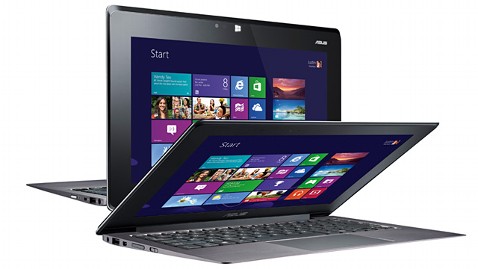
  • The Asus Taichi is a Windows 8 tablet / laptop hybrid that has an LCD screen on the front and back of the display lid. In other words, you can always access one of the screens whether the device is open or closed.  

HP
  • Last month, HP announced the EliteBook Revolve, an enterprise-grade convertible laptop/tablet that runs Windows 8. Although the form factor isn't anything new, the enterprise-grade security that's built into the EliteBook series is an important feature for those working in health care.

Lenovo
  • The Lenovo IdeaPad Yoga that originally came as a 13" model now comes as an 11" model running Windows RT.  Unlike other laptops, you can fold the display all the way back so that you convert the laptop into a tablet. Of course, the keyboard and touch pad becomes inactive when you're using the device in tablet mode. The Yoga 11 comes with Windows RT and the Yoga 13 comes with Windows 8.

Dell
  • Dell will be offering an "Essentials" version of the Latitude 10 slate tablet for only $499. This device will still run Windows 8, but it won't have the standard removable battery option that's found on the standard Latitude 10. The Essentials version also won't support an active digitizer pen. 

Samsung was also demonstrating a flexible, unbreakable screen that may get used on smartphones and tablets. Wouldn't it be nice to have a truly unbreakable screen? Corning was featuring its Gorilla Glass 3 - a thinner, tougher glass. 

Friday, December 14, 2012

Dell Latitude 10 vs. XPS 10 (tablet PCs)

Do you have a Dell account at your hospital? Recently, Dell launched a few new tablet PCs:
  • The Latitude 10 is a slate tablet running Windows 8 and it weighs 1.45 lbs.
  • The XPS 10 is a slate tablet running Windows RT that docks into a keyboard. The tablet alone weighs 1.4 lbs.
Both of these devices have a 10" screen. Both have excellent battery life. One runs Windows 8 and the other runs Windows RT.

Personally, I prefer the form factor of the XPS 10 because it docks into a keyboard (that includes a built-in battery) and turns the entire setup into a clamshell notebook. However, I'd recommend the Latitude 10 for medical professionals since it runs Windows 8 and that makes it compatible with enterprise applications like standard EHRs and CPOE systems.  You can't install legacy Windows applications on devices running Windows RT.

The Latitude 10 has an optional docking station that lets you use the Latitude 10 as a desktop replacement device. Combine an external keyboard and mouse, plug the dock into a large monitor, and you're sitting at a regular workstation. When it's time to go, grab the tablet and you're off. The Latitude 10 is powered by an Intel Clover Trail Atom Z2760 processor and I found it to be fast enough for most standard applications.

The Latitude 10 also has a user-removable battery and you can swap out the standard battery for an extended one. You won't find many Windows 8 tablet PCs or ultrabooks with removable batteries these days.

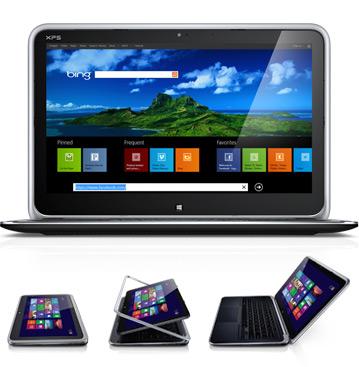
Dell also has the XPS 12 which is a convertible tablet / ultrabook and is built in a unique design where the screen hinges allow you to flip/fold the device from an ultrabook to a tablet. It's what you'll want if you do a lot of keyboard typing and you never want to be without a keyboard. The XPS 12 has a larger 12" screen and a fast i5 or i7 processor.  Since it weighs 3.35 lbs, it's not a device you want to carry around in tablet mode all day.

I had a chance to use all of these devices while I was attending Dell World 2012.

Tuesday, December 11, 2012

My Windows RT experience so far

I've been using Windows 8 on a number of different tablets ranging from some older convertible tablet PCs and slate tablet PCs to some of the newer Windows 8 tablets. I've grown accustomed to the overall user interface and I like Windows 8 apps. For the most part, these apps look and feel roughly the same across all mobile operating devices.

Here at Dell World, I've had some time to dig into some Windows RT devices. Specifically, I've been playing with the Dell XPS 10 tablet running Windows RT and the Microsoft Surface RT tablet. Both of these tablet devices have keyboard options for those who need a laptop experience. The XPS 10 connects with an optional Dell Mobile Keyboard Dock that includes a built-in battery for additional power. The Surface RT connects with a Touch Cover that has a pressure-sensitive flat keyboard or the Type Cover that's more like your traditional mechanical keyboard.

So, what's the difference between Windows RT and Windows 8?

Windows RT is not Windows 8. But, if you picked up a Windows RT device in one hand and a Windows 8 device in the other, you probably won't be able to tell them apart at first. If you played with each device for 5 minutes, you still won't see the differences. Windows RT may initially look and feel like Windows 8, but it's fundamentally different because it won't run applications that are designed for traditional Windows operating systems like Windows XP, Vista, and 7. Windows RT feels like Windows 8 because you still get a "Desktop," you can hover your mouse around the screen, the Control Panel is familiar, and you can open folders like "My Computer" and your "C Drive" and navigate to specific folders using Windows Explorer.

So, where does Windows RT fit? If you need basic functionality, Microsoft Word/Excel/PowerPoint, and if you're willing to wait for app developers to add their apps to the Windows 8 app store, then a device running Windows RT ought to be sufficient. If you need to run any standard Windows applications that are not available as Windows 8 "apps," then you'll want to choose a device running Windows 8.

The future of computing is virtualization and mobile #DellWorld

Here at Dell World, I listed to Michael Dell and members of their executive team speak on a panel about the future of enterprise computing. We're living in a mobile era where more computing is moving towards mobile and this means we're seeing more utilization of cloud-based services and virtualization.

So, what does this mean for healthcare? For one thing, doctors will have access to tools and resources that will help them maintain productivity when they're mobile. They'll be able to deliver better care when they're outside of the hospital. Also, patient data will become more mobile and accessible. Right now, much of the "waste" in the health care system is driven by repeat diagnostic tests that aren't necessary but they're done due to convenience because clinicians don't have universal access to patient records collected at other health organizations. By building health information exchanges (HIEs), we'll gain access to patient data, but we'll also need robust security solutions to protect the privacy of the patient data.

The traditional PC market is dwindling because of the rapid adoption of mobile devices like Apple iPads and Google Android tablets. Windows 8 launched only 2 months ago and we're still waiting to see the next generation of Windows 8-powered tablets hit the market. Some are available for pre-order and a few are on the shelves of retail stores, but some others won't be shipping until the first quarter of 2013. Windows 8 blends the elements of a mobile OS plus an enterprise Windows environment. Will it turn the PC market around?

Discussing BYOD and BYOx here at #DellWorld

Here at Dell World 2012, there was a lively discussion about BYOD, BYOx, and mobility this morning. What's the difference between BYOD vs. BYOx? Well, the "x" in BYOx represents applications, content, and other elements that go beyond the device. In other words, enterprise applications can be available on any device through robust cloud-based platforms. So, there are overlapping themes between BYOD and BYOx, but they're not the same.

We all know that we're seeing so many mobile devices entering the workplace. Mobile operating systems like iOS and Android are becoming ubiquitous in the medical workplace. I speak with physicians and medical students all the time who want to know how they can use their personal mobile device in the healthcare setting without risking security breaches around patient privacy. They're using their personal smartphones to take photos of patient rashes. They're using their iPads for remote desktop access to their office PCs running an EHR.

Here are some interesting stats to consider:
  • College grads today have grown up with the Internet throughout their entire lives. Generation Y, also known as the Millennial Generation, represent the mobile generation.
  • Over $7 million of lost mobile phones are lost each day (the actual $ is probably actually bigger). What type of corporate data breach do these lost phones represent?
  • Today's employees are accessing personal and corporate files on their own devices. What's the risk associated with this type of behavior when you mix personal and corporate cloud-based services? 
It's troubling that many organizations don't have mobile device policies in place today. This is especially true when you look at small medical practices, private medical offices, and even multi-specialty medical groups.  Doctors, nurses, and students are all bringing their own devices into the medical workplace. They're accessing files in the corporate cloud as well as in their personal cloud (personal content). Dell Wyse PocketCloud is an example of a personal cloud solution. The Dell Kace K3000 Mobile Management Appliance is an example of a mobile device solution that delivers robust features and capabilities. Here at Dell World, these solutions will be showcased on the exhibit floor.

Dell's approach to BYOD involves 3 key elements: 1) Define; 2) Protect; and 3) Empower while having a solid foundation that supports the evolving workforce.

Tuesday, November 8, 2011

Dell Latitude ST Tablet PC

The Dell Latitude ST Tablet PC is a new slate tablet from Dell. This device may look like an Apple iPad, but it runs Windows 7 and includes both a capacitive touch-screen along with an active digitizer (for pen-based computing). In short, this device is very similar to other enterprise-level slate Tablet PCs running Windows 7. These include the HP Slate 500, the HP Slate 2, the Motion CL900, the Fujitsu Q550, and others.

All of these smaller slate tablets run Atom processors that are highly power-efficient, but they may feel slow and sluggish compared to modern processors found on standard laptops. Hence, I think these small slates running Windows 7 may fill a certain market need, but they're not designed for robust computing. I've been using the HP Slate 500 for about a year and I find that it's a great digital assistant during my busy workday, but I would not use it as my only computer when I'm busy multitasking to accomplish my work.

The Dell Latitude ST Tablet PC includes a "garage" for the pen, a feature that isn't found in every slate tablet., but a similar feature can be found on the Motion CL900. I use my pen regularly, so I hope to see this type of internal pen holder on all future slate tablets.

For now, I will wait until Windows 8 comes out and continue using my existing hardware.

Thursday, February 17, 2011

Dell Mobile Clinical Computing Significantly Improves Clinician Productivity

* Medical professionals reclaim up to three hours per week each, in study of Mobile Clinical Computing (MCC) at European hospitals
* MCC helps improve IT management and data security for hospitals
* Solution features latest virtualization and bio-metric authentication technologies with services that simplify implementation

ROUND ROCK, Texas--(BUSINESS WIRE)--Findings of Dell Mobile Clinical Computing (MCC) pilot projects at 10 European hospitals show how the right information technology can help medical professionals reclaim up to three hours a week for patient care by improving access to patient information and reducing application access time by an average of 83 percent. For the hospitals, this time savings can add up to £10,000 (approximately $15,000) in annual productivity gains for each medical professional1.
“There are real savings to be realized—in seconds, minutes and hours. And for medical professionals, that is time best spent with patients—not hunting for critical information.”
The adoption of Electronic Medical Records (EMR) is an important step in improving patient care and streamlining administrative processes and the study, commissioned by Dell and performed by Ignetica Ltd., highlights the need to simplify secure access to that information for medical professionals who use it for diagnosis and decision-making. Specifically, the study measures the time clinicians lose searching for the systems and information they need and estimates the impact of these disruptions to patient care and caregiver productivity.

Tuesday, November 23, 2010

The Dell Inspiron Duo - a novel convertible tablet

The Dell Inspiron Duo is not your "typical" convertible tablet.  The engineers at Dell have taken a fresh approach to the convertible concept.

With its innovative flip-hinge design, you can switch from touch to type in seconds.

The Dell Inspiron Duo is a slick touch-screen slate tablet that converts to a nice laptop with a 10.1" screen. It runs Windows 7 and weighs only 3.39 lbs. At $549.99, it would make a nice gift this holiday season. Learn more about the Dell Inspiron Duo at the Dell website.

Friday, September 24, 2010

2010 is the year of the tablet

Last year, industry experts were predicting that 2010 was going to be the year of the tablet. They weren't necessarily speaking about tablet PCs running Windows. We all knew that Apple was going to launch a slate tablet this year. Many speculated that it was going to be called the iSlate or the iTablet. Some thought it was going to be called the iPad.

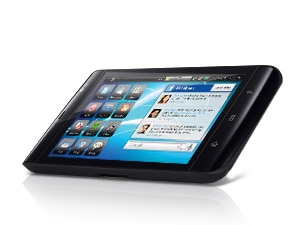
The iPad has generated a tremendous amount of buzz around the digital tablet and it has caused a number of manufacturers to jump into the slate tablet market. HP will be coming out with a slate running webOS. Dell the Streak running Android. Samsung has the Galaxy Tab runnning Android. BlackBerry has the BlackPad coming soon.

By the end of the year, we'll be surrounded by slate tablets ranging from iPads to others running Android, webOS, and BlackBerry. I have to naturally assume that Microsoft will be releasing slates running Windows Phone 7 (maybe they'll need to rename their OS).

In any case, I still wonder about the traditional tablet PC running Windows. Will these tablet PCs ever regain traction? I think we can all confidently say that ultra-mobile PCs (such as the Samsung Q1 running Windows) are dead. What will be next?

Friday, August 13, 2010

Dell Streak: Smartphone or Slate Tablet?

You've probably seen pictures of the Dell Slate. Is this a smartphone or a slate tablet?

Here are some details:

* Widescreen display optimally designed for mobile web, video and movies
* Integrated social networking widgets and apps, plus tons of apps through the Android Marketplace
* Crystal-clear damage-resistant Gorilla® glass screen
* Google MapsTM with navigation and text-to-voice, turn-by-turn directions with Street View
* Multitasking Google Android OS that gives you the freedom to do what you want

I'm eager to get my hands on one of these devices so that I can judge for myself: smartphone or slate?

Wednesday, June 9, 2010

Practice Fusion and Dell to Provide Doctors Affordable Electronic Medical Record (EMR) Package

Earlier this week, Practice Fusion announced:

Practice Fusion and Dell to Provide Doctors Affordable Electronic Medical Record (EMR) Package

So, what types of packages are we talking about here?
  • If you're in a solo practice: a Dell Latitude XT2 tablet PC plus a Vostro 230 desktop.
  • If you're in a 2 provider practice: 2 Vostro 13" laptops and 2 Vostro 230 desktops
  • If you're in a 4 provider practice, 4 Vostro 13" laptops and 3 Vostro 230 desktops
I'd say skip the Vostro laptop and go straight for the Latitude XT2 tablet PC. The XT2 tablet is one of the nicest tablet PCs out there. It's not cheap, but once you get comfortable with pen-based computing, you'll be glad that you have a tablet. Of course, given that Practice Fusion is a free Electronic Health Record (EHR) solution, you'll save thousands of dollars right there!

Click here to view the Practice Fusion EHR + Dell computer packages.

Monday, April 19, 2010

Spring cleaning at the Dell Outlet

Looking for some new office computers? If you're a bargain hunter, then maybe you don't mind buying a refurbished computer or a "scratch and dent" model. The Dell Outlet is going through a spring cleaning sale. You can save 20 to 25% on Dell desktop and laptop computers. Make sure to look for those coupon codes!
www.Dell.com/Outlet