Here's a short little video that was recorded at HIMSS13 where I had the opportunity to discuss how the future of healthcare mobile computing will evolve as hospital devices leverage enterprise operating systems and leverage cloud computing to improve clinical workflow and patient care.

Showing posts with label hp. Show all posts
Showing posts with label hp. Show all posts
Thursday, July 25, 2013


Monday, July 22, 2013
HP Split x2 - Windows 8 tablet
 The HP Split x2 may be the Windows 8 tablet/laptop that you've been waiting for if you've been waiting for a 13" high-powered Windows 8 tablet PC that attaches to a removable keyboard base.
Don't get the HP Split x2 confused with the HP Envy x2 which is a smaller 11.6" tablet that's powered by an Intel Atom processor.
You can use the Split x2 as a slate tablet PC. Or, attach the keyboard base that includes a built-in battery and you have a high-powered laptop that has very long battery life.
The Split x2 has a 13.3" screen and is powered by a 3rd generation Intel Core processor. So, if you've been looking for something faster than Atom, the Split x2 gives you that power.
The tablet has a front webcam but lacks a rear webcam. Also, it's not clear to me if the tablet supports pen input. It doesn't appear to have a built-in silo for a pen.
The keyboard base appears to have space to support an optional spinning hard drive which means you could carry an extra 500 GB of storage in the keyboard base.
Sunday, April 28, 2013
HP Slate 7 Android Tablet
You can now get a 7" Android tablet for $169.99 from HP. The HP Slate 7 is an Android tablet that also includes a microSD card slot, cameras on the front and back, and features Beats Audio for excellent sound from a small little device. Runs Android 4.1.
7" is a really nice size for an Android tablet. Fits easily in one hand. Slips into a white coat pocket.

Sunday, April 14, 2013
HP ElitePad 900 Case
The HP ElitePad 900 case is a thin, light Windows 8 tablet PC built for business. HP makes a Carrying Case (Book Fold) for the ElitePad and it's called the HP ElitePad Case. Here is my short video demonstrating this case:
MFG #H4R88UT
•Carry your HP ElitePad in an executive-style case that doubles as a stand.
•The stylish and sturdy case wraps around the HP ElitePad for easy carrying by hand or storing inside a large bag.
•Fold back the top of the case to create an easel for using the HP ElitePad on its own or with an external keyboard or mouse (sold separately).
•Elastic pen holder stores the pen when not in use.
•Magnetic hall sensor puts unit to sleep when cover is closed to save battery power.
MFG #H4R88UT
•Carry your HP ElitePad in an executive-style case that doubles as a stand.
•The stylish and sturdy case wraps around the HP ElitePad for easy carrying by hand or storing inside a large bag.
•Fold back the top of the case to create an easel for using the HP ElitePad on its own or with an external keyboard or mouse (sold separately).
•Elastic pen holder stores the pen when not in use.
•Magnetic hall sensor puts unit to sleep when cover is closed to save battery power.
Tuesday, April 9, 2013
Impressive battery life with Windows 8 tablets by HP, Dell, and Lenovo
I'm currently on a cross-country flight to speak at the HIMSS Southern California Chapter Annual Healthcare IT Conference on the topic of Social Media in Healthcare: Promoting Patient Empowerment and Engagement, Healthcare Value, and Patient Centered Care."
I decided to travel really light, so I packed an HP ElitePad 900 Windows 8 slate tablet PC (and left the Expansion Jacket and extra battery at home). The tablet weighs only 1.5 lbs.
I'm typing this as I'm working on the airplane, using Wi-Fi (Gogo Internet) and a Bluetooth keyboard. Based on my battery usage pattern on this 6-hr flight, it looks like I'll easily get 9 hours of battery life with the brightness setting on the low side.
When it comes to battery life on PCs, critics often say that published battery life figures often don't reflect real-world usage. I've found that newer Windows 8 tablets like the HP ElitePad, the Dell Latitude 10, and the Lenovo ThinkPad Tablet 2 all have very impressive battery life because they are powered by a second-generation Intel Atom dual-core processor that does a nice job balancing performance with battery life. I have been testing these 3 tablet PCs and I'll be writing more about my experiences using them.
The Microsoft Surface Pro uses a faster Intel processor, but you end up sacrificing battery life. I suspect that I'd probably only get 3-4 hrs of battery life with the Surface Pro, and that's just not enough for my usage patterns.
I decided to travel really light, so I packed an HP ElitePad 900 Windows 8 slate tablet PC (and left the Expansion Jacket and extra battery at home). The tablet weighs only 1.5 lbs.
I'm typing this as I'm working on the airplane, using Wi-Fi (Gogo Internet) and a Bluetooth keyboard. Based on my battery usage pattern on this 6-hr flight, it looks like I'll easily get 9 hours of battery life with the brightness setting on the low side.
When it comes to battery life on PCs, critics often say that published battery life figures often don't reflect real-world usage. I've found that newer Windows 8 tablets like the HP ElitePad, the Dell Latitude 10, and the Lenovo ThinkPad Tablet 2 all have very impressive battery life because they are powered by a second-generation Intel Atom dual-core processor that does a nice job balancing performance with battery life. I have been testing these 3 tablet PCs and I'll be writing more about my experiences using them.
The Microsoft Surface Pro uses a faster Intel processor, but you end up sacrificing battery life. I suspect that I'd probably only get 3-4 hrs of battery life with the Surface Pro, and that's just not enough for my usage patterns.
Thursday, March 7, 2013
Few weeks using the HP ElitePad 900

In case you're wondering about performance and speed, the dual core Intel Atom processor is much faster than previous generation Atom processors. If you do a lot of intensive computing, then you'll want to get a device powered by an Intel i5 or i7 processor, but those devices won't have all-day battery life.
After spending a few weeks with the HP ElitePad 900, I've grown very accustomed to computing on the Windows 8 environment. Windows 8 starts up faster, switches between apps faster, and uses power more efficiently than Windows 7.
Tuesday, March 5, 2013
Windows 8 tablets on display at HIMSS
Have you tried Windows 8 yet? The experience is different when you're using a touch-screen device.
I'v personally been impressed by the form factors, the build quality, and the long battery life seen on many of these Windows 8 tablets. Plus, several of them are coming out with different options such as: 1) removable keyboards; 2) cases; 3) battery options; 3) and other accessories.
Windows 8 is a new operating system that combines an enterprise OS with a mobile OS in a single device. In some cases, you can run applications side-by-side. The Windows 8 user interface is different, so you'll need to spend a little bit of time swiping up, down, left, and right to see what those finger swipes will do when you're running an application. Give it a few minutes and you'll quickly get the hang of it. Pinch-to-zoom seems to have achieved universal adoption. Soon, we'll see more swipe gestures getting incorporated into all types of mobile operating systems.
At the HP booth, you'll see the ElitePad 900 on display. A few of the HP folks may be carrying their ElitePad in an expansion sleeve that has an extra battery and expansion ports. At the Lenovo booth, you'll see the ThinkPad Tablet 2 sitting on a dock or on a removable keyboard. At the Dell booth, you'll see that the Latitude 10 now comes in several configurations including one a security edition that has a built-in Smart Card and fingerprint reader. Fujitsu and Samsung are showing off their convertible Windows 8 tablets that pop off a keyboard dock. So, as you consider your clinical workflow and how you use mobile computers in the clinical setting, you'll be able to find a device that will meet your needs.
Monday, March 4, 2013
Discussing mobility at the HP Healthcare Tweetup at #HIMSS13
 I want to thank everyone who participated in our HP Healthcare mobility tweetup today here at HIMSS. We had a great discussion and heard how different organizations are using mobile devices in the clinical setting to improve patient care.
Also, we had the special privilege to hear from several people from Pediatric Associates, greater Seattle, WA. They were the recipients of the Greenway Innovation Awards at the Annual PrimeLEADER User Conference. With over 80 providers at seven locations, Pediatric Associates leverages the Greenway platform to eliminate multi-location challenges, improve billing performance and support patient empowerment and engagement.
With the availability of Windows 8 devices in the health care setting, we will be seeing a rise in the use of mobile devices among physicians and nurses. Windows 8 slate tablets are allowing clinicians to run fully functional enterprise-level applications on a light, thin, touch-based tablet and they can dock these devices and maintain a full level of productivity by using a large monitor, keyboard, and mouse.
Have you given Windows 8 for a spin? Here at HIMSS, you can hold and test a wide variety of Windows 8 mobile devices ranging from slate tablets, convertible tablet PCs, and laptops.
HIMSS13 coverage is sponsored by HP. HP’s extensive portfolio of products, solutions, services and relationships can help your healthcare organization achieve quality business practices and provide quality patient care.
Thursday, February 28, 2013
Join me for the HP & Intel Lunch on BYOD at #HIMSS13
I hope you will be able to join me on Tuesday March 5 for this complimentary HP & Intel Lunch Panel on BYOD at the HIMSS13 conference. You'll also have a chance to win an HP ElitePad 900 tablet PC!
 While you are attending HIMSS in New Orleans, HP and Intel invite you to be our guest at an informative panel discussion over a delicious buffet lunch.
Learn more on BYOD trends in healthcare environments and discuss how BYOD can work for you with a panel of Healthcare IT experts.
What: Lunch & Learn: BYOD: Benefits, Challenges, and the Future of Mobility in Healthcare
Where: Ernest N. Morial Convention Center, Riverside Meeting Room 215
When: Tuesday, March 5, 11:30 am - 1 pm, lunch served at 11:30 am CT
Register today - seating is limited
Dr. Mark Blatt
Worldwide Medical Director, Intel
Joseph Kim, MD, MPH
President of MCM Education
Bruce Michelson
Distinguished Technologist, Hewlett Packard
The panelists will discuss how hospitals and private practice environments have implemented BYOD, the benefits of BYOD programs, and the challenges they present. You'll hear viewpoints from physician and IT perspectives on security issues surrounding BYOD and how this movement toward mobility may shape healthcare organizations in the future.
Don't miss this exciting discussion - and your chance to enter to win an HP ElitePad 900!*
Limited space available - confirm your seat today.
* Must be present to win.

Learn more on BYOD trends in healthcare environments and discuss how BYOD can work for you with a panel of Healthcare IT experts.
What: Lunch & Learn: BYOD: Benefits, Challenges, and the Future of Mobility in Healthcare
Where: Ernest N. Morial Convention Center, Riverside Meeting Room 215
When: Tuesday, March 5, 11:30 am - 1 pm, lunch served at 11:30 am CT
Register today - seating is limited
Dr. Mark Blatt
Worldwide Medical Director, Intel
Joseph Kim, MD, MPH
President of MCM Education
Bruce Michelson
Distinguished Technologist, Hewlett Packard
The panelists will discuss how hospitals and private practice environments have implemented BYOD, the benefits of BYOD programs, and the challenges they present. You'll hear viewpoints from physician and IT perspectives on security issues surrounding BYOD and how this movement toward mobility may shape healthcare organizations in the future.
Don't miss this exciting discussion - and your chance to enter to win an HP ElitePad 900!*
Limited space available - confirm your seat today.
- Visit the HP booth # 1627
- Visit the Intel booth # 940
* Must be present to win.
Sunday, February 24, 2013
HP Slate 7

Specs include:
- 1.6GHz dual-core ARM processor
- 3 MP camera on back plus a front-facing VGA camera for video conferencing
- Weight: 13 ounces
- HP ePrint
- 7" display
Learn more at hp.com/slate
Thursday, February 21, 2013
Windows 8 on the HP ElitePad 900
Here's a short little video demonstrating some basic Windows 8 features on the new HP ElitePad 900:
Wednesday, February 20, 2013
Reviewing the HP ElitePad 900 Tablet PC running Windows 8
I now have my hands on the HP ElitePad 900 and the HP ElitePad Expansion Jacket that includes a removable built-in battery. The ElitePad runs Windows 8, an enterprise-level operating system that will allow you to run all your native EHRs and CPOE applications that you normally run on your standard PC. Windows 8 will also let you run some mobile apps.
Since you can't play around with an ElitePad at Staples or Best Buy, I thought I'd start by posting some photos that show the size of the device compared to the Apple iPad 3.
Here's a photo comparing the sizes of these 2 tablets and you'll see that they have very similar overall dimensions:

The ElitePad is one of the thinnest Windows 8 tablets I've seen. At 9.2 mm, it's actually barely thinner than the iPad (9.4 mm). Here's a photo showing the ElitePad right on top of an iPad 3. I made a sandwich using both devices. The black bar below represents the ElitePad and the iPad is on top:

The iPad has a 9.7" display while the ElitePad has a 10.1" display. Here is a picture showing the iPad 3 (on the Left) with the widescreen ElitePad (on the Right):

To make sure you're paying attention, I flipped them around this time. So, the next photo shows them in portrait mode (HP on the Left, iPad on the Right):

Initial impressions so far: the ElitePad is fast, but not super-fast. Remember that it uses an Intel Atom-based dual-core processor, and that allows it to have great battery life. It's much faster compared to first generation Windows 7 tablets like the HP Slate 500 or other similar tablet PCs that were powered with earlier Atom processor.
Windows 8 runs very smoothly and it's nice to run standard applications like Microsoft Office, Adobe Photoshop, and others. If you're an iPad owner using Remote Desktop or Virtual Desktop apps to access your Windows PC, you'll appreciate the fact that you can have a fully functional Windows machine in the form factor of a thin and light tablet.
I'll be posting additional thoughts as I show how the HP ElitePad Expansion Jacket works, so stay tuned for more.
Since you can't play around with an ElitePad at Staples or Best Buy, I thought I'd start by posting some photos that show the size of the device compared to the Apple iPad 3.
Here's a photo comparing the sizes of these 2 tablets and you'll see that they have very similar overall dimensions:

The ElitePad is one of the thinnest Windows 8 tablets I've seen. At 9.2 mm, it's actually barely thinner than the iPad (9.4 mm). Here's a photo showing the ElitePad right on top of an iPad 3. I made a sandwich using both devices. The black bar below represents the ElitePad and the iPad is on top:

The iPad has a 9.7" display while the ElitePad has a 10.1" display. Here is a picture showing the iPad 3 (on the Left) with the widescreen ElitePad (on the Right):

To make sure you're paying attention, I flipped them around this time. So, the next photo shows them in portrait mode (HP on the Left, iPad on the Right):

Initial impressions so far: the ElitePad is fast, but not super-fast. Remember that it uses an Intel Atom-based dual-core processor, and that allows it to have great battery life. It's much faster compared to first generation Windows 7 tablets like the HP Slate 500 or other similar tablet PCs that were powered with earlier Atom processor.
Windows 8 runs very smoothly and it's nice to run standard applications like Microsoft Office, Adobe Photoshop, and others. If you're an iPad owner using Remote Desktop or Virtual Desktop apps to access your Windows PC, you'll appreciate the fact that you can have a fully functional Windows machine in the form factor of a thin and light tablet.
I'll be posting additional thoughts as I show how the HP ElitePad Expansion Jacket works, so stay tuned for more.
Thursday, February 14, 2013
Upgrading to Windows 8 on two tablet PCs
I've been testing Windows 8 on a few different tablet PCs. Specifically, I installed Windows 8 on the HP Slate 500 and the HP EliteBook 2760p Convertible Tablet PC.
In the case of the Slate 500: this device is really built to support Windows 7. HP does not provide Windows 8 drivers on their website. After installing Windows 8 on the Slate 500, I found that some key features didn't work. For example, the N-Trig pen does not work properly under Windows 8. There are some beta drivers that you can find on the N-Trig website, but these drivers don't support all the functions of the pen. I hunted around for a while and updated a few drivers, but I finally concluded that the HP Slate 500 is better off running Windows 7.
On the EliteBook 2760p Convertible Tablet PC, Windows 8 offers some really nice features and upgrades over Windows 7. In tablet mode, the touch experience is much better than Windows 7. The 2760p is a convertible tablet PC that supports both capacitive touch and an active digitizer pen. I didn't have any problems using touch or the pen. In touch mode, the on-screen keyboard is much easier to use. Overall performance feels great and Windows 8 runs very smoothly on the 2760p. Battery life on Windows 8 is supposed to be better, but I didn't spend too much time measuring that improvement.
Before upgrading to Windows 8, Microsoft recommends that you run the Windows 8 Upgrade Assistant. It scans your current PC to see if it is ready for Windows 8 and then provides a compatibility report and optional steps for you to buy, download, and install Windows 8.
In the case of the Slate 500: this device is really built to support Windows 7. HP does not provide Windows 8 drivers on their website. After installing Windows 8 on the Slate 500, I found that some key features didn't work. For example, the N-Trig pen does not work properly under Windows 8. There are some beta drivers that you can find on the N-Trig website, but these drivers don't support all the functions of the pen. I hunted around for a while and updated a few drivers, but I finally concluded that the HP Slate 500 is better off running Windows 7.
On the EliteBook 2760p Convertible Tablet PC, Windows 8 offers some really nice features and upgrades over Windows 7. In tablet mode, the touch experience is much better than Windows 7. The 2760p is a convertible tablet PC that supports both capacitive touch and an active digitizer pen. I didn't have any problems using touch or the pen. In touch mode, the on-screen keyboard is much easier to use. Overall performance feels great and Windows 8 runs very smoothly on the 2760p. Battery life on Windows 8 is supposed to be better, but I didn't spend too much time measuring that improvement.
Before upgrading to Windows 8, Microsoft recommends that you run the Windows 8 Upgrade Assistant. It scans your current PC to see if it is ready for Windows 8 and then provides a compatibility report and optional steps for you to buy, download, and install Windows 8.
Wednesday, February 6, 2013
Watch how ophthalmologist Dr. Matt Oliva uses the HP ElitePad
Here's a great video showing how ophthalmologist Dr. Matt Oliva uses the HP ElitePad tablet PC running Windows 8.
Wednesday, January 16, 2013
HP ElitePad 900 with Expansion Jacket
Unlike most other tablets, the HP ElitePad 900 expands your business potential with a complete suite of accessories like the HP ElitePad Expansion Jacket (with removable battery), docking station, and more.
Thursday, January 10, 2013
Exciting new tablets and ultrabooks at CES
This week, my friends are in Las Vegas attending the Consumer Electronics Show (CES). This year, I'm following the show from a distance.
Major computer manufacturers are announcing new tablets and ultrabooks. Here are a few of the ones that caught my attention:
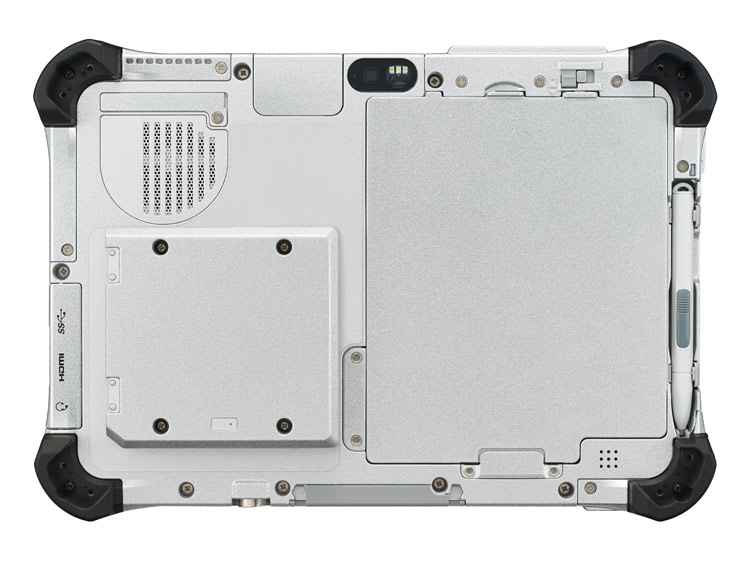 Panasonic Toughpad (similar to their Toughbook line of rugged products)
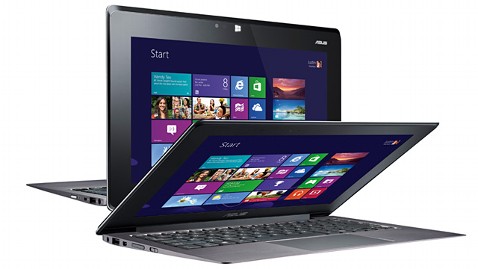 Asus
Asus
HP

Lenovo

Dell

Samsung was also demonstrating a flexible, unbreakable screen that may get used on smartphones and tablets. Wouldn't it be nice to have a truly unbreakable screen? Corning was featuring its Gorilla Glass 3 - a thinner, tougher glass.
Major computer manufacturers are announcing new tablets and ultrabooks. Here are a few of the ones that caught my attention:
Panasonic Toughpad (similar to their Toughbook line of rugged products)- The Toughpad FZ-A1 is the only Android tablet with hardware encryption.
- The Toughpad FZ-G1 is the thinnest and lightest fully-rugged 10.1" Windows 8 tablet.
Asus- The Asus Taichi is a Windows 8 tablet / laptop hybrid that has an LCD screen on the front and back of the display lid. In other words, you can always access one of the screens whether the device is open or closed.
HP
- Last month, HP announced the EliteBook Revolve, an enterprise-grade convertible laptop/tablet that runs Windows 8. Although the form factor isn't anything new, the enterprise-grade security that's built into the EliteBook series is an important feature for those working in health care.
Lenovo
- The Lenovo IdeaPad Yoga that originally came as a 13" model now comes as an 11" model running Windows RT. Unlike other laptops, you can fold the display all the way back so that you convert the laptop into a tablet. Of course, the keyboard and touch pad becomes inactive when you're using the device in tablet mode. The Yoga 11 comes with Windows RT and the Yoga 13 comes with Windows 8.
Dell
- Dell will be offering an "Essentials" version of the Latitude 10 slate tablet for only $499. This device will still run Windows 8, but it won't have the standard removable battery option that's found on the standard Latitude 10. The Essentials version also won't support an active digitizer pen.
Samsung was also demonstrating a flexible, unbreakable screen that may get used on smartphones and tablets. Wouldn't it be nice to have a truly unbreakable screen? Corning was featuring its Gorilla Glass 3 - a thinner, tougher glass.
Wednesday, December 5, 2012
HP EliteBook Revolve: an ultrabook with a "twist"
 The HP EliteBook Revolve is a convertible tablet PC that incorporates the design of a super-slim ultrabook with a touch-based tablet PC. Just "twist" the display and fold it down to get a tablet PC. Imagine taking the HP EliteBook 2760p and slimming it down. That's certainly an oversimplification, but I know that many physicians have owned one of the 2700p series convertible tablet PCs at one time or another. I've personally gone through the 2730p and the 2760p (I never got to the 2710p or the 2740p).
 I really appreciate the fact that the new EliteBook Revolve has a backlit keyboard. So many clinicians benefit from having this simple feature. Radiology reading rooms can be dark. Physicians who travel often work in dark airplanes. The older 2700p tablet PC series included a pop-out LED light at the top of the display that directed the light downward to the keyboard.
The HP EliteBook series represents their enterprise-level notebooks, ultrabooks, and tablet PCs. These devices come equipped with the highest level built-in security solutions to keep patient data safe and secure. The HP EliteBook Revolve will include:
- Active Directory, domain join, PXE boot support and a range of HP Client Management solutions, allowing for secure deployment and effective fleet management.
- HP Client Security to provide protection at every layer, including HP BIOS Protection and Microsoft Defender or Microsoft Security Essentials; an embedded, certified TPM security chip for data encryption; and four years of HP Absolute Data Protect to help further protect the device, data and user identity.
Monday, October 1, 2012
HP ElitePad 900 (Windows 8 Tablet PC)

These sleeves that will attach to the HP ElitePad 900 are called the "HP ElitePad Smart Jackets." They add "connectivity options and an additional ultra-slim battery for longer runtime, along with specific add-ons that customize the tablet for specialized uses." I wonder if they will create a jacket designed for the health care environment. You'll be able to pick up a Rugged Case for the ElitePad 900, so that will give it some additional protection.
At this point, I'm more excited about the new hardware that will be introduced with Windows 8 than I am about the new Microsoft operating system itself. Several major hardware manufacturers are releasing Windows 8 tablets that will have super-long battery life. I personally don't think Windows RT will gain much market share if people can choose a device that is running the full version of Windows 8 instead of Windows RT.
Thursday, September 27, 2012
HP Pocket Whiteboard
Want to make your lectures interactive? What if you could walk up to your screen and draw right on it? The HP Pocket Whiteboard create an interactive whiteboard wherever you go. I could really use something like this when I give my lectures and presentations. If you're an instructor, consider the potential:
Thursday, August 30, 2012
HP Envy x2 (hybrid tablet/notebook PC)

Now, the big question is: What will it cost?
I also hope they make it with an illuminated keyboard. I've been spoiled by using devices that have keys that light up at night.
Subscribe to:
Posts (Atom)