These days, the line separating phone and tablet is getting very blurry. At what point do you call a device a tablet? Recent mobile devices having screens larger than 5" have brought on this new term called a "phablet." It's not quite a phone, but it's also not quite a tablet.
I don't think a 5" device would fit too comfortably in pant pockets. But, it may be fine in a purse or a white coat pocket. Putting one on your belt could be awkward if you're a fairly smaller person. The recently announced Samsung Galaxy S 4 is a 5" smartphone that some may call a phablet. It's similar in size to the Galaxy Note 2 that supports an active S-pen stylus.
I still remember the days of the OQO model 02 which was a 5" PC that ran Windows XP, Vista, or 7. It was a full PC. It was heavy, bulky, and had short battery life, but it was the perfect device for people who needed a full PC in their pocket.
Like many people, I find myself carrying multiple devices. When I travel for business, I carry an ultrabook so that I can do some quick typing and maintain a high level of productivity. I also carry a small tablet for quick reading, scribbling notes, and email/web browsing on-the-go. And then, I have my phone in my pocket. Perhaps that's all going to change soon. Maybe we'll find ourselves only carrying a single device that's capable of everything. The mobile device will dock into a workstation that will allow us to be very productive. We'll be depending more on cloud computing solutions so that the device and the operating system will become less relevant (except for the need for greater security within the OS).

Showing posts with label smartphone. Show all posts
Showing posts with label smartphone. Show all posts
Friday, March 15, 2013


Tuesday, January 31, 2012
Mobility for Health Care: The Choices and Challenges
Here's an upcoming webinar titled, "Mobility for Health Care: The Choices and Challenges"
Tuesday, January 31, 2012
1:00 pm Eastern Standard Time
Complimentary Webinar
Even with the hype, the industry is underestimating the value of mobility as an enabler of business process management. This presentation looks at the degree of expectation and adoption of mobile computing as well as the challenges of rapidly advancing technology and the difficult issues of security and management.
Attendees will learn how to:
• Understand the major mobile platforms (Android, Apple, RIM, or Microsoft) that should be supported
• Review form factors and devices that will prove most useful (smart phones, tablets)
• Discover the appropriate clinical applications for different care settings
• Examine how the devices be procured, managed, and secured
Tuesday, January 31, 2012
1:00 pm Eastern Standard Time
Complimentary Webinar
Even with the hype, the industry is underestimating the value of mobility as an enabler of business process management. This presentation looks at the degree of expectation and adoption of mobile computing as well as the challenges of rapidly advancing technology and the difficult issues of security and management.
Attendees will learn how to:
• Understand the major mobile platforms (Android, Apple, RIM, or Microsoft) that should be supported
• Review form factors and devices that will prove most useful (smart phones, tablets)
• Discover the appropriate clinical applications for different care settings
• Examine how the devices be procured, managed, and secured
Thursday, June 16, 2011
Mobile Technology Meets Healthcare: Risks and Remedies
 Mobile Technology Meets Healthcare: Risks and Remedies
a complimentary one-hour Web seminar:
Date: Tuesday, June 28, 2011
Time: 12 p.m. Eastern / 9 a.m. Pacific
Duration: 1 Hour
The use of laptops and smart phones is big in healthcare, but the newer tablet devices, including iPads, and competing BlackBerry and Android-based tablets, are taking mobility in healthcare to a whole new and exciting level. Doctors are using them for go-anywhere EHR access and data entry, allowing them instant access to patient information. While the ease of accessing this information wherever can be appreciated, it does present new risks to Protected Health Information (PHI) and challenges the organizations responsible for safeguarding PHI to think harder about addressing important issues of increased mobility, including visual privacy – the protection of sensitive data while it is displayed on screen.
Saturday, August 21, 2010
Toktumi (talk to me)
 We're seeing companies develop some clever names these days. Have you heard of Toktumi? The name is pronounced, "talk to me." Do you get it? It's too bad that VOIP doesn't have such a creative sound to it when you try to read the letters VOIP.
 What is Toktumi? Here's some information from their corporate site:
Founded in 2006, San Francisco-based toktumi has created the most affordable, full-featured virtual home office phone service available to help mobile entrepreneurs retain the flexibility, professional image, and proper home/work balance they need to lead successful lives. Toktumi is distributed nationally by Dell and Staples.com.Toktumi provides a nice VOIP phone service on your mobile device so that you can leverage the power of the Internet for your clinical practice or small business. You can easily set up a second line and use a single phone or smartphone to receive calls from several different numbers. The virtual office can become a reality through the use of a service like Toktumi. How would you compare different VOIP services? Vonage, Ringbox, and even Google Voice all offer a variety of services and packages that may help you operate more efficiently. However, only a few providers (like Toktumi and Google Voice) allow you to come up with a second phone number that also includes a voice mail box for that number. You can read some Toktumi reviews to get a better idea about how this type of VOIP may benefit your business.
So, what's the benefit of having a second mobile phone number? If you're running an outpatient practice, you can set up a separate number instead of using an answering service so that your patients have a number that they can always call, 24 hrs a day, 7 days a week. This number can be configured so that different physicians can answer this number at night and on the weekends. This avoids any confusion as to "who's on call tonight?" Your patients can have a number that they can always dial and this would significantly simplify the management of your practice.
Friday, August 13, 2010
Dell Streak: Smartphone or Slate Tablet?
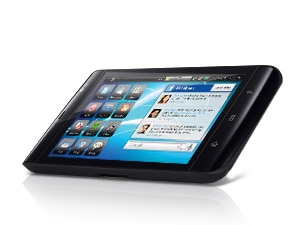
Here are some details:
* Widescreen display optimally designed for mobile web, video and movies
* Integrated social networking widgets and apps, plus tons of apps through the Android Marketplace
* Crystal-clear damage-resistant Gorilla® glass screen
* Google MapsTM with navigation and text-to-voice, turn-by-turn directions with Street View
* Multitasking Google Android OS that gives you the freedom to do what you want
I'm eager to get my hands on one of these devices so that I can judge for myself: smartphone or slate?
Monday, June 21, 2010
When will mobile Internet surpass desktop Internet?
Many analysts are predicting that the majority of people will access the Internet using mobile technology instead of a desktop computer. I think we're going to see desktops go away and they're going to get replaced by notebooks and other small computers. After all, we should be doing everything we can to reduce and eliminate electronic waste or e-waste.
We'll always want large (or multiple) monitors when we're working. The mobile device will never be a substitute for a large screen. However, we're going to get more accustomed to accessing information on a small screen. Also, we're seeing a convergence of smartphones and tablets into devices like the Apple iPad.
So, what does the future look like? It definitely looks like we'll have much more mobile technology in our lives.
We'll always want large (or multiple) monitors when we're working. The mobile device will never be a substitute for a large screen. However, we're going to get more accustomed to accessing information on a small screen. Also, we're seeing a convergence of smartphones and tablets into devices like the Apple iPad.
So, what does the future look like? It definitely looks like we'll have much more mobile technology in our lives.
Wednesday, March 10, 2010
Android Pad
 Now that Apple has the iPad, when will Google release an Android Pad? Such a device would probably be made by HTC (who currently makes the Google Nexus One smartphone). Actually, Archos has a little 5-inch tablet that runs Android and it's called the Archos 5 Internet Media Tablet. They should have simply called it the Android Pad. Several other companies are currently working on Internet tablets that run Android, but those devices haven't been getting much press here in the U.S.
I don't doubt that the iPad will be very popular here. I'm sure as Android gains momentum in the smartphone space, the Android Pad will eventually emerge as direct competition against the iPad.
Saturday, January 23, 2010
Will we see more Gorilla Glass used in health care computers?
 Have you heard of Gorilla Glass?
 Corning Gorilla glass is an environmentally friendly alkali-aluminosilicate thin sheet glass designed specifically to function as a protective window for portable display devices. What really sets Gorilla glass apart from the competition is that it’s both strong and damage resistant.I'm sure we'll be seeing more use of Gorilla Glass in the health care setting. After all, smartphones and mobile computers get dropped quite frequently in the clinical setting. Just ask a medical student, "Have you ever dropped your smartphone or PDA in the hospital?"
Last October, we heard this: Motion’s C5 and F5 are the First Rugged Tablet PCs to Feature Corning’s Durable Gorilla™ Glass. It's great to see that Motion Computing will be using Gorilla Glass in the C5 MCA (Mobile Clinical Assistant). Wouldn't it be nice to see Gorilla Glass used in all the medical tablets and notebooks?
Tuesday, December 22, 2009
Gift idea for gadget lovers: battery extenders
 Shopping for a gadget lover? What does every electronic gadget have in common? They require batteries.
 A battery extender makes a great gift. What do I mean by "battery extender?" Well, I'm primarily thinking about external battery packs that allow you to extend the life of your gadget if you're on a plane, bus, train, etc. If you don't have access to a power source and you can't plug in to recharge your device, then life can be quite frustrating if you have a gadget but you can't use it.
I have a robust external battery that I carry so that I can charge and power my laptop (actually, it's a convertible Tablet PC), my iPod, my smartphone, my Bluetooth headset, and any other gadget that requires power either via a USB cable or a proprietary power supply. These external batteries come in all sizes and shapes and they've been great.
Thursday, December 10, 2009
Tips when you're computing in the car

Never drive while you're computing in a car. If I'm computing in a car, I'm not driving. Because I do some work-related traveling in the car, I find myself pulling out my laptop, tablet, or ultra-mobile PC to stay productive while I'm on the road. Here are some tips I've learned over the years:
- Never expose your computer or computer bag when you're parked. You're inviting theft.
- Carry a DC charger (or preferably an AC/DC charger) that has an attachment for a cigarette lighter adapter. This way, you can stay charged up while you're in the car.
- Use an active laptop cooling pad that has a built-in fan.
- Carry an extra battery.
- Tether using your smartphone to get online. Or, use the built-in WWAN. Broadband cards are a nice option as well.
- Carry a USB-powered keyboard light if you think you'll be riding at night.
- Plan to use maximum screen brightness when you're riding during the day. This will eat up your battery life, so make sure you have plenty of battery or DC power.
- Get on Traffic.com and check your local traffic.
- Get on Weather.com and check your local weather.
- Offer to navigate if necessary. If your computer has a GPS, then you can easily navigate using your PC.
Tuesday, December 8, 2009
Archos 5 Internet Tablet
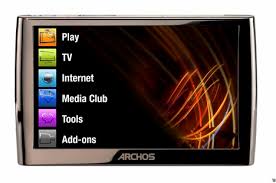
I'm excited about the upcoming Archos 9, but the Archos 5 appears to be a great little mobile device that you can easily slip in your pocket. Unlike the OQO model 02, the Archos 5 is very thin.
Archos has confused consumers by using the name "Archos 5" to refer to two different products:
- an Internet Media Tablet (I'll call this the media tablet)
- an Internet Tablet (I'll call this the Internet tablet)
Now, some may argue that it doesn't make sense to purchase an Internet Tablet if you already use a smartphone. That's a reasonable argument. However, I have a smartphone and I also have an iPod touch. Some may say that the iPod touch is a media tablet. Others may call it an Internet tablet. I suppose if Apple releases a tablet some day, then things could start to get really interesting. However, until we see that happen, we're really talking about devices that are being defined by their screen sizes and storage capacities. Do you have a smartphone that has a 5" screen? Would you want to use a smartphone if it had a 5" screen?
Wednesday, November 4, 2009
I was tempted to buy a netbook today

I saw what appeared to be a killer deal today: A GPS-equipped Dell netbook that includes turn-by-turn navigation features for $499. (I passed on the TV tuner because I never have time to watch television)
Now, let's step back for a minute. How do you use a netbook in your car? Who needs a netbook when you can simply buy a standalone GPS navigator like a TomTom, Garmin, or Magellan for less than $499?
But then again, who needs a standalone GPS unit when you can simply get a GPS-enabled smartphone and install turn-by-turn navigation software made by TomTom, Garmin, and several other major companies?
Fortunately, I did not purchase this netbook. I have enough computers (including some that have built-in GPS functionality) and I really don't need another gadget right now. My HTC Touch Pro2 works just fine as a GPS navigator. My OQO model 02 and my Samsung Q1 Ultra (Ultra-Mobile PC or UMPC) are great gadgets that are capable of GPS navigation if I pair a Bluetooth GPS. My Lenovo Thinkpad X200 tablet PC has a built-in GPS because of the built-in WWAN radio.
So why was I tempted to buy this Dell netbook? Because you simply don't see too many netbooks advertised as a GPS navigator with turn-by-turn navigation software. As netbooks continue to evolve, perhaps a built-in GPS will become a standard feature. Wi-Fi and Bluetooth and fairly standard features. Built-in WWAN is getting to be a standard feature, and this often means that you'll get a built-in GPS antenna.
Sorry Dell, maybe next time. $499 is just too much. $299 is a different story. Of course, if others are looking for a netbook that includes either a built-in GPS or a built-in TV tuner, then you should take a look at the Dell Mini 10 and 10v (starting at $299, but going up to $499 for the nicer models).
Monday, July 20, 2009
Should mobile PCs have a thumb keyboard?
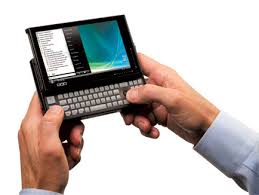
As more healthcare professionals use smartphones (BlackBerry, Treo, etc.) that have a thumb keyboard, they're getting fairly proficient at thumb typing. You don't need to have a T-Mobile Sidekick to know how to use a thumb keyboard.
Does it make sense to include thumb keyboards on more mobile devices such as ultra-mobile PCs (UMPC)? The OQO model 02 had a thumb keyboard. The Sony Vaio UX series also had a thumb keyboard. Samsung added a thumb keyboard to the Q1 Ultra UMPC series when the original Q1 did not have a thumb keyboard.
Does it make sense to have a thumb keyboard on smaller slate tablet PCs? If we follow the Samsung model, we see this:
- Original Q1 (slate only, no thumb keyboard)
- Q1 Ultra (slate plus thumb keyboard)
- Q1 EX (slate only, no thumb keyboard)
Thursday, July 2, 2009
Smartphones and MIDs
MID = mobile internet device. Sounds like a smartphone, doesn't it? Will the term MID dissolve? Or, will smartphones get renamed as MIDs? Read my post on MedicalSmartphones.com titled, "Is a Smartphone an MID?"
Wednesday, June 10, 2009
Do We Need an ExpressCard Slot?
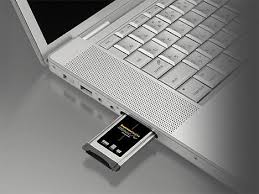
Apple doesn't seem to think so. They've decided to replace the ExpressCard slot with SD (secure digital) slots in the new MacBook Pro. Will other laptop manufacturers follow? I admit that I don't have a single ExpressCard peripheral. My Thinkpad X200 Tablet comes with WWAN built-in (through AT&T). I don't use it since I tether using my smartphone.
Will ExpressCards suffer the same fate as PCMCIA cards? Will they become extinct?
Monday, June 8, 2009
Are Smartphones Mobile Computers?

This has been a topic of debate for a long time. People are trying to use their smartphones as mini computers. There are magazine advertisements and television commercials out there about using smartphones to "work from phone" (instead of work from home). What can you really do on a smartphone?
As smartphone operating systems become more powerful, they are essentially turning into mini computers. People are running Microsoft Office on their smartphones. Windows Mobile comes with mini version of Word, Excel, and PowerPoint. You can run these same applications on other devices through third-party software vendors.
As cloud computing becomes more prevalent in the healthcare industry, the use of netbooks and smartphones may get incorporated into standard operating procedure (SOP). Maybe those people who are over a certain age will be exempt from using these machines that rely on tiny screens. Image source: slashphone
Saturday, May 2, 2009
Swine Flu and Twitter
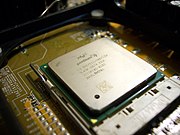
Many people use Twitter while they're on-the-go. Many use a smartphone, laptop, or other mobile device. I use my convertible tablet PC (Lenovo Thinkpad X200 Tablet) when I'm at home, but I'll also take my OQO model 02 if I'm heading out to the mall or coffee shop. Mobile computing technology has made it so easy for us to stay connected. SARS threatened the world in 2002-2003. Looking back, those years seem like the "Dark Ages" of computing. Think about the types of hardware we had! You were lucky to find a Pentium 4 processor on a mobile device. I hope that we'll get to leverage moden computing technology to combat this possible swine flu pandemic.
Wednesday, April 22, 2009
Bluetooth 3.0

It's exciting to see how Bluetooth technology has improved mobile computing. Bluetooth 3.0 is coming soon! I use my smartphone to connect my laptop or UMPC to the Internet and I often tether (or connect) via Bluetooth. Bluetooth 3.0 is going to be really fast and I'm eager to see how it will impact mobile computing and healthcare.
Friday, April 10, 2009
At what point is a PC too small?
We live in a world of mobile technology. We see PDAs, BlackBerrys, iPhones, Smartphones, iPods, and all sorts of other mobile devices. Computers are also getting smaller and we see young people using UMPCs, netbooks, micro PCs, and other miniature computers. But at what point is the PC so small that you fail to be productive? At what point does the small size hinder your ability to do what you need to do? How do you balance size, weight, and functionality? After all, you can probably find a PC in a very small size, and then if you look some more, you can probably find another one that's 25% larger. So how should a physician, pharmacist, or nurse decide on the size of that mobile PC when working in the clinical setting? At what point is an ultra-mobile PC too small?
Subscribe to:
Posts (Atom)