Here's a short little video demonstrating some basic Windows 8 features on the new HP ElitePad 900:

Showing posts with label multitouch. Show all posts
Showing posts with label multitouch. Show all posts
Thursday, February 21, 2013


Saturday, October 2, 2010
Panasonic Toughbook CF-C1 tablet PC gets updated
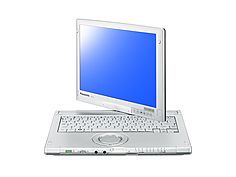
Panasonic Toughbook CF-C1 Offers Tablet Computing For Gloved Workers And Removes The Cost Of Accidental Damage
Class Leading Convertible, Business Rugged Notebook Now Offers Multi-Touch Resistive Screen, Web Camera And 2 Year Accidental Damage Warranty Making It The Business-Ready Tablet
UK. 30TH SEPTEMBER 2010: Panasonic today enhanced its Toughbook CF-C1 range with a Multi-touch Resistive screen, web camera option and a two-year accidental damage warranty making the lightweight, business rugged convertible notebook the tablet for business use.
Able to be used in clamshell or tablet form, the CF-C1 is ideal for mobile workers. The new Multi-touch Resistive screen option is designed to deal with semi-outside conditions less affected by dust particles and water drops and allows the users to operate the device whilst using gloves. The Multi-touch screen also delivers all the benefits of a tablet device allowing pinching and stretching gestures on the screen to control zooming. It is also pressure and gesture sensitive, allowing actions such as the rotation of objects on the screen. This latest screen option complements the existing CF-C1 Multi-touch Digitizer screen model and is available immediately priced at £1,709 + vat. (Standard version)
Wednesday, August 18, 2010
Multitouch coming to Ubuntu 10.10
 If you're a Linux fan, you're probably familiar with Ubuntu. This free operating system will run on almost any system. The next release of Ubuntu is 10.10 and it will be supporting multitouch gestures. That's great if you have a multitouch screen or a touch/track pad like Apple's Magic Trackpad.
Do you have an older PC that's just sitting around? Try installing Ubuntu and experience the world of Linux. You might actually like it.
Tuesday, July 6, 2010
Comparing the HP EliteBook 2730p vs. the 2740p convertible tablet PC
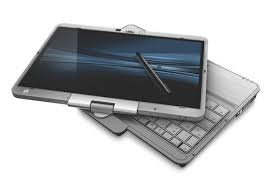
- Multi-touch screen (capacitive) to support Windows 7 gestures.
- 3 USB ports on the 2740p instead of only 2 that's found on the 2730p.
- Louder speakers that face the front on the 2740p, not the single speaker facing the bottom on the 2730p.
- Nicer raised mouse buttons for the trackpad on the 2740p. The flat buttons on the 2730p are difficult to use.
- The keyboard buttons are shaped slightly differently. They're approximately the same size on both the 2730p and the 2740p.
- The camera and pop-out LED light on the display bezel are square on the 2740p instead of round on the 2730p.
- The 2740p is slightly thicker than the 2730p, but you'll barely notice the difference.
- The 2740p comes with faster processor options (Intel Core i7 or i5).
The ThinkPad still has a nicer keyboard because it includes full-size buttons and a standard layout, but typing on the ThinkPad is louder than typing on the keyboard found on the EliteBook.
You can expect several additional posts about this tablet as I spend more time with the HP EliteBook 2740p convertible tablet PC. My first impressions are very positive and the only major drawback that I'm finding at this point is the fact that the keyboard is not as nice as the keyboard found on the ThinkPad.
Wednesday, April 7, 2010
viliv S10 Blade

Of course, you could also get the ASUS Eee PC T101MT. This little convertible tablet PC/netbook is another nice option.
Tuesday, April 6, 2010
HP Slate specs and prices
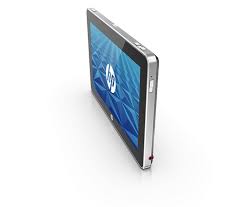 With all the buzz and excitement surrounding the iPad, when's HP releasing the Slate?
It looks like HP has finally released the specs for the Slate. It will have an 8.9" capacitive multi-touch display, it will run Windows 7, it will have an SD card slot, it will have a USB 2.0 port, and it will have cameras on the front and back of the device. With a 1.6GHz Atom Z530 processor and 1 GB of RAM, it won't be a
Reminds me of my Samsung Q1 Ultra Ultra-Mobile PC (UMPC). At $549 for 32 GB of storage, it's going to be very tempting. $599 for 64 GB of storage isn't bad either.
Tuesday, March 30, 2010
Guided tours of the Apple iPad

You're probably already familiar with the "pinch-to-zoom" feature that's found on the iPod touch and iPhone. Additional multi-touch gestures make navigation very easy on the iPad. Well, I doubt I'll buy one this year, but maybe I'll get an iPad through a drawing or on Christmas.
To view the iPad Guided Tours, visit: http://www.apple.com/ipad/guided-tours/
Thursday, March 11, 2010
Lenovo ThinkPad X201 vs. X200 Tablet PC
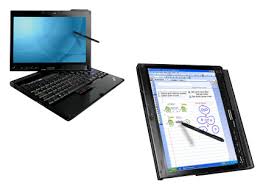 I currently use a Lenovo ThinkPad X200 Tablet PC. It's not old, but it's also not the new ThinkPad X201 Tablet. What are the differences between the X200 and the newer X201 Tablet PCs?
First, the new X201 uses the Intel® Core™ i7 processor while the older X200 uses the Add up to Intel® Core™2 Duo processor. The i7 is currently the "best" Intel processor on the market.
The new X201 tablet also features a multitouch touchpad (in addition to the TrackPoint pointing device).
I'm waiting for Lenovo to install a keyboard light on their tablet PCs. The include an LED light for their laptops, so why don't they add the LED light feature for their convertible tablets? That's on the top of my wish list right now.
Monday, March 1, 2010
Microsoft Surface at #HIMSS10
 Soon, physicians will be showing patients their recent cardiac test results using Microsoft Surface. This amazing touch-screen table technology has a wide range of applications in the world of health care, patient communication, and health education. It's been great to see the Surface here at HIMSS10.
 You can see the Microsoft Surface in the HIMSS10 exhibit hall. Make sure you don't miss it!Microsoft Surface is a revolutionary multi-touch computer that responds to natural hand gestures and real-world objects, helping people interact with digital content in a simple and intuitive way. With a large, horizontal user interface, Surface offers a unique gathering place where multiple users can collaboratively and simultaneously interact with data and each other.
Special thanks to HP for sponsoring me to attend and blog here at HIMSS10.
Saturday, February 6, 2010
Fujitsu LifeBook UH900 Mini-Notebook

This small computer includes a 62 GB, solid state drive (SSD) and an Intel® Atom™ Processor Z530. I wish the screen would fold all the way back so that this device could become a convertible tablet. Well, you can't always have everything.
Tuesday, January 12, 2010
Ubuntu on the ThinkPad X200 Tablet
 I'm a big fan of Ubuntu because it's a free Linux operating system and it's always getting better with each release. The latest version is 9.10 and they even have a "netbook remix" version for netbooks.
 I have an older ThinkPad X200 tablet PC (this model does not include a capacitive multi-touch screen). Although my tablet supports passive touch, it won't support multi-touch gestures. Ubuntu works just fine on my ThinkPad and it's a nice alternative for users who wish to avoid using Microsoft Windows.
Tuesday, January 5, 2010
Will all future tablet PCs include multi-touch screens?
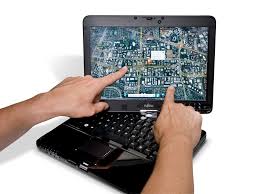 I think that all future touch-screen smartphones will include capacitive multi-touch screens. Will the same be true for tablet PCs? After all, I primarily use my Wacom digitizer when I'm using my tablet PC. Although it's capable of touch-based input, I don't use that very often since I'm a pen-based computing guy.
 Will all future tablet PCs include a dual-input (some call this a dual digitizer) screen that will allow users to navigate using a pen as well as fingers? Are multi-touch features here to stay for tablet PCs? I'm still not entirely sure. Why? You see, capacitive multi-touch makes a lot of sense for smartphones that have small screens. I'm still not entirely convinced that they make sense for professional tablet PCs (I can definitely see their appeal for consumer-based tablet PCs).
Maybe the consumer market will drive tablet PC manufacturers to include multi-touch screens on all future tablets. Maybe the health care sector will only use tablets that include Wacom-based active digitizers that also include passive touch screens. After all, do you think you can use a capacitive touch screen if you're wearing hospital gloves? You can if you have a passive touch screen.
Sunday, December 27, 2009
My current ThinkPad X200 Tablet specs
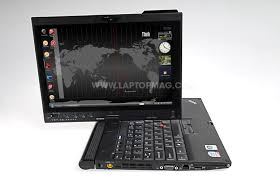 I currently have a Lenovo ThinkPad X200 Tablet PC and I use this as my main PC when I'm at home or when I'm out of the office. I've had this computer for almost a year and it's been a great device. Here are my current specs:
- SL9400(1.86GHz),
- 4GB RAM,
- 320GB 7200rpm HD,
- 12.1in 1280x800 LCD Touchscreen (includes an active Wacom digitizer plus a passive touch-screen panel)
- Intel X4500HD,
- Intel 802.11agn wireless,
- Bluetooth,
- Modem (who still uses these?)
- 1Gb Ethernet,
- HSDPA wireless WAN plus GPS (through AT&T)
- Secure chip,
- X200 UltraBase+CDRW/DVDRW,
- FPR (the fingerprint reader is a great security feature on this device)
- Camera, (great for Skype)
- Intel Turbo Memory,
- 8c Li-Ion and 4c Li-Ion batteries
- Windows 7
My Windows Experience Index is a 3.4 (on a scale of 1.0 to 7.9 and the lowest score on this machine is due to the Gaming Graphics. The Processor gets a 5.2, the Memory/RAM gets 5.8, and the Hard Drive gets 5.9. As I prepare for 2010, I don't have any plans of replacing this ThinkPad and I hope to use this for a few years until there's something really compelling that prompts me to upgrade. ThinkPads are built to last and I know that this machine will someday become a fancy tablet toy for my kids.
Friday, December 11, 2009
More rumors about the Apple Tablet emerge
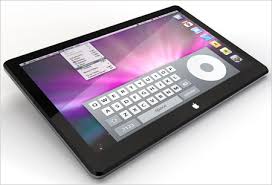
Rumors about the upcoming Apple Tablet seem to never end.
Here are some of the latest rumors circulating on the Internet:
- 10.1" multi-touch screen
- Release around March/April 2010
- Roughly $1,000 (yikes!)
- It will compete against other e-readers like the Nook and Kindle with a 30/70 revenue split (30% to Apple and 70% to publishers)
So what's it going to be Apple? When will we see the real deal instead of all these fake images?
Wednesday, December 2, 2009
Newer ThinkPad X200 Tablet PC with improved battery life
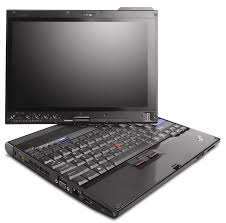
Lenovo refreshed the ThinkPad X200 tablet PC with a multi-touch screen earlier this year. That was in anticipation of Windows 7 since Vista or XP did not have any multi-touch functionality. In that refreshed line of X200 tablets, Lenovo apparently made some additional changes so that the new tablet has improved battery life compared to the original ThinkPad X200 tablet PC. The newer ThinkPad even has a faster processor! I'm surprised that Lenovo didn't rename the newer Thinkpad something like the X200s or X201 tablet PC.
Wednesday, November 25, 2009
Win a Fujitsu T4310 Tablet PC (with multi-touch)

I'm in the spirit of promoting free products right now. If you enjoy drawings and contests, then head over to http://www.fujitsuwin.com to win a Fujitsu T4310 Tablet PC with multi-touch. Windows 7 has some nice multi-touch features that are only available if you have a tablet PC that uses a capacitive touch screen. My Thinkpad X200 tablet PC only has an active digitizer and a passive touch screen, so I'm missing out. However, maybe I'll win a free T4310! I don't think I'd switch since the T4310 doesn't have the one key feature that I'm looking for. That feature is an illuminated keyboard. I do all my blogging at night, so an illuminated keyboard is the one feature I'm waiting to see. The HP EliteBook 2730p has an LED light for the keyboard, but I'd personally prefer a light under the keyboard.
Saturday, November 14, 2009
Video of the new Asus Eee T91MT (multi-touch tablet netbook)
Here's a little video of the new Asus Eee T91MT (multi-touch tablet netbook):
Friday, November 13, 2009
Apple Magic Mouse (multi-touch gestures)

If you're familiar with multi-touch gestures on the Mac, then you'll want an Apple Magic Mouse. This is the first multi-touch mouse and it's currently included with every iMac. If you're looking for some holiday gift ideas, this could make a great $69 stocking stuffer. Apple certainly has some of the most talented and creative engineers and designers on staff (yes, some of my MIT college friends work at Apple).
Using Bluetooth wireless technology, this little peripheral requires no wires or cables. You make your gestures on the surface of the mouse, so imagine taking that track pad and turning that into a mouse. Like many mice, this one also features an ambidextrous design. All you creative lefties out there won't be left behind on this one.
Here are some of the gestures you can perform:
• Click: Magic Mouse is an advanced point-and-click mouse that lets you click and double-click anywhere on its Multi-Touch surface.Learn more here: http://www.apple.com/magicmouse
• Two-button click: Magic Mouse functions as a two-button mouse when you enable Secondary Click in System Preferences. Left-handed users can reassign left and right click, as well.
• 360° scroll: Brush one finger along the Multi-Touch surface to scroll in any direction and to pan a full 360 degrees.
• Screen zoom: Hold down the Control key on your keyboard and scroll with one finger on Magic Mouse to enlarge items on your screen.
• Two-finger swipe: Using two fingers, swipe left and right along the Multi-Touch surface to advance through pages in Safari or browse photos in iPhoto.
Thursday, November 12, 2009
LifeBook T4410 Multitouch Tablet PC Video
Multitouch isn't just for smartphones anymore. Now, Windows 7 incorporates some nice multitouch features into tablet PCs that have capacitive touch screens. Watch this little video of the Fujitsu LifeBook T4410 tablet PC featuring multitouch gestures.
Monday, November 9, 2009
Asus Eee PC T91MT now on Amazon
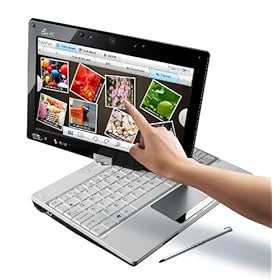
The Asus Eee PC T91MT (T91MT-PU17-WT) is now on Amazon. This isn't just your average "Eee netbook." The T91MT is a convertible netbook / tablet PC. The "MT" stands for multi-touch. It reminds me of the Fujitsu LifeBook P1600 series (1610, 1620, 1630), but the price is substantially different. Now, you can have multi-touch and Windows 7 on a netbook for under $550.
If I were to buy a netbook today, this would be at the top of my list because I'm a tablet PC user and I've always been a fan of pen computing. I believe that future health care professionals will rely heavily on touch and pen computing. I hope that more netbook manufacturers will follow Asus and release multi-touch convertible tablet netbooks in the near future.
Subscribe to:
Posts (Atom)