There's a new version of the Google Nexus 7 Android tablet. The new Nexus 7 is still a 7" Android tablet, but it's going to run the latest Android OS which is Android 4.3. The device is faster, has more RAM, adds a camera to the back, and has a higher pixel density display with a resolution of 1,920 x 1,200. This is the highest resolution that you'll find on a 7" tablet.
The Nexus 7 offers all these "upgrades" in a package that is thinner and lighter.
Will the higher resolution display help physicians and other health care providers view radiology images on a small screen? I'd like to see someone conduct a research study to answer that question.

Showing posts with label Google. Show all posts
Showing posts with label Google. Show all posts
Wednesday, July 24, 2013


Tuesday, April 16, 2013
Loose battery connector in Google Nexus 7 - device will not turn on
Earlier, I wrote about how my Google Nexus 7 wouldn't turn on. After taking it apart, I discovered that the battery could move around inside the device and the battery connector had come loose. Has this happened to you?
Saturday, April 6, 2013
Google Nexus 7 not starting, screen black, flickering - loose battery connection
 I have a Google Nexus 7 and the tablet did not start today. When I had it plugged in, the screen would be on, but it would be black. Then, I would see it flicker while it was still black. When I unplugged it, the screen would go off. In fact, the Nexus 7 did not turn on at all when it was unplugged. I tried holding the power button, but I was always stuck with either a black screen or a black screen that was flickering.
So, I decided to pull the back off the Nexus 7. Then, I saw the problem: it was a loose battery connector. In fact, the battery has some wiggle room and it must have pulled the connector loose. I inserted the battery connector, and the Nexus 7 started up without any problems.
If you have a Nexus 7 that isn't starting up or is stuck on a black screen, maybe the battery connector is loose. The back comes off fairly easily. Take a quick look before you send it in for warranty support from Asus.
Monday, July 23, 2012
A key missing feature on the Google Nexus 7

The other interesting fact about the Nexus 7 is that it uses scratch-resistant Corning glass, but it's not Gorilla Glass. It's also not Gorilla Glass 2. So, what is it?
Finally, I do want to emphasize that the Nexus 7 is a beautiful tablet for $199 and it's a considerable improvement over other devices like the Amazon Kindle Fire. But, don't forget that Amazon is getting ready to launch an updated Kindle Fire 2. The current Kindle Fire doesn't have a camera, but I'm sure the Fire 2 will have at least one camera. The key question is: will it have two?
Saturday, July 7, 2012
Google Nexus 7 Android tablet
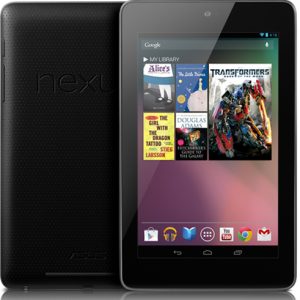 The Google Nexus 7 tablet is one of the hottest tablets that's causing a significant amount of buzz right now. At $199, it's remarkably affordable and it will place some serious competition on the Amazon Kindle Fire.
 The Nexus 7 (8 GB) will be $199 and the 16 GB version is $249.
The Nexus 7 is similar to the Kindle Fire and it even includes both front-facing and rear-facing webcams! Of course, we're expecting an updated Kindle Fire 2 anytime now, so we're about to see the "battle of the 7" Android tablets."
Given that the Nexus 7 is made by ASUS, I wonder what other 7" tablets ASUS will release this year.
Thursday, August 25, 2011
Lenovo ThinkPad slate tablet (Android OS) is now on sale
 The Lenovo ThinkPad tablet is now on sale. Don't get this one confused with the ThinkPad X220 tablets that are convertible laptops.
The ThinkPad tablet runs Android and it's a slate. However, you're limited to the Wi-Fi versions for now. The tablets that include 3G radios will be coming in October. Even though theThinkPad tablets run Google's Android OS, this tablet isn't just like all the other Android tablets out there. This one is really built for business users who require enterprise-level services. Sounds like it could be a good fit for the health care industry. This photo is from GottaBeMobile.
The ThinkPad tablet includes a digitzer pen and has a built-in pen storage compartment in the tablet. It also includes multiple connectivity ports: Native USB 2.0 and micro-USB ports, full-size SD card slot and mini-HDMI output. You won't find these features on most Android tablets (or the Apple iPad for that matter).
Lenovo has made a nice tablet here, but I wonder why it won't be available with a 4G antenna this fall. After all, the Samsung Galaxy Tab 10.1 and the Motorola Xoom are available with 4G.
Tuesday, July 5, 2011
A budget Android slate tablet from VIZIO

The VIZIO Tablet runs Google Android and connects via WiFi & Bluetooth. It also has a built-in GPS.
Wednesday, May 11, 2011
Some Google I/O Highlights

Google I/O has been in full-swing for the past 2 days and a lot has been let loose. I already mentioned yesterday that one of the big announcements was that of Android's next iteration--Ice Cream Sandwich (Android 3.1). This update has been rolled out to 3G Xooms today and initial reports state that most won't notice much of a difference, but it does seem to increase performance. More importantly, Google plans for this release to be released to phones as well--a distinct difference from Honeycomb. Google made a point that this release would address some of the fragmentation that has plagued Android from the start. In addition, Google is mandating that all handset manufacturers shipping Android maintain software updatability for at least 18 months (which just so happens to be 6 months shorter than most people's cell phone contracts).
Google's other big announcement yesterday was their Google Music service. This is the second big cloud-based music service after Amazon's and promises tight integration with Android. Considering iOS won't have a proper app for either service, let's hope for us iPhone users out there that all the rumors are true about iCloud next month...otherwise, Apple stands to fall behind in the "march to the cloud."
Tuesday, May 10, 2011
A big day in the tech world: Google I/O and Microsoft purchases Skype
Author: Riley Alexander, MD, MBA
Today has shown be one loaded with tech news. The biggest news of the day is easily Microsoft's $8.5 billion purchase of Skype. This will give Microsoft control of the world's largest web-based calling service. Microsoft beat out Google in the bidding and may have severely overpaid for Skype, but look for them to tightly integrate it into Windows Phone 7, the Xbox 360 and the upcoming Windows 8. And expect Microsoft to take Apple's Facetime head-on with Skype.
Today has shown be one loaded with tech news. The biggest news of the day is easily Microsoft's $8.5 billion purchase of Skype. This will give Microsoft control of the world's largest web-based calling service. Microsoft beat out Google in the bidding and may have severely overpaid for Skype, but look for them to tightly integrate it into Windows Phone 7, the Xbox 360 and the upcoming Windows 8. And expect Microsoft to take Apple's Facetime head-on with Skype.
The other big event today was Google's I/O conference--essentially their version of Apple's WWDC. Google had a lot of things to announce today, but much of the focus was on Android, particularly the next iteration of the mobile OS...Ice Cream Sandwich (Android 3.1).
Monday, April 25, 2011
Super Google Reader: a must-have Google Chrome extension for Reader users
Author: Riley Alexander, MD, MBA

If you're like me and you read a lot of blogs and/or regularly updated sites frequently, there's a good chance you use Google Reader. And if you do, you're probably as hooked into it as I am.
If you're like me and you read a lot of blogs and/or regularly updated sites frequently, there's a good chance you use Google Reader. And if you do, you're probably as hooked into it as I am.
Well, to feed the addiction, I highly recommend Super Google Reader. It's an extension for Chrome that allows for full viewing of feeds within Reader. After installing, the default is still the truncated view, but Super Google Reader gives you two other options right within the post: Readable and Link. Readable essentially gives the full text of the post, without ads, but may not work with all posts. Link gives you the entire page, graphics and comments included, within the feed--essentially running a tab or browser within the feed. Very slick and streamlined.
Monday, December 13, 2010
Will Chrome OS beat Microsoft Windows?
 When you're on your computer, are you online or offline? In 5 years, how often do you think you'll be sitting in front of a computer that does not have access to the Internet?
 Some will say that the future of computing is all cloud-based computing. Who needs native applications on your mobile computer if you're connected to the Internet? If you can access all your applications on the "cloud," then it really won't matter whether you're running Windows XP, Windows 7, Mac OS-X, Linux, or Chrome OS. Slate tablets like the Apple iPad and the Samsung Galaxy Tab may also have the same computing capabilities as a laptop or desktop if we're relying primarily on cloud-based computing.
I hope that I'll have the opportunity to test a Google Cr-48 laptop so that I can see how Chrome OS looks and feels. If Google ends up taking a very aggressive approach with Chrome OS, will they beat Microsoft Windows? Where will Chrome OS rank as we compare Microsoft Windows, Mac OS-X, Linux, etc.? Chrome OS could quickly take the lead if Google were to give away laptops running Chrome OS. They could easily afford to do this if they ensured that every Chrome OS laptop runs with with embedded advertisements.
Tuesday, December 7, 2010
Google's Cr-48, the first Chrome OS laptop for cloud computing
The Cr-48 is the first laptop coming out with Google's Chrome OS. Google will distribute the laptop through its Chrome OS Pilot Program, so get ready for mobile cloud computing on your chrome OS laptop. It sounds like other laptop manufacturers will be distributing Chrome OS laptops later in 2011.
I like using Google Docs and these Chrome OS devices will allow you to edit and save Google Doc documents offline. Then, when you get connected to the "cloud," you can save and sync those changes when you're back online.
It also sounds like Google is teaming up with Verizon to offer free online connectivity for their Chrome OS laptops. Sounds like a great bargain!
I like using Google Docs and these Chrome OS devices will allow you to edit and save Google Doc documents offline. Then, when you get connected to the "cloud," you can save and sync those changes when you're back online.
It also sounds like Google is teaming up with Verizon to offer free online connectivity for their Chrome OS laptops. Sounds like a great bargain!
Thursday, November 4, 2010
The tablet wars are up and running
According to researcher Strategy Analytics, Apple has 95% of the slate tablet market right now. They've sold almost 5 million iPads (and I'm sure they'll sell many more this holiday season). People who have smartphones are buying iPads. People who have computers are buying iPads. Even though it has similar capabilities found on a smartphone or computer, the iPad is gaining marketshare in the consumer market. At the same time, Google is making a very strong push to get a number of different computer manufacturers to release slate tablets running Android. Consumers are jumping all over these tablets! We're seeing them in coffee shops, libraries, airports, schools, and business settings.
So, how about the enterprise health care market? Will slate tablets become an integral part of the health care delivery system? I think they will and I can envision them playing a variety of roles such as diagnostics, patient education, integration with EHR and CPOE systems, and much more.
So, how about the enterprise health care market? Will slate tablets become an integral part of the health care delivery system? I think they will and I can envision them playing a variety of roles such as diagnostics, patient education, integration with EHR and CPOE systems, and much more.
Wednesday, August 25, 2010
Preview the Samsung Galaxy Tab (Slate Tablet)
Here's a video of the upcoming 7" Samsung Galaxy Tab slate tablet. This device runs Google Android 2.2 (Froyo). I can't wait to try it out.
You can learn about this device here:
http://galaxytab.samsungmobile.com/
You can learn about this device here:
http://galaxytab.samsungmobile.com/
Friday, July 30, 2010
Gmail vs. Yahoo Mail
Both Gmail and Yahoo Mail are free services. In fact, I have active accounts on both Gmail and Yahoo Mail. If I had to make a recommendation, I would recommend Gmail over Yahoo Mail in a heartbeat. You don't see nearly as many advertisements when you're using Gmail. Also, the SPAM filtering technology is better in Gmail. Notice the embedded text link advertisements within the body of the email messages when you're using Yahoo Mail?
Also, if you end up getting an Android smartphone someday, you'll be glad that you have an active Google Account. Android smartphones depend on your Google Account information for things like Contacts, Calendar, Email, etc. If you use Android, you'll get a taste of some of the cloud computing benefits. Speaking of Android, this operating system isn't limited to smartphones. We're already seeing netbooks and slate tablets running Android.
Thursday, July 8, 2010
How to use Gmail as a SPAM filter for your corporate email account

So, how did I do it? Here's the simple explanation for those who are tech-savvy: forward your corporate email to Gmail, then retrieve your emails using the Gmail incoming mail server. To send emails, use your corporate outgoing mail server. Got it?
Need detailed instructions? Here's how you can use Gmail as a SPAM filter for your corporate email account, and this should work whether you're using IMAP or POP:
1. Set up a Gmail account and make sure that POP or IMAP is enabled (depending on which you prefer).
2. Forward your corporate e-mail directly to your new Gmail account.
3. Assuming that you're using Microsoft Outlook (or a similar email client), configure the incoming mail server using the Gmail information. You'll need to use your Gmail username/password to retrieve your emails. Make sure to type your complete Gmail email address as your username.
4. You'll be using your corporate outgoing mail server to send e-mails. So, in your email client, configure the outgoing mail server with your corporate information and uncheck the box that says "Use the same settings as the incoming mail server." This is where you will enter your complete corporate email address as your username.
At the end, you're using Gmail's incoming mail server (plus SPAM filter) to retrieve emails and you're using your corporate outgoing mail server to send emails.
Friday, June 25, 2010
Mobile Health on Google and Yahoo
What happens if you type "mobile health" into Google or Yahoo? You'll see a variety of websites come up on the first page, including MobileHealthComputing.com.
Now, I wonder how many people out there are typing "mobile health" into search engines? What are they looking for? If you ask the average consumer to define "mobile health," I think most of them would struggle. Are you referring to a mobile health clinic? A hospital on wheels? A mobile hospital?
I doubt that your average consumer is thinking about the application of mobile technology in the world of health care. That trend is slowly changing and mobile devices like the Apple iPad and other tablets are going to change that as more health and medical apps continue to show up for these devices. Smartphones are also changing the world of health care as consumers and health care professionals leverage these mobile devices to record and retrieve information.
So, I predict that more people will be looking for "mobile health" resources on the Internet. They'll be using search engines like Google and Yahoo to research information about mobile health or mHealth. Right now, if you type "mHealth" into a search engine, you'll be flooded by websites that are mainly mHealth conferences around the globe. Speaking of mHealth, I hope to see you at the 2nd International mHealth Networking Conference (http://www.mobih.org/), by the mHealth Initiative Inc (mHI).
Now, I wonder how many people out there are typing "mobile health" into search engines? What are they looking for? If you ask the average consumer to define "mobile health," I think most of them would struggle. Are you referring to a mobile health clinic? A hospital on wheels? A mobile hospital?
I doubt that your average consumer is thinking about the application of mobile technology in the world of health care. That trend is slowly changing and mobile devices like the Apple iPad and other tablets are going to change that as more health and medical apps continue to show up for these devices. Smartphones are also changing the world of health care as consumers and health care professionals leverage these mobile devices to record and retrieve information.
So, I predict that more people will be looking for "mobile health" resources on the Internet. They'll be using search engines like Google and Yahoo to research information about mobile health or mHealth. Right now, if you type "mHealth" into a search engine, you'll be flooded by websites that are mainly mHealth conferences around the globe. Speaking of mHealth, I hope to see you at the 2nd International mHealth Networking Conference (http://www.mobih.org/), by the mHealth Initiative Inc (mHI).
Thursday, June 3, 2010
HP webOS slates and other multimedia devices
When HP purchased Palm, they weren't planning on expanding their iPaq line of smartphones. They were interested in putting webOS on slate tablets and other mobile multimedia devices. We're about to see an explosion of slates over the next 6 months as various manufacturers release multimedia devices that will compete against the Apple iPad.
It's going to be an interesting war among the slates. Major smartphone operating systems like Apple iPhone and Google Android will now be facing some still competition from HP webOS. Will BlackBerry also jump into the slate tablet industry? I think it's fair to predict that Microsoft will come up with something in the future (but right now we're waiting for them to release Windows Phone 7 for their smartphones).
Speaking of smartphones, I doubt we'll see a Palm Pre 2 or a Palm Pixi 2 made by HP. If anything, maybe we'll see some iPaq smartphones running webOS. The Compaq iPaq was one of my first major PDAs. I still remember carrying that large color-screen device.
It's going to be an interesting war among the slates. Major smartphone operating systems like Apple iPhone and Google Android will now be facing some still competition from HP webOS. Will BlackBerry also jump into the slate tablet industry? I think it's fair to predict that Microsoft will come up with something in the future (but right now we're waiting for them to release Windows Phone 7 for their smartphones).
Speaking of smartphones, I doubt we'll see a Palm Pre 2 or a Palm Pixi 2 made by HP. If anything, maybe we'll see some iPaq smartphones running webOS. The Compaq iPaq was one of my first major PDAs. I still remember carrying that large color-screen device.
Friday, May 14, 2010
Microsoft Office Live Workspace
 Have you been computing on the cloud using Microsoft Office Live Workspace? Well, I just got this e-mail the other day and it sounds like Microsoft is getting ready to offer some great cloud computing services.
 Your Microsoft Office Live Workspace beta account is about to become even better. You already know it’s a great way to store and share documents, and soon it will come together with Windows Live SkyDrive to become a great way to view, create, and edit documents from virtually anywhere.Not familiar with Microsoft Office Web Apps?
In the coming months, you’ll receive notification when your Office Live Workspace account will be upgraded, along with further details. Until then, there’s no need for you to do anything.
With your SkyDrive account, you’ll get 25 GB of online storage for sharing both documents and photos. Your SkyDrive account is designed to work smoothly with other Windows Live services like Hotmail and Messenger. And you’ll be able to view and edit documents from virtually anywhere* using new Microsoft Office Web Apps.
Microsoft Office Web Apps are convenient online companions to Word, Excel, PowerPoint, and OneNote that give you the freedom to work with your Office documents from virtually anywhere with a supported browser.I currently use Windows Live Sync, so I could definitely use 25 GB of online storage to backup my critical files. As cloud computing continues to gain more traction in the world of health care, I'm sure we'll see more health care professionals using services like Google Docs and Microsoft Office Web Apps. Do you compute on the cloud and are you backing up your files remotely?
Wednesday, May 5, 2010
More slate tablets coming this year
 There are so many rumors circulating on the Internet about upcoming slate tablets. Right now, the Apple iPad is leading the pack. Over 1 million sold!
A few companies are making tablets running Google Android. Not sure which one will be the most popular Android Pad at this point. Will it be made by Dell? It probably won't be HP.
How about the Lenovo IdeaPad U1 Hybrid? That could be the "idea" tablet for those who're looking to use a keyboard. Skip the netbook and go right for the hybrid.
I think it's fair to say that we can expect HP to release a webOS tablet. I'm wondering if they'll allow other manufacturers (like Sony) to run webOS.
Subscribe to:
Posts (Atom)