Showing posts with label Kindle. Show all posts

Saturday, September 15, 2012

New line of Amazon Kindle Fire HD tablets

Amazon has gone from a single Kindle Fire tablet to a new lineup of 4 models:

1. the original Kindle Fire (7" screen)
2. the Kindle Fire HD (7" screen)
3. the Kindle Fire HD 8.9"
4. the Kindle Fire HD 8.9" 4G LTE

The new models now include an "HD display with polarizing filter and anti-glare technology for rich color and deep contrast from any viewing angle." Plus the dual-antenna Wi-Fi is supposed to be much faster than traditional Wi-Fi.

Amazon is introducing these new tablets with a novel way of providing 4G data: "Get 250MB a month for 12 months with a one-time payment of $49.99." In comparison, a device like an iPad will run you about $230/year for 250MB/month of 4G data. If wireless providers continue to offer this type of data package for the Kindle Fire, that's going to be an important differentiator that will give the Fire a unique competitive advantage.

We also can't forget that Amazon provides a unique ecosystem through Amazon Prime:
  • Prime Instant Video - unlimited, instant streaming of thousands of popular movies and TV shows
  • Kindle Owners' Lending Library - Kindle owners can choose from more than 180,000 books to borrow for free with no due dates

Since the Kindle Fire runs a modified version of Android, it won't run every app.

Saturday, July 7, 2012

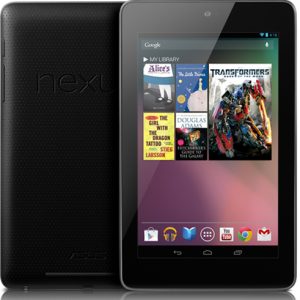
Google Nexus 7 Android tablet

The Google Nexus 7 tablet is one of the hottest tablets that's causing a significant amount of buzz right now. At $199, it's remarkably affordable and it will place some serious competition on the Amazon Kindle Fire.

The Nexus 7 (8 GB) will be $199 and the 16 GB version is $249.

The Nexus 7 is similar to the Kindle Fire and it even includes both front-facing and rear-facing webcams! Of course, we're expecting an updated Kindle Fire 2 anytime now, so we're about to see the "battle of the 7" Android tablets."

Given that the Nexus 7 is made by ASUS, I wonder what other 7" tablets ASUS will release this year.


Wednesday, May 30, 2012

Enjoying the Kindle app on my mobile device(s)

Recently, I did some personal traveling (vacation) and it was great to have tablets for the kids. I had movies playing on the iPad and the ThinkPad Tablet. Meanwhile, I did some writing on my laptop and my wife was working with photos and videos on her Mac. When I a chance to sit back and relax by the pool, I pulled out a tablet and did some reading using the Kindle app. One of the great features about this app is that you can sync your reading across all your devices. What this means is that I can be on page 44 on my iPad. Then, I can put the device away and later if I'm standing in line, I may pull out my Android smartphone and open the Kindle app. It takes me right to page 44 where I left off on my iPad. This reading "sync" is a convenient feature that helps you read through books while remaining device agnostic.

Right now, I'm roughly 1/4 of the way through a book. I did roughly 75% of my reading on my ThinkPad Tablet, about 10% on my Android smartphone, and 15% on my iPad.

This seems like a great way to help medical students keep up with their studies. They should have synchronized textbooks that are accessible on any mobile device. This way, whether they have a tablet or a smartphone, they can read, review, memorize, and work through various clinical subjects to achieve mastery. I didn't have that luxury when I was a student. I still remember carrying heavy textbooks in my backpack and wondering when these things would enter the digital era.

Some of you have probably never purchased an e-book (or digital book). Well, there's a first time for everything. If you're not sure about digital reading, you can test it out by installing the Kindle app on your mobile device and reading some free classics like The Art of War or the Wonderful Wizard of Oz.

Wednesday, January 18, 2012

3 Simple Reasons Why the Kindle Fire is So Popular

Recently, I had a chance to play around with a Kindle Fire. I don't plan to buy one (mainly because I already have enough gadgets), but I can see why this device has been such a hit. This is certainly not your average Kindle. Here are 5 reasons why the Kindle is such a hit right now:

1. Size: The device is small and portability means everything. The larger screen size of an iPad may be nice, but it's not nearly as convenient.

2. Price: At $199, the price is very hard to beat. Most other tablets still range around $300-600 on average.

3. Simplicity: The Android OS is simple to navigate. Amazon has also incorporated its own set of restrictions so the Fire will feel like an Android tablet at times, but it won't have all the capabilities of other Android tablets.

I predict that Amazon will release future models of the Fire that will include:

1. A built-in camera on the front and back
2. A built-in microSD card slot (many other Android tablets include this already)
3. A built-in WWAN radio (3G or 4G) so that you can connect when you don't have Wi-Fi

So, what's going to happen to all the other Kindles? Will the black-and-white Kindle readers still be very popular items, or will we see color screen devices everywhere? The original Kindles are very readable when you're outside sitting in the bright sun, so these will still be choice gadgets for the beaches and pools. But, will color screen technology evolve so that they overcome the popularity of the digital ink Kindles?

Thursday, January 5, 2012

A few days with the Kindle Fire

The Kindle Fire is an Amazon tablet that is based on the Android operating system. Over the holidays, I had the chance to spend a few days with this small 7" tablet and enjoyed playing around with it. It has a full color screen, is capable of rich multimedia, and has Wi-Fi so that you can browse the web and check your email. Plus, if you have an Amazon Prime membership, you can view unlimited streaming videos (movies and TV shows) on this device through a Wi-Fi connection.

One of the major downsides of the Fire is that it's not a traditional Android tablet. You're limited in terms of the types of apps you can install. Plus, the device lacks other features such as a built-in card slot for micro SD or SD cards. Given that it only has 8 GB of internal memory, you may miss that expansion capability that's often found in most other Android tablets. The Kindle Fire also doesn't have a built-in camera.

But, for $199, it's a really good deal for a super-portable entry-level tablet that you can use for reading books, watching videos, checking email, browsing the web, and playing games. Don't expect this to replace your iPad or Android tablet for professional use. If you look for medical apps on the Kindle Fire, you won't find many. You won't find popular medical apps like Epocrates or Medscape in the Kindle Fire App Store.

Thursday, September 29, 2011

Amazon Kindle Fire (for only $199!)

Author: Riley Alexander, MD, MBA

Despite the overall form factor and even the name being out there, Amazon still managed to sneak a few surprises into it's press conference today unveiling it's color tablet, the Kindle Fire. The biggest of these being the price: $199. This is huge. While many the list of tablets entering the fray seems to be growing by the second, essentially none have been able to get much below $400-500 for a release price. This tablet takes the low-cost approach to Apple's philosophy: deliver on experience and content, don't worry about specs--and I think it will do very well.

While many will look at this as more of a "deluxe e-reader" (and I don't think that's necessarily wrong or a bad thing), this device will offer a lot for the money, including Amazon's enticing new (flash-supporting) browser, Amazon Silk. Users will also have access to the Amazon Android app store. I can't see this not being a hit for this holiday season.

Tuesday, September 27, 2011

If you're in the market for a color e-reader/low-end tablet, you may want to wait

Author: Riley Alexander, MD, MBA

While the existence of Amazon's Kindle tablet has all but been confirmed, we still don't know a lot the specific hardware details besides it's size and general form factor. It's looking like we won't have to wait too much longer--Amazon has a conference scheduled for 9/28 that will surprise everyone if it isn't about this color Kindle tablet.

Not to be outdone, it has leaked that Barnes and Noble has plans to update its very capable Nook Color this quarter with not just a hardware update to its current model, but an entirely new model. Very little is known about the new model other than that it is supposed to cost $349 as compared to the current $249 of the standard Nook Color. I'm betting that with a $100 price bump, this device will be larger and much more "tablet-like" than the emphasis on an e-reader with tablet features that the current Nook Color has. I highly recommend waiting to make your holiday purchase of either of these devices as the next models could be fairly significant upgrades.

Tuesday, July 19, 2011

Kindle Textbook Rental

Getting ready to go back to school? Save up to 80% with Kindle Textbook Rental!
  • Great savings: Save up to 80% off the list price of the print textbook
  • Pay only for the time you need: Choose a rental length between 30 and 360 days and pay only for the exact time you need a book. Extend your rental for as little as one day or convert to purchase
  • Rent once, read everywhere: Rent and read tens of thousands of textbooks on PC, Mac, Kindle, or your mobile device
  • Keep your annotations: Access your notes and highlights anytime, even after the rental expires, at kindle.amazon.com

Wednesday, May 25, 2011

New Kindles (3G with Special Offers) and Nooks

Amazon now has a new Kindle 3G. This one includes Special Offers & Sponsored Screensavers and it's only $164. The 3G is free and it works globally, so it's great for international travelers.

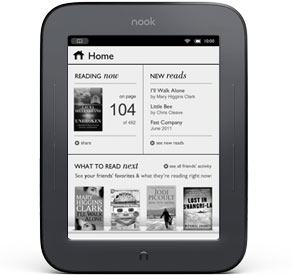
Barnes and Noble recently announced a touch-enabled Nook. The Nook has an all-new look too:

ALL-NEW NOOK
  • The Simple Touch Reader™
  • Easiest to use 6” touchscreen
  • Most advanced E-Ink® display—crisp text, even in bright sun
  • Longest battery life—read up to 2 months on just 1 charge
  • Ultra-light and thin—under 8 ounces
  • Largest bookstore with more than 2 million titles—get them in seconds
  • Expert recommendations & fun social features

Monday, May 23, 2011

Kindle (with advertising) for less, or original Kindle?

I've been speaking with several people who are in the market for an Amazon Kindle. You can get the Kindle "with Special Offers" (also known as advertising) for $114, or the regular Kindle for $139. Which would you get? Will all future e-Book readers include advertising?

The Kindle now offers features like book sharing and you'll soon have the ability to virtually "check out a book" from a library (library lending).

This summer, if you plan to spend a lot of time reading outside, you may find it easier to read on a Kindle than on a color screen slate like an iPad or Xoom. If you have a Kindle, don't forget that you can purchase access to these popular sites on your Kindle:
Anyone try the WebKit-based browser on the Kindle?

Wednesday, April 20, 2011

Amazon to Launch Library Lending for Kindle Books

Customers will be able to borrow Kindle books from over 11,000 local libraries to read on Kindle and free Kindle reading apps


Whispersyncing of notes, highlights and last page read to work for Kindle library books

SEATTLE, Apr 20, 2011 (BUSINESS WIRE) -- (NASDAQ: AMZN)-- Amazon today announced Kindle Library Lending, a new feature launching later this year that will allow Kindle customers to borrow Kindle books from over 11,000 libraries in the United States. Kindle Library Lending will be available for all generations of Kindle devices and free Kindle reading apps.

"We're excited that millions of Kindle customers will be able to borrow Kindle books from their local libraries," said Jay Marine, Director, Amazon Kindle. "Customers tell us they love Kindle for its Pearl e-ink display that is easy to read even in bright sunlight, up to a month of battery life, and Whispersync technology that synchronizes notes, highlights and last page read between their Kindle and free Kindle apps."

Thursday, July 29, 2010

New Amazon Kindle: smaller, thinner, lighter, cheaper (free 3G web browsing)

Amazon has launched a new Kindle.  This device is smaller, thinner, lighter, and cheaper. How cheap? $189. That's a good price. Here's what you get:
• All-New, High-Contrast E-Ink Screen – 50% better contrast than any other e-reader
• Read in Bright Sunlight – No glare
• New and Improved Fonts – New crisper, darker fonts
• New Sleek Design – 21% smaller body while keeping the same 6" size reading area
• 15% Lighter – Only 8.7 ounces, weighs less than a paperback
• Battery Life of One Month – A single charge lasts up to one month with wireless off
• Double the Storage – Up to 3,500 Books
• Books in 60 Seconds – Download books anytime, anywhere
• Free 3G Wireless – No monthly payments, no annual contracts
• Built-In Wi-Fi – In addition to the 3G wireless, you can connect to Wi-Fi hotspots
• 20% Faster Page Turns – Seamless reading
• Enhanced PDF Reader – With dictionary lookup, notes, and highlights
• New WebKit-Based Browser – Free 3G web browsing (experimental)
The experimental 3G web browsing sounds like a very interesting feature. If you spend a lot of time reading in bright sunlight, the Kindle could be a great gadget for you.

Tuesday, May 25, 2010

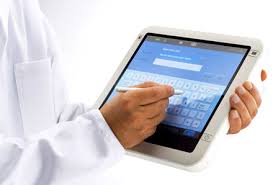
Will doctors embrace the slate tablet as EHRs penetrate the marketplace?

We all know that electronic health records or EHRs are actively penetrating the market because of the HITECH Act. Will doctors embrace the slate tablet? Or will they stick with the old keyboard and mouse?

We're seeing more slate devices like the Apple iPad, Amazon Kindle, and even some Android and webOS powered slates gaining popularity this year. How will this trend influence busy practitioners who need to enter information and look up data at the point of care? Whether you're in a hospital or in a private office, you want to access data quickly and you want to minimize the steps and clicks to perform essential tasks within your EHR.

What I'm finding is that more and more medical students are residents are eagerly adopting new technology like the iPad and they are also relying more heavily on their smartphones to look up medical information. In the past, many of us used standalone PDAs that were not constantly connected to the Internet. Now, you can carry the entire web in your coat pocket. By using a slightly larger device that has a big screen, you can quickly access vital information on the Internet and also navigate through your EHR on a mobile device like the iPad.

So, will doctors soon embrace slate tablets? The nice thing about a slate is that you can use them while you're standing. No need to find a desk or table. You can also draw and mark things quickly and efficiently on a slate computer. My hope is that we'll soon see more thin and light slates that also offer pen-based input.

Monday, May 24, 2010

BusinessWeek on the Entourage eDGe

Are you seeing double? Why buy a Kindle and an iPad if you can get both systems in a single device? This week's BusinessWeek magazine has a story about the eDGe made by Entourage Systems. This has a digital-ink side and a color screen side. So, you get the best of both words: ebooks and multimedia.

You can read the story here.

Wednesday, March 10, 2010

Samsung digital reader may be coming to Barnes and Noble

According to this story on Engadget, the Samsung E6 e-reader may be coming to Barnes and Noble. Given that it has a touch screen and a stylus pen for "inking," this could be the start of a new revolution of digital notepads that may gain tremendous popularity among those of us who wish to avoid paper at all costs.

The Nook is another e-reader that is built for Barnes and Noble, but the Nook has a small color touch screen section on the bottom (so you can't really take notes on the Nook), but it's another great option for people who don't want to write, but want to read.

Eventually, I think the majority of these e-readers (digital book readers) will come with color touch screens. The Apple iPad will be the first, but others will soon follow.

Monday, March 8, 2010

Should medical schools require an iPad?

We've heard of several medical schools requiring students to use either an Apple iPhone or iPod touch, but what about the iPad? Some schools have been experimenting with digital e-book readers like the Amazon Kindle. Medical textbooks are frequently filled with photos and other color-rich images, so the grayscale Kindle isn't the ideal e-book reader for medical students who wish to carry their textbooks electronically. This is where the Apple iPad could revolutionize the way medical students learn.

Will some medical schools try to educate their students using digital technology? I'm sure it's bound to happen. What I don't know is whether the iPad will improve the way students learn medicine. Since I'm a technology advocate, I could make several compelling arguments to say that interactive learning is much more effective than traditional lectures and didactic education. I could also say that retention could be enhanced with the use of digital quizzes that occur at the point-of-learning. You can't do that with a text book, but you could do that with a digital version. I could argue that multimedia enhances the educational experience compared to static color images. But all these arguments could fail if students are not ready and willing to embrace technology to enhance their education.

The average pre-med college student is probably tech-savvy and digitally connected via a smartphone, several social media accounts, and a laptop computer. If you hand that student an iPad filled with medical textbooks and multimedia resources, will that student learn effectively? I would think so.

Thursday, February 18, 2010

Samsung releases a pen-enabled eReader in Korea

Samsung has released a pen-enabled e-Reader in Korea. It's not a Kindle. It's not an iPad.  After seeing this picture, memories of the Apple Newton came flooding back. I really miss using the Newton. I loved the fact that I would write (or ink) my notes on the screen. I loved the fact that it had robust battery life (AA batteries).

Since the Apple iPad uses a capacitive touch screen, it's not designed for traditional pen-enabled inking and handwriting recognition.

Will handwriting recognition be a standard feature found in future e-readers?

Thursday, February 4, 2010

Medical textbooks on the Apple iPad could revolutionize medical education

I'm sure that some medical schools have their medical students using the Apple iPad as an e-reader for medical textbooks. The Amazon Kindle is a great e-reader, but the lack of a color screen makes it suboptimal for medical students who rely on color-rich diagrams, images, etc. So, this is where the Apple iPad could fill that gap.

Can you imagine learning anatomy on an iPad? You won't be limited to static images. Imagine having the ability to click on an image, rotate it, zoom in, and then "peel away" layers of body parts. The iPad could be a tremendous learning tool for medical students. The "touch" aspect of the iPad makes this tool much easier to use compared to a laptop.

Imagine this: you click on the heart. Then, you can zoom in to see the actual muscle fibers. Then, you can zoom in even more to see light microscopic images of the heart. Then, zoom in even more, and you're now seeing electron microscope images.  The iPad could link images and videos of gross pathology with microbiology, pathology with physiology, etc. It could truly revolutionize the medical school experience.

Speaking of textbooks, the Wall Street Journal reports that ScrollMotion is collaborating with some major textbook publishers to transform classrooms into "e-classrooms."

Tuesday, February 2, 2010

Rumors about the Google Tablet

Now that Apple has officially released its iPad, the rumors surrounding the first generation Apple tablet will get replaced by new rumors regarding the Google tablet. It appears that HTC is working with Google to create a tablet that will likely run Chrome OS (or maybe it will dual-boot into Android as well). In any case, I suspect that we'll see a real winner since HTC has a long history of making excellent smartphones and other mobile devices. The current Google Nexus One Android smartphone is made by HTC and branded as a Google smartphone. How will the Google tablet compare to the iPad?

Friday, January 15, 2010

Waiting for details on the HP Slate tablet PC

We saw that HP revealed its "slate" tablet PC at CES. We want more details HP! Will this simply be a color digital reader running Amazon Kindle software? (in other words, a color Kindle) How well will it run Windows 7?

Here's a very short teaser video about the Slate.