Showing posts with label umpc. Show all posts

Thursday, October 28, 2010

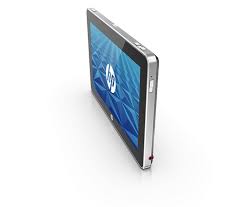
Media slate (e.g., Apple iPad) vs. slate PC (e.g., HP Slate 500)

What's the difference between a media slate vs. a slate PC? A media slate (like an Apple iPad) is built to be a consumer device, not a professional device. However, some people may argue that you can run enterprise-level applications by running a virtual machine on a device like an iPad.

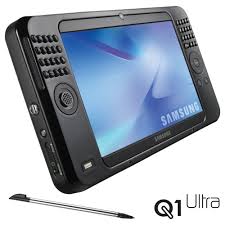
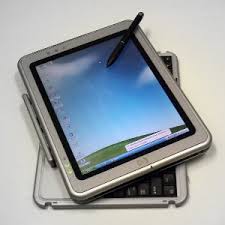
In many ways, the HP Slate 500 looks like a larger version of some of the earlier ultra-mobile PC (UMPC) units. That "origami" UMPC phenomenon that never took off. I admit that I was an early adopter of the UMPC and I purchased a Samsung Q1 Ultra UMPC. I still have that 7" touch-screen tablet and I use it for a variety of things. The 7" screen was a bit too small and the lack of an active digitizer made the Q1 Ultra difficult to use for pen-based computing. However, it was nice and small (but it could have been thinner). I wonder what would happen if Microsoft tried to revive the UMPC now that Apple has plowed the road for people to adopt slate tablets. Would a Samsung UMPC sell like hotcakes if it was priced around $500 or 600?

The HP Slate 500 is a very thin device that only weighs 1.5 pounds. It has an 8.9" screen, a 1.86GHz Atom Z560 processor, 2 GB of RAM, and a 64 GB SSD, so it should run Windows 7 adequately. Compared to my Samsung Q1 Ultra, the HP Slate 500 will be much faster. I'm eager to give it a test drive.

Here is link to a video (on SlashGear) featuring Carol Hess-Nickels from HP talking about the differences between a media slate vs. a slate PC and showing you the key features of the HP Slate 500.

Tuesday, April 6, 2010

HP Slate specs and prices

With all the buzz and excitement surrounding the iPad, when's HP releasing the Slate?

It looks like HP has finally released the specs for the Slate. It will have an 8.9" capacitive multi-touch display, it will run Windows 7, it will have an SD card slot, it will have a USB 2.0 port, and it will have cameras on the front and back of the device. With a 1.6GHz Atom Z530 processor and 1 GB of RAM, it won't be a

Reminds me of my Samsung Q1 Ultra Ultra-Mobile PC (UMPC).   At $549 for 32 GB of storage, it's going to be very tempting. $599 for 64 GB of storage isn't bad either.

Thursday, February 18, 2010

Which computer(s) should I take to #HIMSS10?

I'll be walking all over the place while I'm at HIMSS10 so I don't want to carry a really heavy bag. I'm debating between my Samsung Q1 Ultra UMPC + keyboard, or my Lenovo ThinkPad X200 tablet PC. I often travel with both, but I doubt I'll take both for HIMSS. I'll also have my smartphone and my iPod touch.

I can effectively blog while I'm at HIMSS on almost any machine that has a decent keyboard. The problem with the Q1 Ultra is that it's so slow that I won't be very productive when I'm trying to get some work done at night. I love my ThinkPad, but it's significantly heavier than my Q1 Ultra UMPC (Ultra-Mobile PC). Does anyone still use the phrase UMPC anymore? 

Stay tuned to find out which computers and gadgets I ultimately end up taking to HIMSS10!

Tuesday, January 19, 2010

More thoughts about the Lenovo IdeaPad U1 Hybrid


I've always been a tablet PC user. I have a slate PC and a convertible tablet. In fact, my Samsung Q1 Ultra UMPC (ultra-mobile PC) is my notepad. I don't carry pens or paper when I go to a meeting. Instead, I pull out my executive case and my small little tablet.

the Lenovo IdeaPad U1 Hybrid is a novel concept and I'm very eager to get my hands on one of these devices. I think that this type of device could have many practical applications in the healthcare marketplace (both inpatient and outpatient settings) and I'd like to see how Lenovo will leverage this product in the healthcare sector. I'm sure other major hardware manufacturers will also come out with similar hybrid devices.

The IdeaPad U1 is a first generation hybrid, so unless you're a true early adopter, you're probably going to wait until the second or third generation hybrids hit the market. I'm anxious to also see what Apple will reveal when they announce their tablet (iSlate). I don't think it will be a hybrid tablet like the IdeaPad U1, but then again - maybe we'll be pleasantly surprised.

Sunday, January 10, 2010

Tablets and netbooks are secondary devices

For many individuals, gadgets like tablet PCs and netbooks are secondary devices. We may rely on a "heavy duty" desktop at home or in the office. We may even have a robust laptop/notebook that we use as our main machine. Then, we may carry a netbook, an ultra-mobile PC, or a small tablet as a secondary device.

For me, my Samsung Q1 Ultra UMPC is my office "note pad." I try to avoid using paper whenever I can. So, I'm using Microsoft OneNote to take my notes during meetings. I'm constantly connected and I'm able to quickly look things up on a web browser. For these types of secondary devices, we really don't need to run a full operating system. Instead, a slimmed-down version or even a simple Linux OS is often quite sufficient. I think Lenovo has the right idea with their Skylight 10" mobile computer. Some are calling this a netbook, but this is somewhere between a netbook and a smartphone. It will be interesting to see how these secondary devices evolve as users recognize that they need for a robust solution at home and in the office and they don't need such a robust solution for a secondary device.

Saturday, January 9, 2010

2010 will be the year of the mini slate tablet

2009 was the year of the netbook.
2010 appears like it will be the year of the mini slate tablet.
  • There has been a lot of buzz surrounding the Apple tablet (iSlate).
  • HP unveiled a small slate at CES.
  • Lenovo revealed the IdeaPad U1 Hybrid (slate + keyboard)
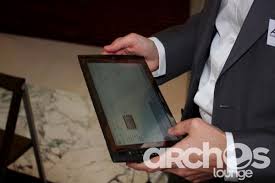
  • Archos has been getting people excited about their Archos 9 PCtablet.
So, will these slate tablet gain momentum in 2010? I think that we're going to see this happen as more consumers embrace digital book readers like the Kindle, Nook, and QUE. People will become more comfortable with the idea of holding a slate in their hands and navigating that device using touch-screen gestures. Many health care professionals are already comfortable with the tablet PC form factor. Now, this comfort level will grow and expand as more physicians use touch-screen smartphones and recognize the value of always having access to a small mobile computer.

Monday, January 4, 2010

UPMC vs. UMPC

UPMC = The University of Pittsburgh Medical Center
UMPC = Ultra-Mobile PC

The two acronyms have the same letters, but in different arrangements. Can you see why people may get them confused?

Who came up with UMPC anyways? It's hardly used these days because the UMPC movement really never took off the ground and netbooks have swept the nation. Now, if a tiny tablet or other form of miniature PC appears, people are more inclined to call them "netbooks."

To add to the confusion, we're now seeing a major movement in digital book readers like the Amazon Kindle and the Barnes and Noble Nook. As these devices evolve and incorporate color screens and Internet capabilities, how will they get classified? What will people call Apple's new iSlate tablet? Will they refer to it as a tablet PC? (I doubt that) or a giant iPod touch? (I doubt that too). They certainly won't call it a UMPC or a digital book reader (even though I'm sure it will be capable of displaying e-books).

We're causing mass confusion by adding more acronyms and names for these small gadgets that don't really fall into the category of "laptop" or "smartphone." Let's hope that 2010 is a year when we'll develop some type of standardization on this whole topic.

Friday, January 1, 2010

Happy New Year!

Wishing all my readers a wonderful Happy New Year! As we start 2010, think about all the computing advances that we'll see this year in the area of mobile computing. We're going to see smaller computers that are more power-efficient. We're going to see an increased uptake in mobile technology, ranging from smartphones to really small computers. We may even see Apple come out with a slate tablet (the iSlate) and digital book readers will gain more popularity.

Wednesday, December 30, 2009

New mobile computers at CES

CES is coming up and we'll see some really great looking mobile computers appear at CES in January. Next week, we'll see a variety of ultra-mobile PCs (UMPCs), mobile internet devices (MIDs), micro PCs, netbooks, and many other mobile devices. Since CES is mainly geared for consumers, we may not see many devices (other than tablet PCs) that can be used in the hospital setting.

Wouldn't it be great to see something like CES that's primarily for health care professionals?

Thursday, December 17, 2009

Excited about CES?


Someday, I hope to attend CES (Consumer Electronics Show). I know several people who attend every year and I'm so envious. So many innovative computers and other mobile devices (such as MIDs, UMPCs, micro computers, etc.) get presented every year at CES. Now that I think about it, it's probably better that I'm not there. Otherwise, I'd be buying things left and right when they come out. I'm very much an early adopter, but recently I've tried to slow down so that I'm not spending so much money on technology that quickly becomes obsolete.

So what about you? Are you a gadget freak? Do you own multiple computers and handheld devices? Are you an early adopter? Do people ask you questions related to technology and computers?

Monday, December 14, 2009

More details about the Fujitsu UH900


The Fujitsu UH900 looks like a really nice mini computer, doesn't it? Chippy over at UMPC Portal has some nice photos and specs on this expensive device ($1400, yikes!). Who's going to spend that type of money on a secondary device? After all, do you expect to use something like the UH900 as your main computer?

Sometimes I wonder if the term "UMPC" is dead. Everyone is talking about netbooks and they have gained tremendous popularity because of their low price point. Well, to read more about the Fujitsu LifeBook UH900 at UMPC Portal, click here.

Tuesday, November 17, 2009

Google Chrome OS launching soon


The Google Chrome Operating System (OS) is launching quite soon. I'm excited to see this new, lean operating system that should work quite well on ultra-mobile PCs (UMPCs) and netbooks. I plan to try Chrome OS on my Samsung Q1 Ultra (mini tablet) to see how it compares with Ubuntu, XP, and Windows 7.

If Chrome OS improves speed, efficiency, and battery life on my UMPC, then it will be a winning OS for me. After all, the Q1 Ultra has a slow processor and this device isn't meant to be used for any type of heavy computing.

Sunday, November 1, 2009

Tablet PCs and drug reps


These days, when a pharmaceutical sales representative comes to your visit to provide some "drug detailing," you can expect to see some multimedia. Tablet PCs have revolutionized the way that information is now delivered. You can use a tablet and give an interactive presentation while you're standing up. There's no need to sit down and open your laptop. No need for a "slim jim" or any other type of printed visual aid if you have a color LCD screen on a tablet computer.

Sometimes I wonder if Tablet PCs have lost their "wow" factor. After all, we see computers everywhere now. So if someone comes to your office and pulls out a cool gadget (like an iPod touch or an ultra-mobile PC), the novelty factor seems lost. Maybe the upcoming Apple tablet will rejuvenate some of that lost "wow" factor and perhaps we'll see every pharma drug rep equipped with an Apple Tablet in 2010. Probably not.

Tuesday, October 27, 2009

Installing Windows 7 on my Samsung UMPC


I spent some time last night installing Windows 7 on my Samsung Q1 Ultra which is an ultra-mobile PC (UMPC). This tiny little tablet computer came with Windows Vista or XP Tablet. I've mainly been running XP but I've also been using Windows 7 RC (release candidate - build 7100) on this machine. Now, I'm in the process of reloading all my applications so that I can test the RTM (release to manufacturing) version of Windows 7.

I'm eager to see how Windows 7 performs on this device. Win7 RC worked fairly well. It was certainly much better compared to Vista. I'm hoping that Windows 7 with all its tablet-friendly features will motivate more physicians to start leveraging the tablet computer for its touch screen. I still see so many health care professionals using convertible tablets as laptops. Pick up the pen and use the screen, not the keyboard!

Saturday, October 3, 2009

When is a netbook no longer a netbook?


One of the latest netbooks to appear on the market is the Lenovo IdeaPad S12. This machine has a 12.1" screen, so is it no longer a netbook? At $500, it's priced really well compared to other 12" ultra-portable laptops out there. Lenovo calls the S12 a "roomy 12" netbook" so they're clearly marketing the S series as netbooks.

At some point, someone will have to come up with some clear definitions on what constitutes a netbook vs. a notebook, etc. Microsoft had come up with some definitions for the term UMPC (ultra-mobile PC) back when they launched the Origami promotion. These were the specs for an UMPC:
  • Windows Vista Home Premium OS
  • Approximately 7" diagonal display (or smaller)
  • Minimum 800 x 480 resolution
  • Approximately 2 pounds
  • Integrated touch panel
  • WiFi- and Bluetooth-enabled
Well, as Windows 7 replaces Vista and XP, it should be interesting to see how mobile computers get defined and labeled.

Tuesday, September 29, 2009

Use multiple monitors with DisplayLink technology

I love using multiple monitors. Thanks to DisplayLink technology, it's easier than ever to use more monitors - especially when using a mobile computer like a laptop, tablet, ultra-mobile PC (UMPC), and others.

I've often wondered when desktops and laptops will start coming with two video ports. You can get desktops that are built for gaming and those will often have two DVI ports (or maybe two VGA ports if it's an older machine). However, if you're not a gamer and you don't need that level of horsepower, why spend the money?

DisplayLink is starting to appear in monitors and docking stations, so it's becoming easier than ever to use multiple monitors. If you like to multi-task and you like to open many different windows, then you may want to look into DisplayLink technology.

Friday, September 11, 2009

Is a smartphone a pocket computer?

How do you define the word "computer?" Here's how Webster defines it: a programmable usually electronic device that can store, retrieve, and process data.

Today, so many devices and gadgets qualify as a computer if you choose to follow the Webster dictionary. Of course, most of us expect that personal computers will run an operating system such as Linux, Mac OS X, and Microsoft Windows.

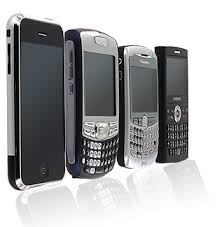
We now have specific terms for simpler devices that don't run a complete OS. The line between a mobile internet device or MID and smartphone is getting blurred all the time. At what point will a smartphone replace all these ultra-mobile PCs (UMPCs) and micro PCs that are emerging? I often wonder about the role of these pocket-sized computers that run Windows XP, Vista, or 7. Does that really make sense? Or is Google Android sufficient?

For some people, the smartphone has become their pocket computer. They check e-mail, use Microsoft Word, Excel, and PowerPoint, and they browse the Internet. You've seen those commercials on television where people are using their smartphone to stay productive outside of the office. Is that realistic? Are people actually doing that? How productive can you be on such a small device?

Wednesday, August 19, 2009

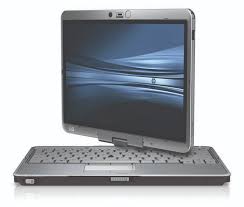
HP EliteBook 2730p


I received the HP EliteBook 2730p tablet PC to review it for a few weeks. This is a great convertible tablet! Although there have been numerous reviews published online, I'm going to approach this from a medical user's perspective. Now remember that my main computer is a Lenovo Thinkpad X200 Tablet PC. I've also had an X41 tablet (along with a few convertible tablets made by Fujitsu and an Ultra-Mobile PC (UMPC) made by Samsung). So, I've had my share of tablet computers.

Out of the box, the 2730p looks like a very high quality machine. You're not going to find any flimsy plastic on this device. The EliteBook lives up to its name as an "elite" machine. I've used many computers made by HP/Compaq and some have a better build quality compared to others. The 2730p is fantastic.

There's one thing the 2730p has that my Thinkpad lacks: the keyboard night light. To some, this may seem rather silly. However, if you're working in a hospital (say a radiology suite or a dark call room), you may encounter some situations when that keyboard night light can be quite handy.

Expect more from me next week as I dig into this device and compare it to the Thinkpad.

Thursday, August 13, 2009

Would you use a "mini notebook" over a netbook or notebook?


First, perhaps we have to define the term "mini notebook." I am not referring to netbooks. I'm not referring to tablet-style ultra-mobile PCs (UMPC). In my book, the category "mini notebook" is a very unique category because we see a few devices out there that don't really fall into the UMPC or netbook categories. Some may say that they're a netbook or UMPC, but I'd probably disagree.

Let me pick on two examples:
  1. Sony Vaio P. This is a very slim mini notebook. It lacks a touch screen. The screen is 8" and it weighs 1.4 pounds. Some may call it a netbook, but Sony prefers not to call it a netbook. I call this device a mini notebook. It's smaller than a netbook. It could be a UMPC (since it is ultra-mobile), but that could be debatable.
  2. Fujitsu U820. Fujitsu calls this device a "mini-notebook." It has a passive touch screen that is 5.6" and the device weighs 1.32 pounds. This device can be converted from a notebook to a tablet. So, it's actually a mini convertible tablet PC. Fujitsu shouldn't call it a mini notebook.
Are these mini notebooks practical devices? Or are they glorified toys (very expensive toys) for gadget lovers like me? They're still far too expensive to compete against netbooks. Will they survive? At some point, devices can be too small to be very useful.

As smartphones become more powerful and as they blur the line between smartphone and MID (mobile internet device), we will certainly see an evolution of mobile computing practices. What if someday, your smartphone is your entire PC? You dock it at work, use a full-size keyboard with two monitors, and then you remove it from the dock to take it home with you. Can you imagine holding that much computing power in your pocket?

Monday, August 3, 2009

Why I use a universal power supply


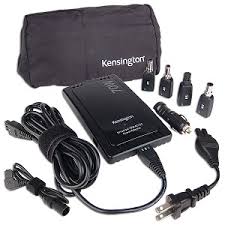
Over the weekend, I took a mini family vacation. I took my convertible tablet/laptop, but I also took my ultra-mobile PC (UMPC) to entertain kids in the car. Since I use a universal power supply, I only needed one power charger with two different power tips. One tip for the Lenovo Thinkpad X200 tablet and one tip for the Samsung Q1 Ultra UMPC. Why carry two power adapters if you can get away with one?

Also, my power adapter allows me to use the charger in the car. It comes with a cigarette charging adapter so I can keep the UMPC powered during long car rides. The airplane adapter used to be very handy during long flights, but now that many airlines have turned the power off, those are practically useless.

So who makes these types of universal power adapters?
  • Kensington
  • Targus
  • iGo
You may also notice that some of these power adapters overlap manufacturers. By that, I mean that both iGo and Kensington may use the same charger and tips (branded as each respective company). Or, Kensington and Targus may use the same charger and tips for a particular charger.